ISVforce Guide
 j
jNewer Version Available
Manage Third-Party Connected Apps
| Available in: both Salesforce Classic (not available in all orgs) and Lightning Experience |
| Connected Apps can be created in: Group,
Professional, Enterprise, Performance, Unlimited, and
Developer Editions Connected Apps can be installed in: All Editions |
| User Permissions Needed | |
|---|---|
| To read, create, update, or delete connected apps: | Customize Application AND either Modify All Data OR Manage Connected Apps |
| To update all fields except Profiles, Permission Sets, and Service Provider SAML Attributes: | Customize Application AND either Modify All Data OR Manage Connected Apps |
| To update Profiles, Permission Sets, and Service Provider SAML Attributes: | Customize Application AND Modify All Data AND Manage Profiles and Permission Sets |
| To install and uninstall connected apps: | Customize Application AND either Modify All Data OR Manage Connected Apps |
| To install and uninstall packaged connected apps: | Customize Application AND either Modify All Data OR Manage Connected Apps AND Download AppExchange Packages |
As a third-party connected app consumer, you’re org installed the app from the AppExchange Marketplace or as a managed package from Salesforce or a third-party vendor’s website. You can only edit the app’s access policies, such as determining who can use the app and whether the app can access data from a remote location.
Example
Connected Apps Installed by Salesforce
Some Salesforce client apps, such as the Salesforce app and Salesforce for Outlook, are implemented as connected apps. Salesforce automatically installs them in your org.
- Salesforce for Android and Salesforce for iOS
- Salesforce for other mobile apps
Salesforce packages appear in Setup under the Installed Packages List. See Installed Packages.
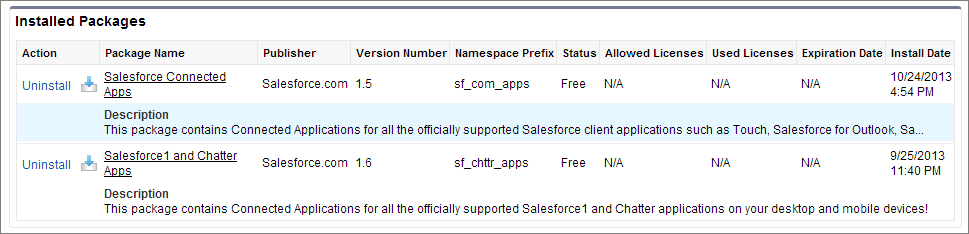
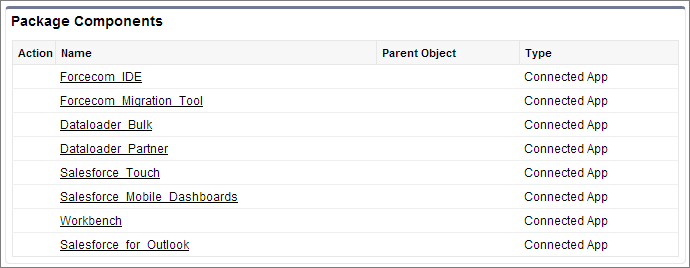
Click a package name to see the list of components. The following are some components in the Salesforce Connected Apps package.
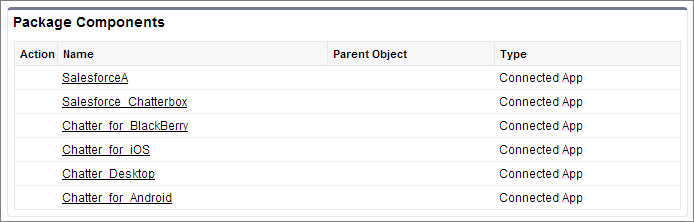
The following are examples of components for the Salesforce app and Chatter app packages.
To install or reinstall the Salesforce app package for connected apps, you can install it from App Exchange.
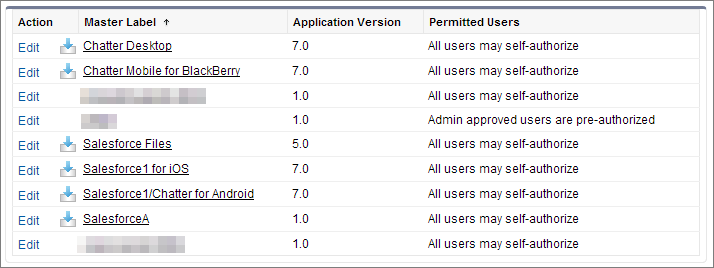
You can manage installed connected apps from the Connected Apps page. The connected apps that Salesforce installs appear in the list as installed by a managed package. They appear along with your other installed connected apps.