


Lightning Flow for Service Developer Guide
 j
jNewer Version Available
Integrate Open CTI with Lightning Flow for Service
Open CTI provides a set of APIs that enables third-party telephony services to
integrate with Salesforce. Lightning Flow for Service takes advantage of three Open CTI
methods: getSoftphoneLayout(), screenPop(), and searchAndScreenPop().
-
Update your Open CTI implementation to allow incoming calls to screen-pop to
flows.
You can also pass call data, such as the phone number or customer name, directly to a flow when it’s screen-popped.Use Open CTI API version 42.0 and later with the following methods.
-
Create flows.
For example, create an Unknown Caller screen flow for when there’s an incoming call and there’s no match in Salesforce for the caller. In Flow Builder, create a screen flow to verify the caller.
- Add a screen with input components First Name, Last Name, Phone Number, and Address.
- Add the Create Records element to create a contact and set the contact fields using the screen input components.
- Connect the start element to the Unknown Caller screen.
In addition to the Unknown Caller flow, create other flows and actions that you want your agents to use when talking to customers on the phone.
-
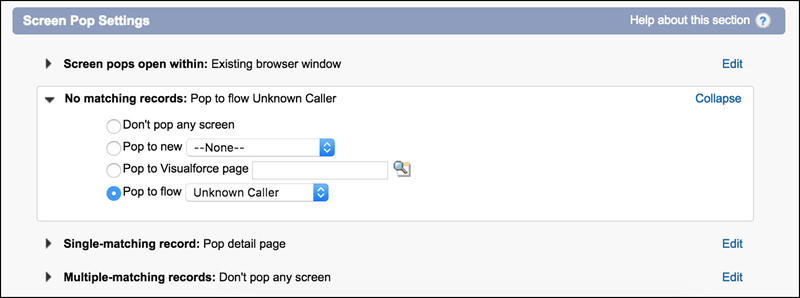
Configure screen-pop settings in the softphone layout.
From Setup, go to the Softphone Layouts page.
For No matching records, select Pop to flow. Then select the flow you created for Unknown Callers.
For Single-matching records, select Pop detail page. This setting allows the contact record page, for example, to be popped.
- Create an Actions & Recommendations deployment and configure default actions for the phone channel.
-
Customize the record
page.
Add the Actions & Recommendations component to a record page, such as the contact page. Select the deployment in the component properties. When calls match a Salesforce record and users get popped to that page, they can see which actions to complete for the call.