


Salesforce Health Cloud Developer Guide
 j
jNewer Version Available
Customize the Patient Conversion Process
The settings that control these processes are available for customization so that you can control how patient creation and data mapping occur in your org. From Setup, enter Custom metadata in the Quick Find box, then select Custom Metadata Types.
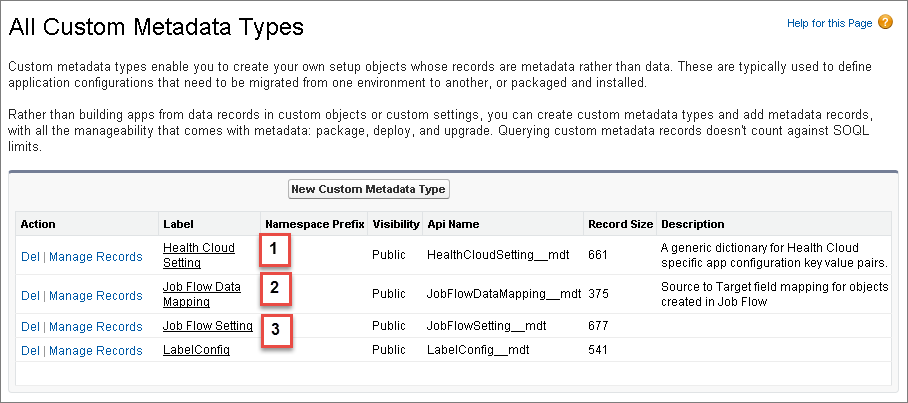
- Health Cloud Setting (1) contains the configuration values for processes like the job flow that creates patients.
- Job Flow Data Mapping (2) holds the rules that determine which fields from the Candidate Patient object get mapped to patient objects like Account, Contact, and Case.
- Job Flow Setting (3) contains the actual job flows that execute in the patient creation process.
You can customize the delivered patient creation job flow by creating your own custom Apex class and adding your own job, changing the order in which the jobs run, or overriding the job entirely and using your own job flow. You can also change which fields are mapped during patient creation.
Health Cloud Settings
Health Cloud Settings contains a variety of key/value pairs of configuration settings for the Health Cloud application. This includes the two default settings that control which flow to use when creating patients. PatientCreateFlow_default controls which job flow to use when creating patients and PatientCreateMappingGroup__default controls which group of mappings is used. You can deactivate either of these records and create your own patient creation flow or mapping group.
When creating your own job flows, you must rename the Setting Name and Setting Value fields. For readability, it’s helpful to make the object name and label of Health Cloud Setting record be a combination of the setting name and something about the new value. For example, you can rename PatientCreateFlow_default to PatientCreateFlow_mynewflow.
To learn more about overriding one of the Health Cloud job settings, see Use Custom Metadata Settings to Configure Health Cloud.
Patient Creation and Data Mapping Job Flows
You can also add new steps to the patient creation job flow or add new mappings to the data mapping process. To deactivate a step in the job flow, deselect the Active field for the record.