Lightning Flow for Service Developer Guide
 j
jNewer Version Available
View the Action History
| Available in: Lightning Experience |
| Available in: Essentials, Professional, Enterprise,
Performance, Unlimited, and Developer Editions Lightning console apps are available for an extra cost to users with Salesforce Platform user licenses for certain products. Some restrictions apply. For pricing details, contact your Salesforce account executive. |
Use the Component’s History to Understand Status
The History tab lists state changes for actions associated with the record. It helps agents and supervisors grasp status so that they can quickly decide what to do next. For example, in a handoff or escalation, an agent or supervisor can review the history to identify gaps and determine the next step.
Here’s an example. The History tab lists the most recent 20 state changes, sorted with the
most recently logged events listed first. Click View More to see the
next 20 state changes in the log. Users can filter the list to see actions by status. The
filter only applies to the last 200 actions. 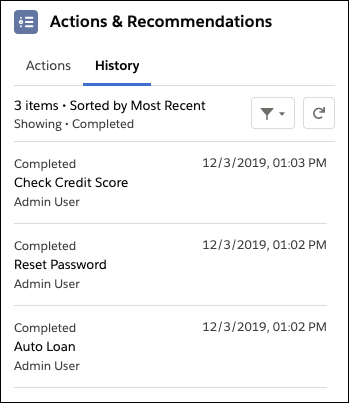
Use APIs to Query the Action History
You can also use APIs to query the RecordActionHistory object, which is a big object.
Both synchronous and asynchronous queries are supported. Using SOQL, SOAP, REST, Bulk, or Apex APIs, synchronous queries must follow a specific pattern or they fail. See the description and examples in the Object Reference for Salesforce and Lightning Platform. To learn more about big objects and how to query them, see the Query Big Objects module on Trailhead.
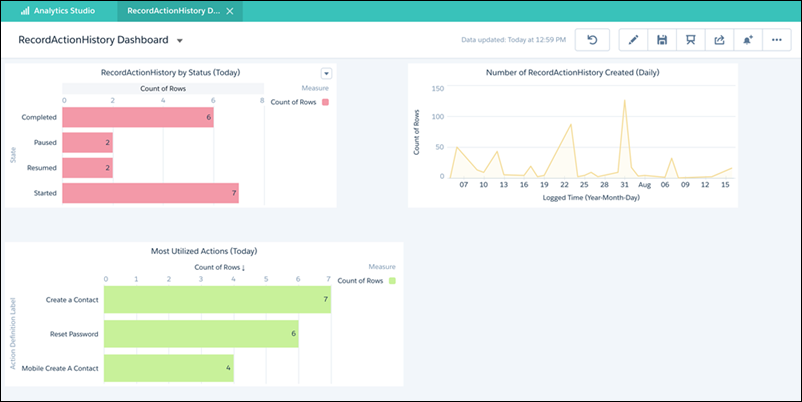
If you have access to Analytics, you can query the RecordActionHistory object and use the
data to build an Analytics dashboard. For example, the dashboard can show usage data and
compare how many actions were started, paused, resumed, and completed in a given time
period.