


Apex Developer Guide
 j
jNewer Version Available
Recommendations Class
Namespace
Recommendations Methods
The following are methods for Recommendations. All methods are static.
createRecommendationAudience(communityId, recommendationAudience)
API Version
35.0
Requires Chatter
No
Signature
public static ConnectApi.RecommendationAudience createRecommendationAudience(String communityId, ConnectApi.RecommendationAudienceInput recommendationAudience)
Parameters
- communityId
- Type: String
- Use the ID for an Experience Cloud site, internal, or null.
- recommendationAudience
- Type: ConnectApi.RecommendationAudienceInput
- A ConnectApi.RecommendationAudienceInput object.
Return Value
Usage
Community managers can access, create, and delete audiences, definitions, and schedules for custom recommendations. (Community managers are users with the Create and Set Up Experiences or Manage Experiences permission.) Users with the Modify All Data permission can also access, create, and delete custom recommendation audiences, custom recommendation definitions, and scheduled custom recommendations.
createRecommendationAudience(communityId, name)
API Version
35.0
Requires Chatter
No
Signature
public static ConnectApi.RecommendationAudience createRecommendationAudience(String communityId, String name)
Parameters
Return Value
Usage
Community managers can access, create, and delete audiences, definitions, and schedules for custom recommendations. (Community managers are users with the Create and Set Up Experiences or Manage Experiences permission.) Users with the Modify All Data permission can also access, create, and delete custom recommendation audiences, custom recommendation definitions, and scheduled custom recommendations.
createRecommendationDefinition(communityId, recommendationDefinition)
API Version
35.0
Requires Chatter
No
Signature
public static ConnectApi.RecommendationDefinition createRecommendationDefinition(String communityId, ConnectApi.RecommendationDefinitionInput recommendationDefinition)
Parameters
- communityId
- Type: String
- Use the ID for an Experience Cloud site, internal, or null.
- recommendationDefinition
- Type: ConnectApi.RecommendationDefinitionInput
- A ConnectApi.RecommendationDefinitionInput object.
Return Value
Usage
Recommendation definitions allow you to create custom recommendations that appear in Experience Cloud sites, encouraging users to watch videos, take training and more.
Community managers can access, create, and delete audiences, definitions, and schedules for custom recommendations. (Community managers are users with the Create and Set Up Experiences or Manage Experiences permission.) Users with the Modify All Data permission can also access, create, and delete custom recommendation audiences, custom recommendation definitions, and scheduled custom recommendations.
These recommendations appear by default on the Customer Service template. They appear on the home and question detail pages and in the feed in Salesforce mobile web. They also appear anywhere community managers add recommendations using Experience Builder in the Customer Service template.
So that users don’t see the same recommendations all the time, Salesforce periodically removes and brings back custom recommendations that haven’t been accepted or dismissed.
createRecommendationDefinition(communityId, name, title, actionUrl, actionUrlName, explanation)
API Version
35.0
Requires Chatter
No
Signature
public static ConnectApi.RecommendationDefinition createRecommendationDefinition(String communityId, String name, String title, String actionUrl, String actionUrlName, String explanation)
Parameters
- communityId
- Type: String
- Use the ID for an Experience Cloud site, internal, or null.
- name
- Type: String
- Name of the custom recommendation definition. The name is displayed in Setup.
- title
- Type: String
- Title of the custom recommendation definition.
- actionUrl
- Type: String
- URL for acting on the custom recommendation, for example, the URL to join a group.
- actionUrlName
- Type: String
- Text label for the action URL in the user interface, for example, “Launch.”
- explanation
- Type: String
- Explanation, or body, of the custom recommendation.
Return Value
Usage
Recommendation definitions allow you to create custom recommendations that appear in Experience Cloud sites, encouraging users to watch videos, take training and more.
Community managers can access, create, and delete audiences, definitions, and schedules for custom recommendations. (Community managers are users with the Create and Set Up Experiences or Manage Experiences permission.) Users with the Modify All Data permission can also access, create, and delete custom recommendation audiences, custom recommendation definitions, and scheduled custom recommendations.
These recommendations appear by default on the Customer Service template. They appear on the home and question detail pages and in the feed in Salesforce mobile web. They also appear anywhere community managers add recommendations using Experience Builder in the Customer Service template.
So that users don’t see the same recommendations all the time, Salesforce periodically removes and brings back custom recommendations that haven’t been accepted or dismissed.
createScheduledRecommendation(communityId, scheduledRecommendation)
API Version
35.0
Requires Chatter
No
Signature
public static ConnectApi.ScheduledRecommendation createScheduledRecommendation(String communityId, ConnectApi.ScheduledRecommendationInput scheduledRecommendation)
Parameters
- communityId
- Type: String
- Use the ID for an Experience Cloud site, internal, or null.
- scheduledRecommendation
- Type: ConnectApi.ScheduledRecommendationInput
- A ConnectApi.ScheduledRecommendationInput object.
Return Value
Usage
Community managers can access, create, and delete audiences, definitions, and schedules for custom recommendations. (Community managers are users with the Create and Set Up Experiences or Manage Experiences permission.) Users with the Modify All Data permission can also access, create, and delete custom recommendation audiences, custom recommendation definitions, and scheduled custom recommendations.
createScheduledRecommendation(communityId, recommendationDefinitionId, rank, enabled, recommendationAudienceId, channel)
API Version
36.0
Requires Chatter
No
Signature
public static ConnectApi.ScheduledRecommendation createScheduledRecommendation(String communityId, String recommendationDefinitionId, Integer rank, Boolean enabled, String recommendationAudienceId, ConnectApi.RecommendationChannel channel)
Parameters
- communityId
- Type: String
- Use the ID for an Experience Cloud site, internal, or null.
- recommendationDefinitionId
- Type: String
- ID of the custom recommendation definition.
- rank
- Type: Integer
- Relative rank of the scheduled custom recommendation
indicated by ascending whole numbers starting with 1.
Setting the rank is comparable to an insertion into an ordered list. The scheduled custom recommendation is inserted into the position specified by the rank. The rank of all the scheduled custom recommendations after it is pushed down. See Ranking scheduled custom recommendations example.
If the specified rank is larger than the size of the list, the scheduled custom recommendation is put at the end of the list. The rank of the scheduled custom recommendation is the size of the list, instead of the one specified.
If a rank is not specified, the scheduled custom recommendation is put at the end of the list.
- enabled
- Type: Boolean
- Indicates whether scheduling is enabled. If true, the custom recommendation is enabled and appears in Experience Cloud sites. If false, custom recommendations in feeds in Salesforce mobile web aren’t removed, but no new custom recommendations appear. In Customer Service and Partner Central sites, disabled custom recommendations no longer appear.
- recommendationAudienceId
- Type: String
- ID of the custom recommendation definition that this scheduled recommendation schedules.
- channel
- Type: ConnectApi.RecommendationChannel
- A way to tie custom recommendations
together. For example, display recommendations in specific places in the UI or
show recommendations based on time of day or geographic locations.
Values are:
- CustomChannel1—Custom recommendation channel. Not used by default. Work with your community manager to define custom channels. For example, community managers can use Experience Builder to determine where recommendations appear.
- CustomChannel2—Custom recommendation channel. Not used by default. Work with your community manager to define custom channels.
- CustomChannel3—Custom recommendation channel. Not used by default. Work with your community manager to define custom channels.
- CustomChannel4—Custom recommendation channel. Not used by default. Work with your community manager to define custom channels.
- CustomChannel5—Custom recommendation channel. Not used by default. Work with your community manager to define custom channels.
- DefaultChannel—Default recommendation channel. Recommendations appear by default on the Home and Question Detail pages of Customer Service and Partner Central Experience Builder templates. They also appear in the feed in the Salesforce mobile web and anywhere community managers add recommendations using Experience Builder.
Return Value
Usage
Community managers can access, create, and delete audiences, definitions, and schedules for custom recommendations. (Community managers are users with the Create and Set Up Experiences or Manage Experiences permission.) Users with the Modify All Data permission can also access, create, and delete custom recommendation audiences, custom recommendation definitions, and scheduled custom recommendations.
- Ranking scheduled custom recommendations example
-
If you have these scheduled custom recommendations:
Scheduled Recommendations Rank ScheduledRecommendationA 1 ScheduledRecommendationB 2 ScheduledRecommendationC 3 And you include this information in the Scheduled Custom Recommendation Input:
Scheduled Recommendation Rank ScheduledRecommendationD 2 The result is:
Scheduled Recommendation Rank ScheduledRecommendationA 1 ScheduledRecommendationD 2 ScheduledRecommendationB 3 ScheduledRecommendationC 4
deleteRecommendationAudience(communityId, recommendationAudienceId)
API Version
35.0
Requires Chatter
No
Signature
public static Void deleteRecommendationAudience(String communityId, String recommendationAudienceId)
Parameters
Return Value
Type: Void
Usage
Community managers can access, create, and delete audiences, definitions, and schedules for custom recommendations. (Community managers are users with the Create and Set Up Experiences or Manage Experiences permission.) Users with the Modify All Data permission can also access, create, and delete custom recommendation audiences, custom recommendation definitions, and scheduled custom recommendations.
deleteRecommendationDefinition(communityId, recommendationDefinitionId)
API Version
35.0
Requires Chatter
No
Signature
public static Void deleteRecommendationDefinition(String communityId, String recommendationDefinitionId)
Parameters
Return Value
Type: Void
Usage
Community managers can access, create, and delete audiences, definitions, and schedules for custom recommendations. (Community managers are users with the Create and Set Up Experiences or Manage Experiences permission.) Users with the Modify All Data permission can also access, create, and delete custom recommendation audiences, custom recommendation definitions, and scheduled custom recommendations.
deleteRecommendationDefinitionPhoto(communityId, recommendationDefinitionId)
API Version
35.0
Requires Chatter
Yes
Signature
public static Void deleteRecommendationDefinitionPhoto(String communityId, String recommendationDefinitionId)
Parameters
Return Value
Type: Void
Usage
Community managers can access, create, and delete audiences, definitions, and schedules for custom recommendations. (Community managers are users with the Create and Set Up Experiences or Manage Experiences permission.) Users with the Modify All Data permission can also access, create, and delete custom recommendation audiences, custom recommendation definitions, and scheduled custom recommendations.
deleteScheduledRecommendation(communityId, scheduledRecommendationId, deleteDefinitionIfLast)
API Version
35.0
Requires Chatter
No
Signature
public static Void deleteScheduledRecommendation(String communityId, String scheduledRecommendationId, Boolean deleteDefinitionIfLast)
Parameters
- communityId
- Type: String
- Use the ID for an Experience Cloud site, internal, or null.
- scheduledRecommendationId
- Type: String
- ID of the scheduled custom recommendation.
- deleteDefinitionIfLast
- Type: Boolean
- If true and if this is the last scheduled custom recommendation of a custom recommendation definition, deletes the custom recommendation definition. Default is false.
Return Value
Type: Void
Usage
Community managers can access, create, and delete audiences, definitions, and schedules for custom recommendations. (Community managers are users with the Create and Set Up Experiences or Manage Experiences permission.) Users with the Modify All Data permission can also access, create, and delete custom recommendation audiences, custom recommendation definitions, and scheduled custom recommendations.
Deleting a scheduled custom recommendation is comparable to a deletion in an ordered list. All scheduled custom recommendations after the deleted scheduled custom recommendation receive a new, higher rank automatically.
getRecommendationAudience(communityId, recommendationAudienceId)
API Version
35.0
Requires Chatter
No
Signature
public static ConnectApi.RecommendationAudience getRecommendationAudience(String communityId, String recommendationAudienceId)
Parameters
Return Value
Usage
Community managers can access, create, and delete audiences, definitions, and schedules for custom recommendations. (Community managers are users with the Create and Set Up Experiences or Manage Experiences permission.) Users with the Modify All Data permission can also access, create, and delete custom recommendation audiences, custom recommendation definitions, and scheduled custom recommendations.
getRecommendationAudienceMembership(communityId, recommendationAudienceId)
API Version
35.0
Requires Chatter
No
Signature
public static ConnectApi.UserReferencePage getRecommendationAudienceMembership(String communityId, String recommendationAudienceId)
Parameters
Return Value
Usage
Community managers can access, create, and delete audiences, definitions, and schedules for custom recommendations. (Community managers are users with the Create and Set Up Experiences or Manage Experiences permission.) Users with the Modify All Data permission can also access, create, and delete custom recommendation audiences, custom recommendation definitions, and scheduled custom recommendations.
getRecommendationAudienceMembership(communityId, recommendationAudienceId, pageParam, pageSize)
API Version
35.0
Requires Chatter
No
Signature
public static ConnectApi.UserReferencePage getRecommendationAudienceMembership(String communityId, String recommendationAudienceId, Integer pageParam, Integer pageSize)
Parameters
- communityId
- Type: String
- Use the ID for an Experience Cloud site, internal, or null.
- recommendationAudienceId
- Type: String
- ID of the custom recommendation audience.
- pageParam
- Type: Integer
- Specifies the number of the page you want returned. Starts at 0. If you pass in null or 0, the first page is returned.
- pageSize
- Type: Integer
- Specifies the number of members per page.
Return Value
Usage
Community managers can access, create, and delete audiences, definitions, and schedules for custom recommendations. (Community managers are users with the Create and Set Up Experiences or Manage Experiences permission.) Users with the Modify All Data permission can also access, create, and delete custom recommendation audiences, custom recommendation definitions, and scheduled custom recommendations.
getRecommendationAudiences(communityId)
API Version
35.0
Requires Chatter
No
Signature
public static ConnectApi.RecommendationAudiencePage getRecommendationAudiences(String communityId)
Parameters
- communityId
- Type: String
- Use the ID for an Experience Cloud site, internal, or null.
Return Value
Usage
Community managers can access, create, and delete audiences, definitions, and schedules for custom recommendations. (Community managers are users with the Create and Set Up Experiences or Manage Experiences permission.) Users with the Modify All Data permission can also access, create, and delete custom recommendation audiences, custom recommendation definitions, and scheduled custom recommendations.
getRecommendationAudiences(communityId, pageParam, pageSize)
API Version
35.0
Requires Chatter
No
Signature
public static ConnectApi.RecommendationAudiencePage getRecommendationAudiences(String communityId, Integer pageParam, Integer pageSize)
Parameters
Return Value
Usage
Community managers can access, create, and delete audiences, definitions, and schedules for custom recommendations. (Community managers are users with the Create and Set Up Experiences or Manage Experiences permission.) Users with the Modify All Data permission can also access, create, and delete custom recommendation audiences, custom recommendation definitions, and scheduled custom recommendations.
getRecommendationDefinition(communityId, recommendationDefinitionId)
API Version
35.0
Requires Chatter
No
Signature
public static ConnectApi.RecommendationDefinition getRecommendationDefinition(String communityId, String recommendationDefinitionId)
Parameters
Return Value
Usage
Community managers can access, create, and delete audiences, definitions, and schedules for custom recommendations. (Community managers are users with the Create and Set Up Experiences or Manage Experiences permission.) Users with the Modify All Data permission can also access, create, and delete custom recommendation audiences, custom recommendation definitions, and scheduled custom recommendations.
getRecommendationDefinitionPhoto(communityId, recommendationDefinitionId)
API Version
35.0
Requires Chatter
Yes
Signature
public static ConnectApi.Photo getRecommendationDefinitionPhoto(String communityId, String recommendationDefinitionId)
Parameters
Return Value
Type: ConnectApi.Photo
Usage
Community managers can access, create, and delete audiences, definitions, and schedules for custom recommendations. (Community managers are users with the Create and Set Up Experiences or Manage Experiences permission.) Users with the Modify All Data permission can also access, create, and delete custom recommendation audiences, custom recommendation definitions, and scheduled custom recommendations.
getRecommendationDefinitions(communityId)
API Version
35.0
Requires Chatter
No
Signature
public static ConnectApi.RecommendationDefinitionPage getRecommendationDefinitions(String communityId)
Parameters
- communityId
- Type: String
- Use the ID for an Experience Cloud site, internal, or null.
Return Value
Usage
Community managers can access, create, and delete audiences, definitions, and schedules for custom recommendations. (Community managers are users with the Create and Set Up Experiences or Manage Experiences permission.) Users with the Modify All Data permission can also access, create, and delete custom recommendation audiences, custom recommendation definitions, and scheduled custom recommendations.
getRecommendationForUser(communityId, userId, action, objectId)
API Version
33.0
Requires Chatter
Yes
Signature
public static ConnectApi.RecommendationCollection getRecommendationForUser(String communityId, String userId, ConnectApi.RecommendationActionType action, String objectId)
Parameters
- communityId
- Type: String
- Use the ID for an Experience Cloud site, internal, or null.
- userId
- Type: String
- The ID for the context user or the keyword me.
- action
- Type: ConnectApi.RecommendationActionType
- Specifies the action to take on a recommendation.
- follow—Follow a file, record, topic, or user.
- join—Join a group.
- view—View a file, group, article, record, user, custom, or static recommendation.
- objectId
- Type: String
- Specifies the object to act on.
- If action is follow, objectId is a user ID, file ID, record ID, or topic ID (version 36.0 and later).
- If action is join, objectId is a group ID.
- If action is view, objectId is a user ID, file ID, group ID, record ID, custom recommendation ID (version 34.0 and later), the enum Today for static recommendations (version 35.0 and later), or an article ID (version 37.0 and later).
Return Value
Usage
getRecommendationsForUser(communityId, userId, contextAction, contextObjectId, channel, maxResults)
API Version
36.0
Available to Guest Users
Requires Chatter
Yes
Signature
public static ConnectApi.RecommendationCollection getRecommendationsForUser(String communityId, String userId, ConnectApi.RecommendationActionType contextAction, String contextObjectId, ConnectApi.RecommendationChannel channel, Integer maxResults)
Parameters
- communityId
- Type: String
- Use the ID for an Experience Cloud site, internal, or null.
- userId
- Type: String
- The ID for the context user or the keyword me.
- contextAction
- Type: ConnectApi.RecommendationActionType
- Action that the context user just performed. Supported values are:
- follow
- view
- contextObjectId
- Type: String
- ID of the object that the context user just performed an action on.
- If contextAction is follow, contextObjectId is a user ID, file ID, record ID, or topic ID.
- If contextAction is view, contextObjectId is a user ID, file ID, group ID, record ID, or article ID (version 37.0 and later).
- channel
- Type: ConnectApi.RecommendationChannel
- A way to tie custom recommendations
together. For example, display recommendations in specific places in the UI or
show recommendations based on time of day or geographic locations.
Values are:
- CustomChannel1—Custom recommendation channel. Not used by default. Work with your community manager to define custom channels. For example, community managers can use Experience Builder to determine where recommendations appear.
- CustomChannel2—Custom recommendation channel. Not used by default. Work with your community manager to define custom channels.
- CustomChannel3—Custom recommendation channel. Not used by default. Work with your community manager to define custom channels.
- CustomChannel4—Custom recommendation channel. Not used by default. Work with your community manager to define custom channels.
- CustomChannel5—Custom recommendation channel. Not used by default. Work with your community manager to define custom channels.
- DefaultChannel—Default recommendation channel. Recommendations appear by default on the Home and Question Detail pages of Customer Service and Partner Central Experience Builder templates. They also appear in the feed in the Salesforce mobile web and anywhere community managers add recommendations using Experience Builder.
- maxResults
- Type: Integer
- Maximum number of recommendation results; default is 10. Values must be from 1 to 99.
Return Value
Usage
If you want to get recommendations based on a recent action performed, such as following a user, use contextAction and contextObjectId together. For example, if you just followed Pam, you specify follow for contextAction and Pam’s user ID for contextObjectId.
This method only recommends users who are followed by people who
follow Pam. In this example, John follows Pam so the method returns a recommendation for you
to follow Suzanne since John also follows Suzanne.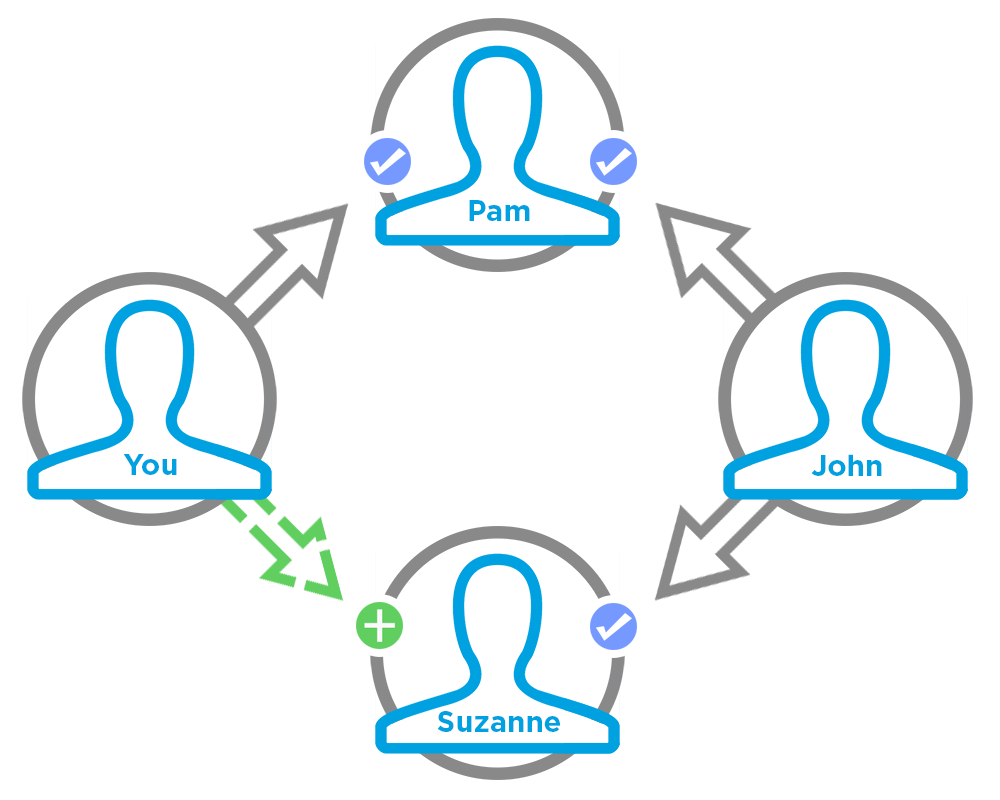
To test code that uses this method, use the matching set test method (prefix the method name with setTest). Use the set test method with the same parameters or the code throws an exception.
getRecommendationsForUser(communityId, userId, action, contextAction, contextObjectId, channel, maxResults)
API Version
36.0
Available to Guest Users
Requires Chatter
Yes
Signature
public static ConnectApi.RecommendationCollection getRecommendationsForUser(String communityId, String userId, ConnectApi.RecommendationActionType action, ConnectApi.RecommendationActionType contextAction, String contextObjectId, ConnectApi.RecommendationChannel channel, Integer maxResults)
Parameters
- communityId
- Type: String
- Use the ID for an Experience Cloud site, internal, or null.
- userId
- Type: String
- The ID for the context user or the keyword me.
- action
- Type: ConnectApi.RecommendationActionType
- Specifies the action to take on a recommendation.
- follow—Follow a file, record, topic, or user.
- join—Join a group.
- view—View a file, group, article, record, user, custom, or static recommendation.
- contextAction
- Type: ConnectApi.RecommendationActionType
- Action that the context user just performed. Supported values are:
- follow
- view
- contextObjectId
- Type: String
- ID of the object that the context user just performed an action on.
- If contextAction is follow, contextObjectId is a user ID, file ID, record ID, or topic ID.
- If contextAction is view, contextObjectId is a user ID, file ID, group ID, record ID, or article ID (version 37.0 and later).
- channel
- Type: ConnectApi.RecommendationChannel
- A way to tie custom recommendations
together. For example, display recommendations in specific places in the UI or
show recommendations based on time of day or geographic locations.
Values are:
- CustomChannel1—Custom recommendation channel. Not used by default. Work with your community manager to define custom channels. For example, community managers can use Experience Builder to determine where recommendations appear.
- CustomChannel2—Custom recommendation channel. Not used by default. Work with your community manager to define custom channels.
- CustomChannel3—Custom recommendation channel. Not used by default. Work with your community manager to define custom channels.
- CustomChannel4—Custom recommendation channel. Not used by default. Work with your community manager to define custom channels.
- CustomChannel5—Custom recommendation channel. Not used by default. Work with your community manager to define custom channels.
- DefaultChannel—Default recommendation channel. Recommendations appear by default on the Home and Question Detail pages of Customer Service and Partner Central Experience Builder templates. They also appear in the feed in the Salesforce mobile web and anywhere community managers add recommendations using Experience Builder.
- maxResults
- Type: Integer
- Maximum number of recommendation results; default is 10. Values must be from 1 to 99.
Return Value
Usage
If you want to get recommendations based on a recent action performed, such as following a user, use contextAction and contextObjectId together. For example, if you just followed Pam, you specify follow for contextAction and Pam’s user ID for contextObjectId.
This method only recommends users who are followed by people who
follow Pam. In this example, John follows Pam so the method returns a recommendation for you
to follow Suzanne since John also follows Suzanne.
To test code that uses this method, use the matching set test method (prefix the method name with setTest). Use the set test method with the same parameters or the code throws an exception.
getRecommendationsForUser(communityId, userId, action, objectCategory, contextAction, contextObjectId, channel, maxResults)
API Version
36.0
Available to Guest Users
Requires Chatter
Yes
Signature
public static ConnectApi.RecommendationCollection getRecommendationsForUser(String communityId, String userId, ConnectApi.RecommendationActionType action, String objectCategory, ConnectApi.RecommendationActionType contextAction, String contextObjectId, ConnectApi.RecommendationChannel channel, Integer maxResults)
Parameters
- communityId
- Type: String
- Use the ID for an Experience Cloud site, internal, or null.
- userId
- Type: String
- The ID for the context user or the keyword me.
- action
- Type: ConnectApi.RecommendationActionType
- Specifies the action to take on a recommendation.
- follow—Follow a file, record, topic, or user.
- join—Join a group.
- view—View a file, group, article, record, user, custom, or static recommendation.
- objectCategory
- Type: String
-
- If action is follow, objectCategory is users, files, topics, or records.
- If action is join, objectCategory is groups.
- If action is view, objectCategory is users, files, groups, records, custom, apps, or articles (version 37.0 and later).
- If action is follow, objectCategory is 005 (users), 069 (files), 0TO (topics), or 001 (accounts), for example.
- If action is join, objectCategory is 0F9 (groups).
- If action is view, objectCategory is 005 (users), 069 (files), 0F9 (groups), 0RD (custom recommendations), T (static recommendations), 001 (accounts), or kA0 (articles), for example, (version 370 and later).
- contextAction
- Type: ConnectApi.RecommendationActionType
- Action that the context user just performed. Supported values are:
- follow
- view
- contextObjectId
- Type: String
- ID of the object that the context user just performed an action on.
- If contextAction is follow, contextObjectId is a user ID, file ID, record ID, or topic ID.
- If contextAction is view, contextObjectId is a user ID, file ID, group ID, record ID, or article ID (version 37.0 and later).
- channel
- Type: ConnectApi.RecommendationChannel
- A way to tie custom recommendations
together. For example, display recommendations in specific places in the UI or
show recommendations based on time of day or geographic locations.
Values are:
- CustomChannel1—Custom recommendation channel. Not used by default. Work with your community manager to define custom channels. For example, community managers can use Experience Builder to determine where recommendations appear.
- CustomChannel2—Custom recommendation channel. Not used by default. Work with your community manager to define custom channels.
- CustomChannel3—Custom recommendation channel. Not used by default. Work with your community manager to define custom channels.
- CustomChannel4—Custom recommendation channel. Not used by default. Work with your community manager to define custom channels.
- CustomChannel5—Custom recommendation channel. Not used by default. Work with your community manager to define custom channels.
- DefaultChannel—Default recommendation channel. Recommendations appear by default on the Home and Question Detail pages of Customer Service and Partner Central Experience Builder templates. They also appear in the feed in the Salesforce mobile web and anywhere community managers add recommendations using Experience Builder.
- maxResults
- Type: Integer
- Maximum number of recommendation results; default is 10. Values must be from 1 to 99.
Return Value
Usage
If you want to get recommendations based on a recent action performed, such as following a user, use contextAction and contextObjectId together. For example, if you just followed Pam, you specify follow for contextAction and Pam’s user ID for contextObjectId.
This method only recommends users who are followed by people who
follow Pam. In this example, John follows Pam so the method returns a recommendation for you
to follow Suzanne since John also follows Suzanne.
To test code that uses this method, use the matching set test method (prefix the method name with setTest). Use the set test method with the same parameters or the code throws an exception.
getScheduledRecommendation(communityId, scheduledRecommendationId)
API Version
35.0
Requires Chatter
No
Signature
public static ConnectApi.ScheduledRecommendation getScheduledRecommendation(String communityId, String scheduledRecommendationId)
Parameters
Return Value
Usage
Community managers can access, create, and delete audiences, definitions, and schedules for custom recommendations. (Community managers are users with the Create and Set Up Experiences or Manage Experiences permission.) Users with the Modify All Data permission can also access, create, and delete custom recommendation audiences, custom recommendation definitions, and scheduled custom recommendations.
getScheduledRecommendations(communityId, channel)
API Version
36.0
Requires Chatter
No
Signature
public static ConnectApi.ScheduledRecommendationPage getScheduledRecommendations(String communityId, ConnectApi.RecommendationChannel channel)
Parameters
- communityId
- Type: String
- Use the ID for an Experience Cloud site, internal, or null.
- channel
- Type: ConnectApi.RecommendationChannel
- A way to tie custom recommendations
together. For example, display recommendations in specific places in the UI or
show recommendations based on time of day or geographic locations.
Values are:
- CustomChannel1—Custom recommendation channel. Not used by default. Work with your community manager to define custom channels. For example, community managers can use Experience Builder to determine where recommendations appear.
- CustomChannel2—Custom recommendation channel. Not used by default. Work with your community manager to define custom channels.
- CustomChannel3—Custom recommendation channel. Not used by default. Work with your community manager to define custom channels.
- CustomChannel4—Custom recommendation channel. Not used by default. Work with your community manager to define custom channels.
- CustomChannel5—Custom recommendation channel. Not used by default. Work with your community manager to define custom channels.
- DefaultChannel—Default recommendation channel. Recommendations appear by default on the Home and Question Detail pages of Customer Service and Partner Central Experience Builder templates. They also appear in the feed in the Salesforce mobile web and anywhere community managers add recommendations using Experience Builder.
Return Value
Usage
Community managers can access, create, and delete audiences, definitions, and schedules for custom recommendations. (Community managers are users with the Create and Set Up Experiences or Manage Experiences permission.) Users with the Modify All Data permission can also access, create, and delete custom recommendation audiences, custom recommendation definitions, and scheduled custom recommendations.
rejectRecommendationForUser(communityId, userId, action, objectId)
API Version
33.0
Requires Chatter
Yes
Signature
public static rejectRecommendationForUser(String communityId, String userId, ConnectApi.RecommendationActionType action, String objectId)
Parameters
- communityId
- Type: String
- Use the ID for an Experience Cloud site, internal, or null.
- userId
- Type: String
- The ID for the context user or the keyword me.
- action
- Type: ConnectApi.RecommendationActionType
- Specifies the action to take on a recommendation. Supported values are:
- follow—Follow a file, record, topic, or user.
- join—Join a group.
- view—View a file, group, article, record, user, custom, or static recommendation.
- objectId
- Type: String
- Specifies the object to take action on.
- If action is follow, objectId is a user ID, file ID, record ID, or topic ID (version 36.0 and later).
- If action is join, objectId is a group ID.
- If action is view, objectId is a custom recommendation ID, the enum Today for static recommendations, or an article ID (version 37.0 and later).
Return Value
Type: Void
rejectRecommendationForUser(communityId, userId, action, objectEnum)
API Version
34.0
Requires Chatter
Yes
Signature
public static rejectRecommendationForUser(String communityId, String userId, ConnectApi.RecommendationActionType action, ConnectApi.RecommendedObjectType objectEnum)
Parameters
- communityId
- Type: String
- Use the ID for an Experience Cloud site, internal, or null.
- userId
- Type: String
- The ID for the context user or the keyword me.
- action
- Type: ConnectApi.RecommendationActionType
- Specifies the action to take on a recommendation. Supported values are:
- view—View a static recommendation.
- objectEnum
- Type: ConnectApi.RecommendedObjectType
- Specifies the object type to take action on.
- Today—Static recommendations that don’t have an ID, for example, the Today app recommendation.
Return Value
Type: Void
updateRecommendationAudience(communityId, recommendationAudienceId, recommendationAudience)
API Version
35.0
Requires Chatter
No
Signature
public static ConnectApi.RecommendationAudience updateRecommendationAudience(String communityId, String recommendationAudienceId, ConnectApi.RecommendationAudienceInput recommendationAudience)
Parameters
- communityId
- Type: String
- Use the ID for an Experience Cloud site, internal, or null.
- recommendationAudienceId
- Type: String
- ID of the custom recommendation audience.
- recommendationAudience
- Type: ConnectApi.RecommendationAudienceInput
- A ConnectApi.RecommendationAudienceInput object.
Return Value
Usage
Community managers can access, create, and delete audiences, definitions, and schedules for custom recommendations. (Community managers are users with the Create and Set Up Experiences or Manage Experiences permission.) Users with the Modify All Data permission can also access, create, and delete custom recommendation audiences, custom recommendation definitions, and scheduled custom recommendations.
updateRecommendationDefinition(communityId, recommendationDefinitionId, name, title, actionUrl, actionUrlName, explanation)
API Version
35.0
Requires Chatter
No
Signature
public static ConnectApi.RecommendationDefinition updateRecommendationDefinition(String communityId, String recommendationDefinitionId, String name, String title, String actionUrl, String actionUrlName, String explanation recommendationDefinition)
Parameters
- communityId
- Type: String
- Use the ID for an Experience Cloud site, internal, or null.
- recommendationDefinitionId
- Type: String
- ID of the custom recommendation definition.
- name
- Type: String
- Name of the custom recommendation definition. The name is displayed in Setup.
- title
- Type: String
- Title of the custom recommendation definition.
- actionUrl
- Type: String
- URL for acting on the custom recommendation, for example, the URL to join a group.
- actionUrlName
- Type: String
- Text label for the action URL in the user interface, for example, “Launch.”
- explanation
- Type: String
- Explanation, or body, of the custom recommendation.
Return Value
Usage
Community managers can access, create, and delete audiences, definitions, and schedules for custom recommendations. (Community managers are users with the Create and Set Up Experiences or Manage Experiences permission.) Users with the Modify All Data permission can also access, create, and delete custom recommendation audiences, custom recommendation definitions, and scheduled custom recommendations.
updateRecommendationDefinition(communityId, recommendationDefinitionId, recommendationDefinition)
API Version
35.0
Requires Chatter
No
Signature
public static ConnectApi.RecommendationDefinition updateRecommendationDefinition(String communityId, String recommendationDefinitionId, ConnectApi.RecommendationDefinitionInput recommendationDefinition)
Parameters
- communityId
- Type: String
- Use the ID for an Experience Cloud site, internal, or null.
- recommendationDefinitionId
- Type: String
- ID of the custom recommendation definition.
- recommendationDefinition
- Type: ConnectApi.RecommendationDefinitionInput
- A ConnectApi.RecommendationDefinitionInput object containing the properties to update.
Return Value
Usage
Community managers can access, create, and delete audiences, definitions, and schedules for custom recommendations. (Community managers are users with the Create and Set Up Experiences or Manage Experiences permission.) Users with the Modify All Data permission can also access, create, and delete custom recommendation audiences, custom recommendation definitions, and scheduled custom recommendations.
updateRecommendationDefinitionPhoto(communityId, recommendationDefinitionId, fileUpload)
API Version
35.0
Requires Chatter
Yes
Signature
public static ConnectApi.Photo updateRecommendationDefinitionPhoto(String communityId, String recommendationDefinitionId, ConnectApi.BinaryInput fileUpload)
Parameters
- communityId
- Type: String
- Use the ID for an Experience Cloud site, internal, or null.
- recommendationDefinitionId
- Type: String
- ID of the custom recommendation definition.
- fileUpload
- Type: ConnectApi.BinaryInput
- A file to use as the photo. The content type must be usable as an image.
Return Value
Type: ConnectApi.Photo
Usage
Community managers can access, create, and delete audiences, definitions, and schedules for custom recommendations. (Community managers are users with the Create and Set Up Experiences or Manage Experiences permission.) Users with the Modify All Data permission can also access, create, and delete custom recommendation audiences, custom recommendation definitions, and scheduled custom recommendations.
updateRecommendationDefinitionPhoto(communityId, recommendationDefinitionId, fileId, versionNumber)
API Version
35.0
Requires Chatter
Yes
Signature
public static ConnectApi.Photo updateRecommendationDefinitionPhoto(String communityId, String recommendationDefinitionId, String fileId, Integer versionNumber)
Parameters
- communityId
- Type: String
- Use the ID for an Experience Cloud site, internal, or null.
- recommendationDefinitionId
- Type: String
- ID of the custom recommendation definition.
- fileId
- Type: String
- ID of a file already uploaded. The file must be an image, and be smaller than 2 GB.
- versionNumber
- Type: Integer
- Version number of the existing file. Specify either an existing version number, or null to get the latest version.
Return Value
Type: ConnectApi.Photo
Usage
Community managers can access, create, and delete audiences, definitions, and schedules for custom recommendations. (Community managers are users with the Create and Set Up Experiences or Manage Experiences permission.) Users with the Modify All Data permission can also access, create, and delete custom recommendation audiences, custom recommendation definitions, and scheduled custom recommendations.
updateRecommendationDefinitionPhotoWithAttributes(communityId, recommendationDefinitionId, photo)
API Version
35.0
Requires Chatter
Yes
Signature
public static ConnectApi.Photo updateRecommendationDefinitionPhotoWithAttributes(String communityId, String recommendationDefinitionId, ConnectApi.PhotoInput photo)
Parameters
- communityId
- Type: String
- Use the ID for an Experience Cloud site, internal, or null.
- recommendationDefinitionId
- Type: String
- ID of the custom recommendation definition.
- photo
- Type: ConnectApi.PhotoInput
- A ConnectApi.PhotoInput object specifying the file ID, version number, and cropping parameters.
Return Value
Type: ConnectApi.Photo
Usage
Community managers can access, create, and delete audiences, definitions, and schedules for custom recommendations. (Community managers are users with the Create and Set Up Experiences or Manage Experiences permission.) Users with the Modify All Data permission can also access, create, and delete custom recommendation audiences, custom recommendation definitions, and scheduled custom recommendations.
updateRecommendationDefinitionPhotoWithAttributes(communityId, recommendationDefinitionId, photo, fileUpload)
API Version
35.0
Requires Chatter
Yes
Signature
public static ConnectApi.Photo updateRecommendationDefinitionPhotoWithAttributes(String communityId, String recommendationDefinitionId, ConnectApi.PhotoInput photo, ConnectApi.BinaryInput fileUpload)
Parameters
- communityId
- Type: String
- Use the ID for an Experience Cloud site, internal, or null.
- recommendationDefinitionId
- Type: String
- ID of the custom recommendation definition.
- photo
- Type: ConnectApi.PhotoInput
- A ConnectApi.PhotoInput object specifying the cropping parameters.
- fileUpload
- Type: ConnectApi.BinaryInput
- A file to use as the photo. The content type must be usable as an image.
Return Value
Type: ConnectApi.Photo
Usage
Community managers can access, create, and delete audiences, definitions, and schedules for custom recommendations. (Community managers are users with the Create and Set Up Experiences or Manage Experiences permission.) Users with the Modify All Data permission can also access, create, and delete custom recommendation audiences, custom recommendation definitions, and scheduled custom recommendations.
updateScheduledRecommendation(communityId, scheduledRecommendationId, scheduledRecommendation)
API Version
35.0
Requires Chatter
No
Signature
public static ConnectApi.ScheduledRecommendation updateScheduledRecommendation(String communityId, String scheduledRecommendationId, ConnectApi.ScheduledRecommendationInput scheduledRecommendation)
Parameters
- communityId
- Type: String
- Use the ID for an Experience Cloud site, internal, or null.
- scheduledRecommendationId
- Type: String
- ID of the scheduled custom recommendation.
- scheduledRecommendation
- Type: ConnectApi.ScheduledRecommendationInput
- A ConnectApi.ScheduledRecommendationInput object containing the properties to update.
Return Value
Usage
Community managers can access, create, and delete audiences, definitions, and schedules for custom recommendations. (Community managers are users with the Create and Set Up Experiences or Manage Experiences permission.) Users with the Modify All Data permission can also access, create, and delete custom recommendation audiences, custom recommendation definitions, and scheduled custom recommendations.
- Ranking scheduled custom recommendations example
-
If you have these scheduled custom recommendations:
Scheduled Recommendations Rank ScheduledRecommendationA 1 ScheduledRecommendationB 2 ScheduledRecommendationC 3 And you include this information in the Scheduled Custom Recommendation Input:
Scheduled Recommendation Rank ScheduledRecommendationD 2 The result is:
Scheduled Recommendation Rank ScheduledRecommendationA 1 ScheduledRecommendationD 2 ScheduledRecommendationB 3 ScheduledRecommendationC 4
updateScheduledRecommendation(communityId, scheduledRecommendationId, rank, enabled, recommendationAudienceId)
API Version
35.0
Requires Chatter
No
Signature
public static ConnectApi.ScheduledRecommendation updateScheduledRecommendation(String communityId, String scheduledRecommendationId, Integer rank, Boolean enabled, String recommendationAudienceId)
Parameters
- communityId
- Type: String
- Use the ID for an Experience Cloud site, internal, or null.
- scheduledRecommendationId
- Type: String
- ID of the scheduled custom recommendation.
- rank
- Type: Integer
- Relative rank of the scheduled custom recommendation
indicated by ascending whole numbers starting with 1.
Setting the rank is comparable to an insertion into an ordered list. The scheduled custom recommendation is inserted into the position specified by the rank. The rank of all the scheduled custom recommendations after it is pushed down. See Ranking scheduled custom recommendations example.
If the specified rank is larger than the size of the list, the scheduled custom recommendation is put at the end of the list. The rank of the scheduled custom recommendation is the size of the list, instead of the one specified.
If a rank is not specified, the scheduled custom recommendation is put at the end of the list.
- enabled
- Type: Boolean
- Indicates whether scheduling is enabled. If true, the custom recommendation is enabled and appears in Experience Cloud sites. If false, custom recommendations in feeds in Salesforce mobile web aren’t removed, but no new custom recommendations appear. In Customer Service and Partner Central sites, disabled custom recommendations no longer appear.
- recommendationAudienceId
- Type: String
- ID of the custom recommendation definition that this scheduled recommendation schedules.
Return Value
Usage
Community managers can access, create, and delete audiences, definitions, and schedules for custom recommendations. (Community managers are users with the Create and Set Up Experiences or Manage Experiences permission.) Users with the Modify All Data permission can also access, create, and delete custom recommendation audiences, custom recommendation definitions, and scheduled custom recommendations.
- Ranking scheduled custom recommendations example
-
If you have these scheduled custom recommendations:
Scheduled Recommendations Rank ScheduledRecommendationA 1 ScheduledRecommendationB 2 ScheduledRecommendationC 3 And you include this information in the Scheduled Custom Recommendation Input:
Scheduled Recommendation Rank ScheduledRecommendationD 2 The result is:
Scheduled Recommendation Rank ScheduledRecommendationA 1 ScheduledRecommendationD 2 ScheduledRecommendationB 3 ScheduledRecommendationC 4
Recommendations Test Methods
The following are the test methods for Recommendations. All methods are static.
For information about using these methods to test your ConnectApi code, see Testing ConnectApi Code.
setTestGetRecommendationForUser(communityId, userId, action, objectId, result)
API Version
33.0
Requires Chatter
Yes
Signature
public static Void setTestGetRecommendationForUser(String communityId, String userId, ConnectApi.RecommendationActionType action, String objectId, ConnectApi.RecommendationCollection result)
Parameters
- communityId
- Type: String
- Use the ID for an Experience Cloud site, internal, or null.
- userId
- Type: String
- The ID for the context user or the keyword me.
- action
- Type: ConnectApi.RecommendationActionType
- Specifies the action to take on a recommendation.
- follow—Follow a file, record, topic, or user.
- join—Join a group.
- view—View a file, group, article, record, user, custom, or static recommendation.
- objectId
- Type: String
- Specifies the object to take action on.
- If action is follow, objectId is a user ID, file ID, record ID, or topic ID (version 36.0 and later).
- If action is join, objectId is a group ID.
- If action is view, objectId is a user ID, file ID, group ID, record ID, custom recommendation ID, the enum Today for static recommendations, or an article ID (version 37.0 and later).
- result
- Type: ConnectApi.RecommendationCollection
- The object containing test data.
Return Value
Type: Void
setTestGetRecommendationsForUser(communityId, userId, contextAction, contextObjectId, channel, maxResults, result)
API Version
36.0
Requires Chatter
Yes
Signature
public static Void setTestGetRecommendationsForUser(String communityId, String userId, ConnectApi.RecommendationActionType contextAction, String contextObjectId, ConnectApi.RecommendationChannel channel, Integer maxResults, ConnectApi.RecommendationCollection result)
Parameters
- communityId
- Type: String
- Use the ID for an Experience Cloud site, internal, or null.
- userId
- Type: String
- The ID for the context user or the keyword me.
- contextAction
- Type: ConnectApi.RecommendationActionType
- Action that the context user just performed. Supported values are:
- follow
- view
- contextObjectId
- Type: String
- ID of the object that the context user just performed an action on.
- If contextAction is follow, contextObjectId is a user ID, file ID, record ID, or topic ID.
- If contextAction is view, contextObjectId is a user ID, file ID, group ID, record ID, or article ID (version 37.0 and later).
- channel
- Type: ConnectApi.RecommendationChannel
- A way to tie custom recommendations
together. For example, display recommendations in specific places in the UI or
show recommendations based on time of day or geographic locations.
Values are:
- CustomChannel1—Custom recommendation channel. Not used by default. Work with your community manager to define custom channels. For example, community managers can use Experience Builder to determine where recommendations appear.
- CustomChannel2—Custom recommendation channel. Not used by default. Work with your community manager to define custom channels.
- CustomChannel3—Custom recommendation channel. Not used by default. Work with your community manager to define custom channels.
- CustomChannel4—Custom recommendation channel. Not used by default. Work with your community manager to define custom channels.
- CustomChannel5—Custom recommendation channel. Not used by default. Work with your community manager to define custom channels.
- DefaultChannel—Default recommendation channel. Recommendations appear by default on the Home and Question Detail pages of Customer Service and Partner Central Experience Builder templates. They also appear in the feed in the Salesforce mobile web and anywhere community managers add recommendations using Experience Builder.
- maxResults
- Type: Integer
- Maximum number of recommendation results; default is 10. Values must be from 1 to 99.
- result
- Type: ConnectApi.RecommendationCollection
- The object containing test data.
Return Value
Type: Void
setTestGetRecommendationsForUser(communityId, userId, action, contextAction, contextObjectId, channel, maxResults, result)
API Version
36.0
Requires Chatter
Yes
Signature
public static Void setTestGetRecommendationsForUser(String communityId, String userId, ConnectApi.RecommendationActionType action, ConnectApi.RecommendationActionType contextAction, String contextObjectId, ConnectApi.RecommendationChannel channel, Integer maxResults, ConnectApi.RecommendationCollection result)
Parameters
- communityId
- Type: String
- Use the ID for an Experience Cloud site, internal, or null.
- userId
- Type: String
- The ID for the context user or the keyword me.
- action
- Type: ConnectApi.RecommendationActionType
- Specifies the action to take on a recommendation.
- follow—Follow a file, record, topic, or user.
- join—Join a group.
- view—View a file, group, article, record, user, custom, or static recommendation.
- contextAction
- Type: ConnectApi.RecommendationActionType
- Action that the context user just performed. Supported values are:
- follow
- view
- contextObjectId
- Type: String
- ID of the object that the context user just performed an action on.
- If contextAction is follow, contextObjectId is a user ID, file ID, record ID, or topic ID.
- If contextAction is view, contextObjectId is a user ID, file ID, group ID, record ID, or article ID (version 37.0 and later).
- channel
- Type: ConnectApi.RecommendationChannel
- A way to tie custom recommendations
together. For example, display recommendations in specific places in the UI or
show recommendations based on time of day or geographic locations.
Values are:
- CustomChannel1—Custom recommendation channel. Not used by default. Work with your community manager to define custom channels. For example, community managers can use Experience Builder to determine where recommendations appear.
- CustomChannel2—Custom recommendation channel. Not used by default. Work with your community manager to define custom channels.
- CustomChannel3—Custom recommendation channel. Not used by default. Work with your community manager to define custom channels.
- CustomChannel4—Custom recommendation channel. Not used by default. Work with your community manager to define custom channels.
- CustomChannel5—Custom recommendation channel. Not used by default. Work with your community manager to define custom channels.
- DefaultChannel—Default recommendation channel. Recommendations appear by default on the Home and Question Detail pages of Customer Service and Partner Central Experience Builder templates. They also appear in the feed in the Salesforce mobile web and anywhere community managers add recommendations using Experience Builder.
- maxResults
- Type: Integer
- Maximum number of recommendation results; default is 10. Values must be from 1 to 99.
- result
- Type: ConnectApi.RecommendationCollection
- The object containing test data.
Return Value
Type: Void
setTestGetRecommendationsForUser(communityId, userId, action, objectCategory, contextAction, contextObjectId, channel, maxResults, result)
API Version
36.0
Requires Chatter
Yes
Signature
public static Void setTestGetRecommendationsForUser(String communityId, String userId, ConnectApi.RecommendationActionType action, String objectCategory, ConnectApi.RecommendationActionType contextAction, String contextObjectId, ConnectApi.RecommendationChannel channel, Integer maxResults, ConnectApi.RecommendationCollection result)
Parameters
- communityId
- Type: String
- Use the ID for an Experience Cloud site, internal, or null.
- userId
- Type: String
- The ID for the context user or the keyword me.
- action
- Type: ConnectApi.RecommendationActionType
- Specifies the action to take on a recommendation.
- follow—Follow a file, record, topic, or user.
- join—Join a group.
- view—View a file, group, article, record, user, custom, or static recommendation.
- objectCategory
- Type: String
-
- If action is follow, objectCategory is users, files, records, or topics.
- If action is join, objectCategory is groups.
- If action is view, objectCategory is users, files, groups, records,custom, apps, or articles (version 37.0 and later).
- If action is follow, objectCategory is 005 (users), 069 (files), 0TO (topics), or 001 (accounts), for example.
- If action is join, objectCategory is 0F9 (groups).
- If action is view, objectCategory is 005 (users), 069 (files), 0F9 (groups), 0RD (custom recommendations), T (static recommendations), 001 (accounts), or kA0 (articles), for example, (version 370 and later).
- contextAction
- Type: ConnectApi.RecommendationActionType
- Action that the context user just performed. Supported values are:
- follow
- view
- contextObjectId
- Type: String
- ID of the object that the context user just performed an action on.
- If contextAction is follow, contextObjectId is a user ID, file ID, record ID, or topic ID.
- If contextAction is view, contextObjectId is a user ID, file ID, group ID, record ID, or article ID (version 37.0 and later).
- channel
- Type: ConnectApi.RecommendationChannel
- A way to tie custom recommendations
together. For example, display recommendations in specific places in the UI or
show recommendations based on time of day or geographic locations.
Values are:
- CustomChannel1—Custom recommendation channel. Not used by default. Work with your community manager to define custom channels. For example, community managers can use Experience Builder to determine where recommendations appear.
- CustomChannel2—Custom recommendation channel. Not used by default. Work with your community manager to define custom channels.
- CustomChannel3—Custom recommendation channel. Not used by default. Work with your community manager to define custom channels.
- CustomChannel4—Custom recommendation channel. Not used by default. Work with your community manager to define custom channels.
- CustomChannel5—Custom recommendation channel. Not used by default. Work with your community manager to define custom channels.
- DefaultChannel—Default recommendation channel. Recommendations appear by default on the Home and Question Detail pages of Customer Service and Partner Central Experience Builder templates. They also appear in the feed in the Salesforce mobile web and anywhere community managers add recommendations using Experience Builder.
- maxResults
- Type: Integer
- Maximum number of recommendation results; default is 10. Values must be from 1 to 99.
- result
- Type: ConnectApi.RecommendationCollection
- The object containing test data.
Return Value
Type: Void
Retired Recommendations Methods
The following methods for Recommendations are retired.
createScheduledRecommendation(communityId, recommendationDefinitionId, rank, enabled, recommendationAudienceId)
API Version
Requires Chatter
No
Signature
public static ConnectApi.ScheduledRecommendation createScheduledRecommendation(String communityId, String recommendationDefinitionId, Integer rank, Boolean enabled, String recommendationAudienceId)
Parameters
- communityId
- Type: String
- Use the ID for an Experience Cloud site, internal, or null.
- recommendationDefinitionId
- Type: String
- ID of the custom recommendation definition.
- rank
- Type: Integer
- Relative rank of the scheduled custom recommendation
indicated by ascending whole numbers starting with 1.
Setting the rank is comparable to an insertion into an ordered list. The scheduled custom recommendation is inserted into the position specified by the rank. The rank of all the scheduled custom recommendations after it is pushed down. See Ranking scheduled custom recommendations example.
If the specified rank is larger than the size of the list, the scheduled custom recommendation is put at the end of the list. The rank of the scheduled custom recommendation is the size of the list, instead of the one specified.
If a rank is not specified, the scheduled custom recommendation is put at the end of the list.
- enabled
- Type: Boolean
- Indicates whether scheduling is enabled. If true, the custom recommendation is enabled and appears in Experience Cloud sites. If false, custom recommendations in feeds in Salesforce mobile web aren’t removed, but no new custom recommendations appear. In Customer Service and Partner Central sites, disabled custom recommendations no longer appear.
- recommendationAudienceId
- Type: String
- ID of the custom recommendation definition that this scheduled recommendation schedules.
Return Value
Usage
Community managers can access, create, and delete audiences, definitions, and schedules for custom recommendations. (Community managers are users with the Create and Set Up Experiences or Manage Experiences permission.) Users with the Modify All Data permission can also access, create, and delete custom recommendation audiences, custom recommendation definitions, and scheduled custom recommendations.
- Ranking scheduled custom recommendations example
-
If you have these scheduled custom recommendations:
Scheduled Recommendations Rank ScheduledRecommendationA 1 ScheduledRecommendationB 2 ScheduledRecommendationC 3 And you include this information in the Scheduled Custom Recommendation Input:
Scheduled Recommendation Rank ScheduledRecommendationD 2 The result is:
Scheduled Recommendation Rank ScheduledRecommendationA 1 ScheduledRecommendationD 2 ScheduledRecommendationB 3 ScheduledRecommendationC 4
getRecommendationsForUser(communityId, userId, contextAction, contextObjectId, maxResults)
API Version
Requires Chatter
Yes
Signature
public static ConnectApi.RecommendationCollection getRecommendationsForUser(String communityId, String userId, ConnectApi.RecommendationActionType contextAction, String contextObjectId, Integer maxResults)
Parameters
- communityId
- Type: String
- Use the ID for an Experience Cloud site, internal, or null.
- userId
- Type: String
- The ID for the context user or the keyword me.
- contextAction
- Type: ConnectApi.RecommendationActionType
- Action that the context user just performed. Supported values are:
- follow
- view
- contextObjectId
- Type: String
- ID of the object that the context user just performed an action on.
- If contextAction is follow, contextObjectId is a user ID, file ID, or record ID.
- If contextAction is view, contextObjectId is a user ID, file ID, group ID, or record ID.
- maxResults
- Type: Integer
- Maximum number of recommendation results; default is 10. Values must be from 1 to 99.
Return Value
Usage
If you want to get recommendations based on a recent action performed, such as following a user, use contextAction and contextObjectId together. For example, if you just followed Pam, you specify follow for contextAction and Pam’s user ID for contextObjectId.
This method only recommends users who are followed by people who
follow Pam. In this example, John follows Pam so the method returns a recommendation for you
to follow Suzanne since John also follows Suzanne.
To test code that uses this method, use the matching set test method (prefix the method name with setTest). Use the set test method with the same parameters or the code throws an exception.
getRecommendationsForUser(communityId, userId, action, contextAction, contextObjectId, maxResults)
API Version
Requires Chatter
Yes
Signature
public static ConnectApi.RecommendationCollection getRecommendationsForUser(String communityId, String userId, ConnectApi.RecommendationActionType action, ConnectApi.RecommendationActionType contextAction, String contextObjectId, Integer maxResults)
Parameters
- communityId
- Type: String
- Use the ID for an Experience Cloud site, internal, or null.
- userId
- Type: String
- The ID for the context user or the keyword me.
- action
- Type: ConnectApi.RecommendationActionType
- Specifies the action to take on a recommendation.
- follow—Follow a file, record, topic, or user.
- join—Join a group.
- view—View a file, group, article, record, user, custom, or static recommendation.
- contextAction
- Type: ConnectApi.RecommendationActionType
- Action that the context user just performed. Supported values are:
- follow
- view
- contextObjectId
- Type: String
- ID of the object that the context user just performed an action on.
- If contextAction is follow, contextObjectId is a user ID, file ID, or record ID.
- If contextAction is view, contextObjectId is a user ID, file ID, group ID, or record ID.
- maxResults
- Type: Integer
- Maximum number of recommendation results; default is 10. Values must be from 1 to 99.
Return Value
Usage
If you want to get recommendations based on a recent action performed, such as following a user, use contextAction and contextObjectId together. For example, if you just followed Pam, you specify follow for contextAction and Pam’s user ID for contextObjectId.
This method only recommends users who are followed by people who
follow Pam. In this example, John follows Pam so the method returns a recommendation for you
to follow Suzanne since John also follows Suzanne.
To test code that uses this method, use the matching set test method (prefix the method name with setTest). Use the set test method with the same parameters or the code throws an exception.
getRecommendationsForUser(communityId, userId, action, objectCategory, contextAction, contextObjectId, maxResults)
API Version
Requires Chatter
Yes
Signature
public static ConnectApi.RecommendationCollection getRecommendationsForUser(String communityId, String userId, ConnectApi.RecommendationActionType action, String objectCategory, ConnectApi.RecommendationActionType contextAction, String contextObjectId, Integer maxResults)
Parameters
- communityId
- Type: String
- Use the ID for an Experience Cloud site, internal, or null.
- userId
- Type: String
- The ID for the context user or the keyword me.
- action
- Type: ConnectApi.RecommendationActionType
- Specifies the action to take on a recommendation.
- follow—Follow a file, record, topic, or user.
- join—Join a group.
- view—View a file, group, article, record, user, custom, or static recommendation.
- objectCategory
- Type: String
-
- If action is follow, objectCategory is users, files, or records.
- If action is join, objectCategory is groups.
- If action is view, objectCategory is users, files, groups, records, custom, or apps.
- If action is follow, objectCategory is 005 (users), 069 (files), or 001 (accounts), for example.
- If action is join, objectCategory is 0F9 (groups).
- If action is view, objectCategory is 005 (users), 069 (files), 0F9 (groups), 0RD (custom recommendations), T (static recommendations), or 001 (accounts), for example.
- contextAction
- Type: ConnectApi.RecommendationActionType
- Action that the context user just performed. Supported values are:
- follow
- view
- contextObjectId
- Type: String
- ID of the object that the context user just performed an action on.
- If contextAction is follow, contextObjectId is a user ID, file ID, or record ID.
- If contextAction is view, contextObjectId is a user ID, file ID, group ID, or record ID.
- maxResults
- Type: Integer
- Maximum number of recommendation results; default is 10. Values must be from 1 to 99.
Return Value
Usage
If you want to get recommendations based on a recent action performed, such as following a user, use contextAction and contextObjectId together. For example, if you just followed Pam, you specify follow for contextAction and Pam’s user ID for contextObjectId.
This method only recommends users who are followed by people who
follow Pam. In this example, John follows Pam so the method returns a recommendation for you
to follow Suzanne since John also follows Suzanne.
To test code that uses this method, use the matching set test method (prefix the method name with setTest). Use the set test method with the same parameters or the code throws an exception.
getScheduledRecommendations(communityId)
API Version
Requires Chatter
No
Signature
public static ConnectApi.ScheduledRecommendationPage getScheduledRecommendations(String communityId)
Parameters
- communityId
- Type: String
- Use the ID for an Experience Cloud site, internal, or null.
Return Value
Usage
Community managers can access, create, and delete audiences, definitions, and schedules for custom recommendations. (Community managers are users with the Create and Set Up Experiences or Manage Experiences permission.) Users with the Modify All Data permission can also access, create, and delete custom recommendation audiences, custom recommendation definitions, and scheduled custom recommendations.
setTestGetRecommendationsForUser(communityId, userId, contextAction, contextObjectId, maxResults, result)
API Version
33.0–35.0
Requires Chatter
Yes
Signature
public static Void setTestGetRecommendationsForUser(String communityId, String userId, ConnectApi.RecommendationActionType contextAction, String contextObjectId, Integer maxResults, ConnectApi.RecommendationCollection result)
Parameters
- communityId
- Type: String
- Use the ID for an Experience Cloud site, internal, or null.
- userId
- Type: String
- The ID for the context user or the keyword me.
- contextAction
- Type: ConnectApi.RecommendationActionType
- Action that the context user just performed. Supported values are:
- follow
- view
- contextObjectId
- Type: String
- ID of the object that the context user just performed an action on.
- If contextAction is follow, contextObjectId is a user ID, file ID, or record ID.
- If contextAction is view, contextObjectId is a user ID, file ID, group ID, or record ID.
- maxResults
- Type: Integer
- Maximum number of recommendation results; default is 10. Values must be from 1 to 99.
- result
- Type: ConnectApi.RecommendationCollection
- The object containing test data.
Return Value
Type: Void
setTestGetRecommendationsForUser(communityId, userId, action, contextAction, contextObjectId, maxResults, result)
API Version
33.0–35.0
Requires Chatter
Yes
Signature
public static Void setTestGetRecommendationsForUser(String communityId, String userId, ConnectApi.RecommendationActionType action, ConnectApi.RecommendationActionType contextAction, String contextObjectId, Integer maxResults, ConnectApi.RecommendationCollection result)
Parameters
- communityId
- Type: String
- Use the ID for an Experience Cloud site, internal, or null.
- userId
- Type: String
- The ID for the context user or the keyword me.
- action
- Type: ConnectApi.RecommendationActionType
- Specifies the action to take on a recommendation.
- follow—Follow a file, record, topic, or user.
- join—Join a group.
- view—View a file, group, article, record, user, custom, or static recommendation.
- contextAction
- Type: ConnectApi.RecommendationActionType
- Action that the context user just performed. Supported values are:
- follow
- view
- contextObjectId
- Type: String
- ID of the object that the context user just performed an action on.
- If contextAction is follow, contextObjectId is a user ID, file ID, or record ID.
- If contextAction is view, contextObjectId is a user ID, file ID, group ID, or record ID.
- maxResults
- Type: Integer
- Maximum number of recommendation results; default is 10. Values must be from 1 to 99.
- result
- Type: ConnectApi.RecommendationCollection
- The object containing test data.
Return Value
Type: Void
setTestGetRecommendationsForUser(communityId, userId, action, objectCategory, contextAction, contextObjectId, maxResults, result)
API Version
33.0–35.0
Requires Chatter
Yes
Signature
public static Void setTestGetRecommendationsForUser(String communityId, String userId, ConnectApi.RecommendationActionType action, String objectCategory, ConnectApi.RecommendationActionType contextAction, String contextObjectId, Integer maxResults, ConnectApi.RecommendationCollection result)
Parameters
- communityId
- Type: String
- Use the ID for an Experience Cloud site, internal, or null.
- userId
- Type: String
- The ID for the context user or the keyword me.
- action
- Type: ConnectApi.RecommendationActionType
- Specifies the action to take on a recommendation.
- follow—Follow a file, record, topic, or user.
- join—Join a group.
- view—View a file, group, article, record, user, custom, or static recommendation.
- objectCategory
- Type: String
-
- If action is follow, objectCategory is users, files, or records.
- If action is join, objectCategory is groups.
- If action is view, objectCategory is users, files, groups, records,custom, or apps.
- If action is follow, objectCategory is 005 (users), 069 (files), or 001 (accounts), for example.
- If action is join, objectCategory is 0F9 (groups).
- If action is view, objectCategory is 005 (users), 069 (files), 0F9 (groups), 0RD (custom recommendations), T (static recommendations), or 001 (accounts), for example.
- contextAction
- Type: ConnectApi.RecommendationActionType
- Action that the context user just performed. Supported values are:
- follow
- view
- contextObjectId
- Type: String
- ID of the object that the context user just performed an action on.
- If contextAction is follow, contextObjectId is a user ID, file ID, or record ID.
- If contextAction is view, contextObjectId is a user ID, file ID, group ID, or record ID.
- maxResults
- Type: Integer
- Maximum number of recommendation results; default is 10. Values must be from 1 to 99.
- result
- Type: ConnectApi.RecommendationCollection
- The object containing test data.
Return Value
Type: Void