


Lightning Aura Components Developer Guide
 j
jNewer Version Available
Component IDs
Local IDs
A local ID is an ID that is only scoped to the component. A local ID is often unique but it’s not required to be unique.
Create a local ID by using the aura:id attribute. For example:
1<lightning:button aura:id="button1" label="button1"/>Find the button component by calling cmp.find("button1") in your client-side controller, where cmp is a reference to the component containing the button.
find() returns different types depending on the result.
- If the local ID is unique, find() returns the component.
- If there are multiple components with the same local ID, find() returns an array of the components.
- If there is no matching local ID, find() returns undefined.
To find the local ID for a component in JavaScript, use cmp.getLocalId().
Global IDs
Every component has a unique globalId, which is the generated runtime-unique ID of the component instance. A global ID (1) is not guaranteed to be the same beyond the lifetime of a component, so it should never be relied on. A global ID can be useful to differentiate between multiple instances of a component or for debugging purposes.
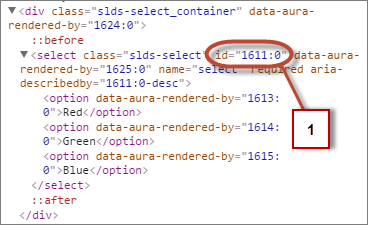
To create a unique ID for an HTML element, you can use the globalId as a prefix or suffix for your element. For example:
1<div id="{!globalId + '_footer'}"></div>In your browser’s developer console, retrieve the element using document.getElementById("<globalId>_footer"), where <globalId> is the generated runtime-unique ID.
To retrieve a component’s global ID in JavaScript, use the getGlobalId() function.
1var globalId = cmp.getGlobalId();