


ISVforce Guide
 j
jNewer Version Available
Check Security Review Progress and History
The Security Review Progress component (1) gives you a quick look at the current review’s status, tasks that require your attention, and requests from the Product Security team.
The Security Review History component (2) catalogs security review activity for a specific listing. For each submitted review, past and present, see the package version name, submission date, and status.
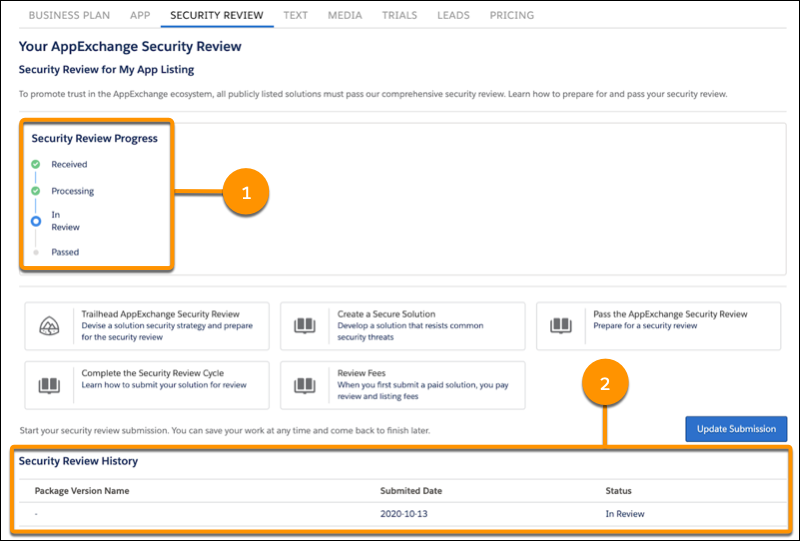
With all this information in one place, getting post-submission updates has never been simpler.
| Status | Component | Description |
|---|---|---|
| Received | Progress and History | Security Review Operations received your submission. |
| Processing | Progress and History |
Security Review Operations is verifying that your submission is ready to review. A submission is ready to review if it includes everything required to test the security of your solution. |
| In Review | Progress and History | The review is in progress. |
| Passed | Progress and History |
Product Security finished the review, and your solution passed. You can publicly list and distribute your solution on AppExchange. |
| Expired | History |
Either we received no response to re-review notifications and warnings, or the solution repeatedly failed re-review. To ensure that you receive re-review notifications, keep the contact information on your listing up to date. If you need more time to fix issues discovered in a re-review, request a deadline extension by logging a case in the Salesforce Partner Community. For the case topic, select Security Review under AppExchange (ISV) App Setup & Management. |