


Lightning Flow for Service Developer Guide
 j
jNewer Version Available
Customize Your Lightning Pages with the Actions & Recommendations Component
First, plan out your user’s experience. When do you want users to see the component? What records will your users be on? What other information do you want your users to see on the page?
After you identify a record page to edit, create a custom Lightning page for it using one of the pinned region templates available in the Lightning App Builder. The pinned region page allows you to display the Actions & Recommendations component while flows open in subtabs for console apps.
- Before you add the component to your record pages, create an Actions & Recommendations deployment.
-
Add the component to your pages.
In the Lightning App Builder, drag the Actions & Recommendations component to a pinned region on a page. For the Service Console app, we recommend adding the component to the left pinned sidebar.
-
Select the deployment in component properties.
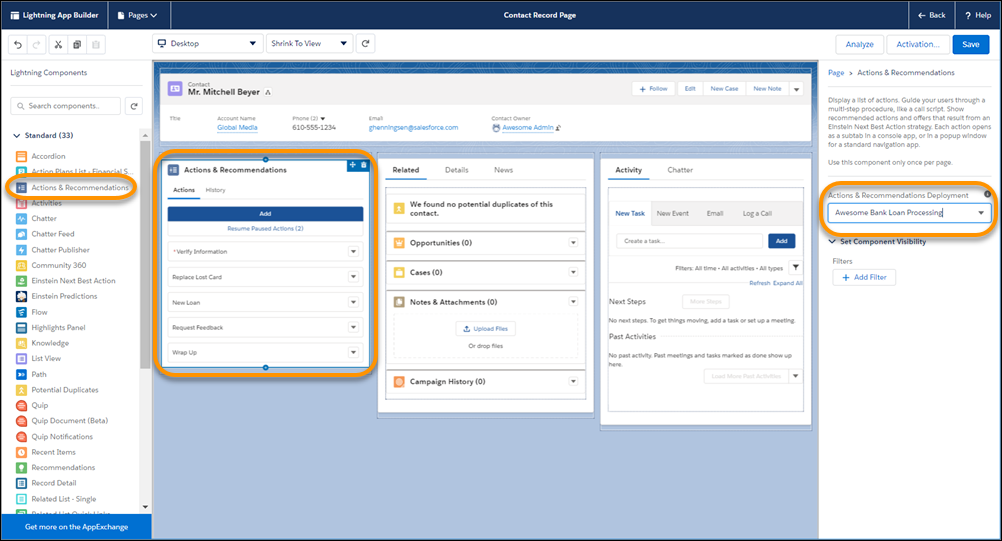
If you don’t select a deployment, no actions appear when the user clicks Add. In addition, the component is empty unless other RecordActions exist for the record.
-
Save your Lightning page.
If needed, activate the page and assign it to your app.