


Visualforce Developer Guide
 j
jNewer Version Available
Refreshing Chart Data Using JavaScript Remoting
1<apex:page controller="PieChartRemoteController">
2    <script>
3    function retrieveChartData(callback) {
4       var year = document.getElementById('theYear').value;
5       Visualforce.remoting.Manager.invokeAction(
6           '{!$RemoteAction.PieChartRemoteController.getRemotePieData}',
7           year,
8           function(result, event) {
9               if(event.status && result && (result.constructor === Array)) {
10                   callback(result);
11                   RemotingPieChart.show();
12               }
13               else if (event.type === 'exception') {
14                   document.getElementById("remoteResponseErrors").innerHTML = event.message +
15                       '<br/>' + event.where;
16               }
17               else {
18                   document.getElementById("remoteResponseErrors").innerHTML = event.message;
19               }
20           },
21           { escape: true }
22       );
23    }
24    function refreshRemoteChart() {
25        var statusElement = document.getElementById('statusDisplay');
26        statusElement.innerHTML = "loading...";
27        retrieveChartData(function(statusElement){
28                return function(data){
29                    RemotingPieChart.reload(data);
30                    statusElement.innerHTML = '';
31                };
32            }(statusElement)
33        );
34    }
35    </script>
36
37    <apex:pageBlock title="Charts">
38
39        <apex:pageBlockSection title="Visualforce Charting + JavaScript Remoting">
40
41            <apex:chart height="350" width="450" data="retrieveChartData"
42                name="RemotingPieChart" hidden="true">
43                <apex:pieSeries dataField="data" labelField="name"/>
44                <apex:legend position="right"/>
45            </apex:chart>
46
47            <div>
48                <select id="theYear" onChange="refreshRemoteChart();">
49                    <option value="2013">2013</option>
50                    <option value="2012">2012</option>
51                    <option value="2011">2011</option>
52                    <option value="2010">2010</option>
53                </select>
54                <span id="statusDisplay"></span>
55                <span id="remoteResponseErrors"></span>
56            </div>
57
58        </apex:pageBlockSection>
59
60    </apex:pageBlock>
61</apex:page>
This markup attaches a chart component to its data source by setting the chart’s data attribute to the name of a JavaScript function, retrieveChartData, which returns the data. The name of the function is provided as a string.
A static HTML <select> menu displays the years available to chart. The menu is not associated with a form element of any kind, and its value is never submitted directly back to the controller. Instead, the <select> menu’s onChange attribute calls a JavaScript function, refreshRemoteChart(), whenever the menu changes. There are two additional static HTML elements: two <span> tags with IDs. The <span> tags are empty when the page loads, and are updated via JavaScript to display status and error messages when necessary.
- The chart component’s data attribute is set to “retrieveChartData”, the name of the first JavaScript function. This tells the chart component to use the JavaScript function to load its data. The chart component invokes retrieveChartData() directly only once, when the chart is first created and the data is initially loaded.
- Reloading happens when the second JavaScript function, refreshRemoteChart(), is called. This is the second link, from the theYear menu. When the year menu changes, refreshRemoteChart() is invoked, and it re-invokes the retrieveChartData() function to load a new set of data.
- When refreshRemoteChart() invokes retrieveChartData(), it provides an anonymous function as a callback, which handles the result of the @RemoteAction call when it returns. This callback updates the chart by calling RemotingPieChart.reload(data). The chart itself is RemotingPieChart, named by setting the name attribute, and reload() is a JavaScript function available on Visualforce charts once created, which accepts new data and then redraws the chart.
This diagram illustrates these links between the different components
of the page: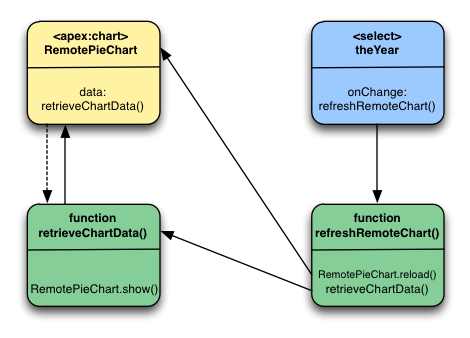
The sequence for the initial loading of the chart is simple: the <apex:chart> named RemotePieChart calls retrieveChartData() to get its initial data, and retrieveChartData() calls RemotePieChart.show() when it has the data. And, the chart appears.
Updates are more complicated. When a new year is chosen from the theYear menu, the menu’s onChange event fires, which calls the refreshRemoteChart() function. refreshRemoteChart() in turn calls the retrieveChartData() function, and when the @RemoteAction returns new data, retrieveChartData() (via the callback provided by refreshRemoteChart()) calls RemotePieChart.reload(). And, the chart updates.
Here are a couple of other items to note:
- The <apex:chart> uses the hidden="true" attribute to prevent the chart from displaying before there’s data to display. The retrieveChartData() function calls RemotingPieChart.show() to display the chart once the chart data is loaded. This and RemotingPieChart.reload() provide for much smoother chart animations than can be achieved using <apex:actionSupport>.
- The refreshRemoteData() function sets the statusElement HTML <span> to a “loading…” message before it attempts to update the data by calling retrieveChartData(), and then the anonymous callback function sets it to an empty string to hide the message once the data is returned and the chart updated. It’s a bit more work than using <apex:actionStatus>, for basically the same effect. You can easily show a “busy” animation or graphic using the same technique.
PieChartRemoteController
1public class PieChartRemoteController {
2
3    // The year to be charted
4    public String chartYear {
5        get {
6            if (chartYear == Null) chartYear = '2013';
7            return chartYear;
8        }
9        set;
10    }
11
12    // Years available to be charted, for <apex:selectList>
13    public static List<SelectOption> getChartYearOptions() {
14        List<SelectOption> years = new List<SelectOption>();
15        years.add(new SelectOption('2013','2013'));
16        years.add(new SelectOption('2012','2012'));
17        years.add(new SelectOption('2011','2011'));
18        years.add(new SelectOption('2010','2010'));
19        return years;
20    }
21
22    public List<PieWedgeData> getPieData() {
23        // Visualforce expressions can't pass parameters, so get from property
24        return PieChartRemoteController.generatePieData(this.chartYear);
25    }
26
27    @RemoteAction
28    public static List<PieWedgeData> getRemotePieData(String year) {
29        // Remoting calls can send parameters with the call
30        return PieChartRemoteController.generatePieData(year);
31    }
32
33    // Private data "generator"
34    private static List<PieWedgeData> generatePieData(String year) {
35        List<PieWedgeData> data = new List<PieWedgeData>();
36        if(year.equals('2013')) {
37            // These numbers are absolute quantities, not percentages
38            // The chart component will calculate the percentages
39            data.add(new PieWedgeData('Jan', 30));
40            data.add(new PieWedgeData('Feb', 15));
41            data.add(new PieWedgeData('Mar', 10));
42            data.add(new PieWedgeData('Apr', 20));
43            data.add(new PieWedgeData('May', 20));
44            data.add(new PieWedgeData('Jun',  5));
45        }
46        else {
47            data.add(new PieWedgeData('Jan', 20));
48            data.add(new PieWedgeData('Feb', 35));
49            data.add(new PieWedgeData('Mar', 30));
50            data.add(new PieWedgeData('Apr', 40));
51            data.add(new PieWedgeData('May',  5));
52            data.add(new PieWedgeData('Jun', 10));
53        }
54        return data;
55    }
56
57    // Wrapper class
58    public class PieWedgeData {
59
60        public String name { get; set; }
61        public Integer data { get; set; }
62
63        public PieWedgeData(String name, Integer data) {
64            this.name = name;
65            this.data = data;
66        }
67    }
68}- Using a Visualforce expression, {!pieData}, which calls the instance method getPieData().
- Using JavaScript remoting, by calling the @RemoteAction static method getRemotePieData() from a JavaScript method.