


Visualforce Developer Guide
 j
jNewer Version Available
Building a Table of Data in a Page
Some Visualforce components, such as <apex:pageBlockTable> or <apex:dataTable>, allow you to display information from multiple records at a time by iterating over a collection of records. To illustrate this concept, the following page uses the <apex:pageBlockTable> component to list the contacts associated with an account that is currently in context:
1<apex:page standardController="Account">
2   <apex:pageBlock title="Hello {!$User.FirstName}!">
3      You are viewing the {!account.name} account.
4   </apex:pageBlock>
5   <apex:pageBlock title="Contacts">
6      <apex:pageBlockTable value="{!account.Contacts}" var="contact">
7         <apex:column value="{!contact.Name}"/>
8         <apex:column value="{!contact.MailingCity}"/>
9         <apex:column value="{!contact.Phone}"/>
10      </apex:pageBlockTable>
11   </apex:pageBlock>
12</apex:page>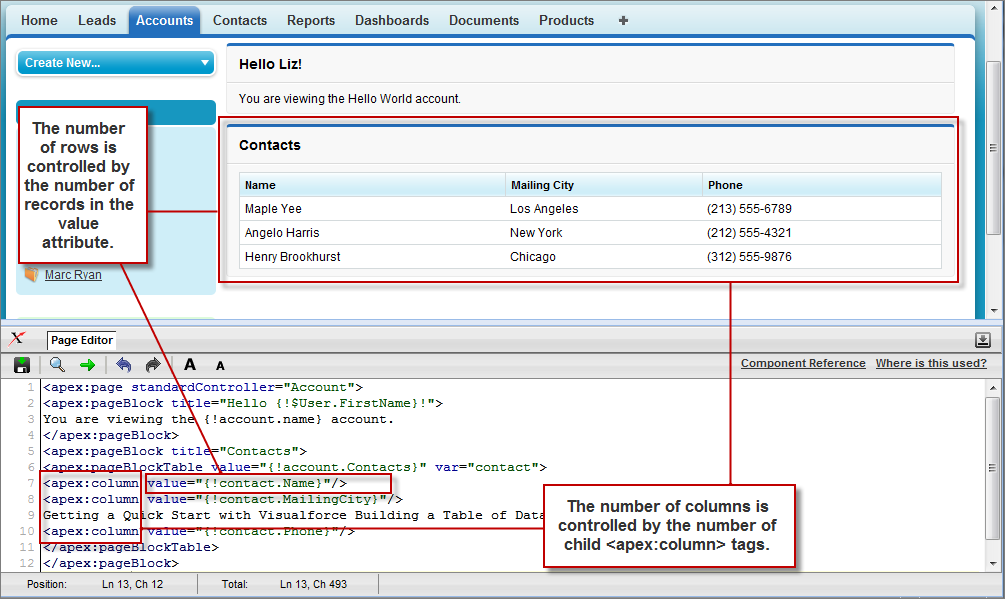
Like other iteration components, <apex:pageBlockTable> includes two required attributes, value and var:
- value takes a list of sObject records or values of any other Apex type. In the example above, {!account.Contacts} retrieves the ID of the account that is currently in context and then traverses the relationship to retrieve the list of the associated contacts.
- var specifies the name of the iteration variable. This variable is used within the body of the <apex:pageBlockTable> tag to access the fields on each contact. In this example, value="{!contact.Name}" is used on the <apex:column> tag to display the name of the contact.
The <apex:pageBlockTable> component takes one or more child <apex:column> components. The number of rows in the table is controlled by the number of records returned with the value attribute.