


Salesforce Security Guide
 j
jLead Data Export Policy Migration Example
| Available in: Salesforce Classic and Lightning Experience |
| Available in: Enterprise, Unlimited, and
Developer Editions Requires Salesforce Shield or Salesforce Event Monitoring add-on subscriptions. |
Here’s a summary of what we’ve decided so far.
- Create two enhanced policies, one based on ReportEvent and the other on ApiEvent.
- Add conditions to the ReportEvent policy using the QueriedEntities and RowsProcessed fields.
- Add conditions to the ApiEvent policy using the QueriedEntities, ElapsedTime, and RowsProcessed fields.
- Use Condition Builder to create the policy, along with showing the Apex code.
This is the Apex code for the legacy policy that we’re migrating.
1global class DataLoaderLeadExportCondition implements TxnSecurity.PolicyCondition {
2  public boolean evaluate(TxnSecurity.Event e) {
3    // The event data is a Map<String, String>.
4    // We need to call the valueOf() method on appropriate data types to use them in our logic.
5    Integer numberOfRecords = Integer.valueOf(e.data.get('NumberOfRecords'));
6    Long executionTimeMillis = Long.valueOf(e.data.get('ExecutionTime'));
7    String entityName = e.data.get('EntityName');
8
9    // Trigger the policy only for an export on leads, where we are downloading
10    // more than 2000 records or it took more than 1 second (1000ms).
11    if ('Lead'.equals(entityName)){
12      if (numberOfRecords > 2000 || executionTimeMillis > 1000){
13        return true;
14      }
15    }
16
17    // For everything else don't trigger the policy.
18    return false;
19  }
20}- QueriedEntities Equals Lead
- RowsProcessed Greater than 2000
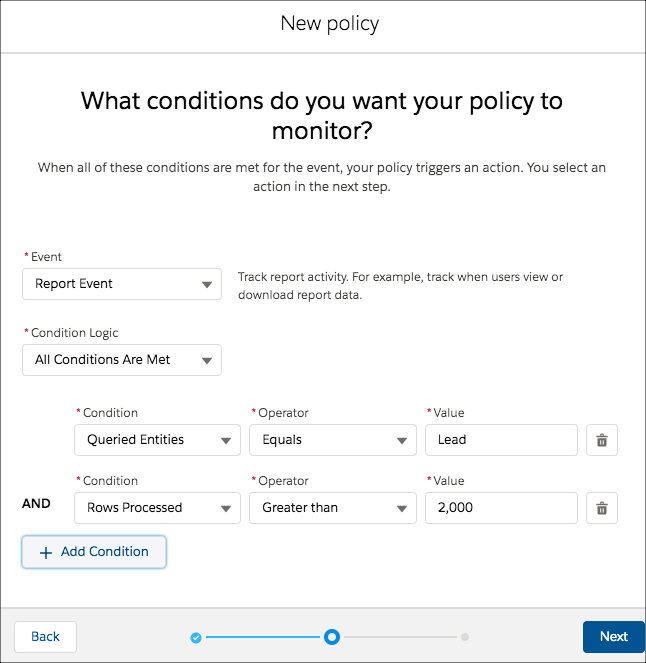
On the actions page, specify the same actions as in your legacy policy.
The steps to create the ApiEvent policy are similar, except we use condition logic. Remember that the legacy policy monitors lead exports when either the rows processed are greater than 2,000 or the elapsed time is greater than 1,000. Here's how to implement this logic in Condition Builder.

You’re done!
And here’s the Apex code for the ApiEvent enhanced policy.
1global class LeadExportApiEventCondition implements TxnSecurity.EventCondition {
2
3    public boolean evaluate(SObject event) {
4        ApiEvent apiEvent = (ApiEvent) event;
5
6        Decimal rowsProcessed = apiEvent.RowsProcessed;
7        Decimal elapsedTime = apiEvent.ElapsedTime;
8        String queriedEntities = apiEvent.QueriedEntities;
9
10        if ('Lead'.equals(queriedEntities)){
11            if (rowsProcessed > 2000 || elapsedTime > 1000) {
12                return true;
13            }
14        }
15        return false;
16    }
17}
The preceding example shows how elegant and natural the Apex code for enhanced policies is. For example, here’s the legacy way to get the number of rows processed.
1Integer numberOfRecords = Integer.valueOf(e.data.get('NumberOfRecords'));Here’s the enhanced policy code in which you can get the required values directly from the event object without typecasting the field values.
1Decimal rowsProcessed = apiEvent.RowsProcessed;Much better and easier to read! For completeness, here’s the Apex code for the ReportEvent policy.
1global class LeadExportReportEventCondition implements TxnSecurity.EventCondition {
2
3    public boolean evaluate(SObject event) {
4        ReportEvent reportEvent = (ReportEvent) event;
5
6        Decimal rowsProcessed = reportEvent.RowsProcessed;
7        String queriedEntities = reportEvent.QueriedEntities;
8
9        if ('Lead'.equals(queriedEntities)) {
10            if (rowsProcessed > 2000) {
11                return true;
12            }
13        }
14        return false;
15    }
16}
Consolidate Apex Classes Example
Did you notice that the previous two Apex classes for the new Lead Data Export enhanced policies are similar? The main difference is that one policy casts the sObject to ReportEvent and the other to ApiEvent. Let’s change our use case a bit to show how to create a single Apex class that handles multiple event objects. In this case, we remove the condition of checking for elapsed time in the ApiEvent. Now the two policies monitor the same fields of their respective event objects: RowsProcessed and QueriedEntities.
Here’s an example of the "consolidated" Apex class.
1global class LeadExportEventCondition implements TxnSecurity.EventCondition {
2    public boolean evaluate(SObject event) {
3        switch on event{
4            when ApiEvent apiEvent {
5                return evaluate(apiEvent.QueriedEntities, apiEvent.RowsProcessed);
6            }
7            when ReportEvent reportEvent {
8                return evaluate(reportEvent.QueriedEntities, reportEvent.RowsProcessed);
9            }
10            when null {
11                 return false;
12            }
13            when else{
14                return false;
15            }
16        }
17    }
18
19    private boolean evaluate(String queriedEntities, Decimal rowsProcessed){
20        if ('Lead'.equals(queriedEntities) && rowsProcessed > 2000){
21            return true;
22        }
23        return false;
24    }
25}
The preceding example shows how the Apex code for a policy that handles multiple event objects uses implicit typecasting, branching logic, and event error cases with the switch statement. Also, it’s easy to update this code to handle a new event object or use case.
Expand the Lead Data Export Example with New Use Cases
Let’s say that you’ve created a custom report type in your org that’s based on leads and other objects, such as campaigns. You want to enforce your enhanced policy on this report type, too. In this case, the QueriedEntities field contains a comma-separated list of the objects that the custom report type is based on, such as Lead,Campaign,MyOtherObject. To ensure that the enhanced policy triggers on this custom report type, use the contains() method to check for Lead in the QueriedEntities value rather than equals(). For example:
1global class LeadExportEventCondition implements TxnSecurity.EventCondition {
2    public boolean evaluate(SObject event) {
3        switch on event{
4            when ApiEvent apiEvent {
5                return evaluate(apiEvent.QueriedEntities, apiEvent.RowsProcessed);
6            }
7            when ReportEvent reportEvent {
8                return evaluate(reportEvent.QueriedEntities, reportEvent.RowsProcessed);
9            }
10            when null {
11                 return false;
12            }
13            when else {
14                return false;
15            }
16        }
17    }
18
19    private boolean evaluate(String queriedEntities, Decimal rowsProcessed){
20        if (queriedEntities.contains('Lead') && rowsProcessed > 2000){
21            return true;
22        }
23        return false;
24    }
25
26}
Next, imagine that you have a custom object HRCase__c that you want to monitor in addition to leads. Add a condition on the QueriedEntities field. For example:
1global class DataExportEventCondition implements TxnSecurity.EventCondition {
2    public boolean evaluate(SObject event) {
3        switch on event{
4            when ApiEvent apiEvent {
5                return evaluate(apiEvent.QueriedEntities, apiEvent.RowsProcessed);
6            }
7            when ReportEvent reportEvent {
8                return evaluate(reportEvent.QueriedEntities, reportEvent.RowsProcessed);
9            }
10            when null {
11                 return false;
12            }
13            when else{
14                return false;
15            }
16        }
17    }
18
19    private boolean evaluate(String queriedEntities, Decimal rowsProcessed){
20        if (containsQueriedEntities(queriedEntities) && rowsProcessed > 2000){
21            return true;
22        }
23        return false;
24    }
25
26    private boolean containsQueriedEntities(String queriedEntities){
27        return queriedEntities.contains('Lead') ||
28               queriedEntities.contains('HRCase__c');
29    }
30}
So far we’ve used the ApiEvent and ReportEvent event objects to monitor API queries and report operations. But users can also use list views to view or export org data. Sounds like a job for the ListViewEvent event object! To update the Apex code, add a switch case.
1global class DataExportEventCondition implements TxnSecurity.EventCondition {
2    public boolean evaluate(SObject event) {
3        switch on event{
4            when ApiEvent apiEvent {
5                return evaluate(apiEvent.QueriedEntities, apiEvent.RowsProcessed);
6            }
7            when ReportEvent reportEvent {
8                return evaluate(reportEvent.QueriedEntities, reportEvent.RowsProcessed);
9            }
10            when ListViewEvent listViewEvent {
11                return evaluate(listViewEvent.QueriedEntities, listViewEvent.RowsProcessed);
12            }
13            when null {
14                 return false;
15            }
16            when else {
17                return false;
18            }
19        }
20    }
21
22    private boolean evaluate(String queriedEntities, Decimal rowsProcessed){
23        if (containsQueriedEntities(queriedEntities) && rowsProcessed > 2000){
24            return true;
25        }
26        return false;
27    }
28
29    private boolean containsQueriedEntities(String queriedEntities){
30        return queriedEntities.contains('Lead') ||
31               queriedEntities.contains('HRCase__c');
32    }
33}