


Tableau CRM SAQL Developer Guide
 j
jNewer Version Available
cogroup
- inner cogroup
- left outer cogroup
- right outer cogroup
- full outer cogroup
Inner cogroup
1result = cogroup data_stream_1 by field1, data_stream_2 by field2;field1 and field2 must be the same type, but can have different names. For example, q=group ops by 'Owner', quota by 'Name';
Example - Inner cogroup
Suppose that you want to understand how much time your reps spend meeting with each account. Is there a relationship between spending more time and winning an account? Are some reps spending much more or much less time than average? To answer these questions, first combine meeting data with account data using cogroup.
Suppose that you have a dataset of meeting information from the Salesforce Event object. In this example, your reps have had six meetings with four different companies. The Meetings dataset has a MeetingDuration column, which contains the meeting duration in hours.
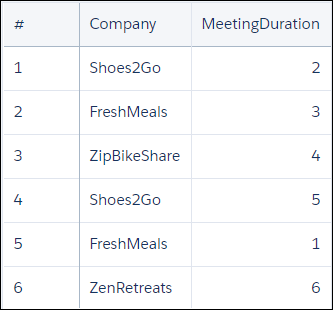
The account data exists in the Salesforce Opportunity object. The Ops dataset has an Account, Won, and Amount column. The Amount column contains the dollar value of the opportunity, in millions.

To see the effect of meeting duration on opportunities, you start by combining these two datasets into a single data stream using cogroup.
1q = cogroup ops by 'Account', meetings by 'Company';Internally (you cannot see these results yet), the resulting cogrouped data stream contains the following data. Note how the data streams are rolled up on one or more dimensions.
1(1,{(Shoes2Go,2,), (Shoes2Go,5)},{(Shoes2Go,1,1.5), (Shoes2Go,0,3})
2
3(2,{(FreshMeals,3), (FreshMeals, 5)},{(FreshMeals,1,2) (FreshMeals, 1, 1.4)})
4
5(3,{(ZipBikeShare,4)},{(ZipBikeShare,1, 1.1)})
6
7(4,{(ZenRetreats,6)},{(ZenRetreats,0, 2)})
Now the datasets are combined. To see the data, you create a projection using foreach:
1ops = load "Ops";
2meetings = load "Meetings";
3q = cogroup ops by 'Account', meetings by 'Company';
4q = foreach q generate ops.'Account' as 'Account', sum(ops.'Amount') as 'sum_Amount', sum(meetings.'MeetingDuration') as 'TimeSpent';
The resulting data stream contains the sum of amount and total meeting time for each company. The sum of amount is the sum of the dollar value for every opportunity for the company.
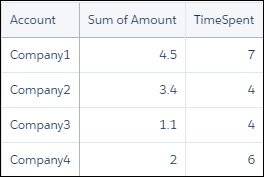
Now that you have combined the data into a single data stream, you can analyze the effects that total meeting time has on your opportunities.
Left Outer cogroup
1result = cogroup data_stream_1 by field1 left, data_stream_2 by field2;field1 and field2 must be the same type, but can have different names. For example, q=group ops by 'Owner' left, quota by 'Name';
Example - Left Outer cogroup With coalesce
Suppose that you want to see what percentage of quota that your reps have obtained. Your quota dataset shows each employee's quota (notice that Farah does not have a quota):

Your opportunities data shows the opportunity amount that each employee has won (notice that Jonathan does not have a won opportunity).
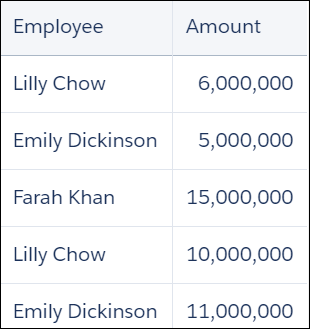
Use a left outer cogroup to show only employees that have quotas. Also show the percentage of quota attained.
1quota = load "Quota";
2opp = load "Opportunity";
3q = group quota by 'Employee' left, opp by 'Employee';
4q = foreach q generate quota.'Employee' as 'Employee', trunc(sum(opp.'Amount')/sum(quota.'Quota')*100, 2) as 'Percent Attained';
Jonathan has not won any opportunities yet, so his percent attained is null.

Use coalesce to replace the null opportunities with a zero.
1quota = load "Quota";
2opp = load "Opportunity";
3q = group quota by 'Employee' left, opp by 'Employee';
4q = foreach q generate quota.'Employee' as 'Employee', trunc(coalesce(sum(opp.'Amount'),0)/sum(quota.'Quota')*100, 2) as 'Percent Attained';
Now Jonathan's percent attained is displayed as zero.

Right Outer cogroup
1result = cogroup data_stream_1 by field1 right, data_stream_2 by field2;field1 and field2 must be the same type, but can have different names. For example, q=group ops by 'Owner' right, quota by 'Name';
Full Outer cogroup
1result = cogroup data_stream_1 by field1 full, data_stream_2 by field2;field1 and field2 must be the same type, but can have different names. For example, q=group ops by 'Owner' full, quota by 'Name';