


LWR Sites for Experience Cloud
 j
jNewer Version Available
Pages and Components in the LWR Template
Build Your Own (LWR), as the name implies, is a minimal template that provides only the
most essential out-of-the-box pages and components.
The template includes only the following template pages. So to create a working site, you
must create
additional custom pages.
- Home
- Error
- Login
- Forgot Password
- Check Password
- Register
Also, we provide LWC versions of only a few components, so to accomplish your goals, you must
create custom
Lightning web components.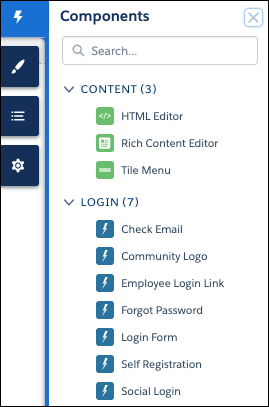
These out-of-the-box components provide similar functionality to the corresponding components in Aura sites.
- Rich Content Editor lets you add text to the page.
- HTML Editor lets you add and edit custom markup.
- Tile Menu adds an intuitive, image-based navigation menu to your site.
- Check Email displays a message instructing the user to check password reset email.
- Community Logo displays the logo that you specify in Login & Registration in the Administration workspace.
- Employee Login Link redirects internal users to the Salesforce login page to log in to the site.
- Forgot Password sends a reset password email to the given username.
- Login Form logs users into the site using their username and password.
- Self Registration allows external users to self-register in the site.
- Social Login logs users into the site using Auth Providers or SAML SSO.