Salesforce Mobile Notifications Implementation Guide
 j
jNewer Version Available
Push Notification Registration and Flow
- The OS vendor that delivers the notification to devices
- The Salesforce organization that sends the notification
- The mobile devices that receive and display the notification
Here is an outline of the registration process for developers.
- Register with the mobile OS vendor, such as Apple or Google, for push service.
- Create a connected app in Salesforce to upload the push credentials, such as the iOS .p12 certificate or the Android token.
- Enable the mobile client app to handle push notifications using the Salesforce Mobile SDK.
- Write Apex triggers to send push notifications when certain events occur on Salesforce records.
- (For partners only) For partners who are developing the push notification triggers for
other customer organizations, this additional step should be performed.
Create a managed package containing the connected app and Apex triggers. Distribute this package to customer organizations.
- Developer registration with the OS vendor (Apple in this figure)
- Connected app setup in Salesforce
- Sending the push notification via the trigger from the Salesforce organization
- Delivery of the push notification to mobile devices by the OS vendor
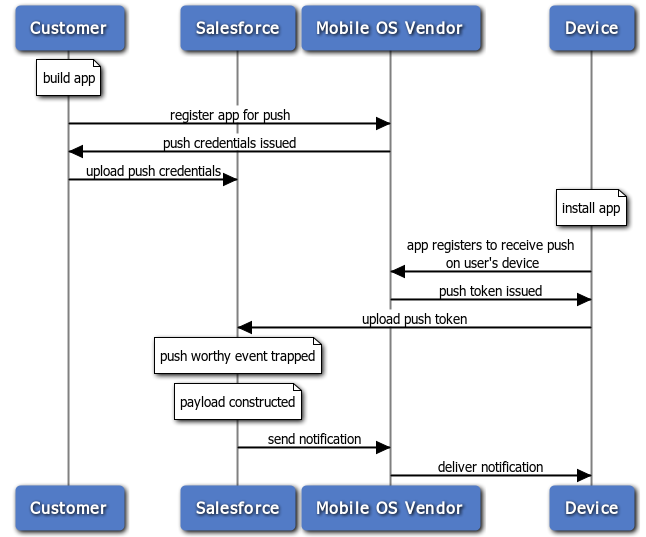
The Push Notification Service sends the message to the users specified in the send call of the Apex Messaging.PushNotification class.
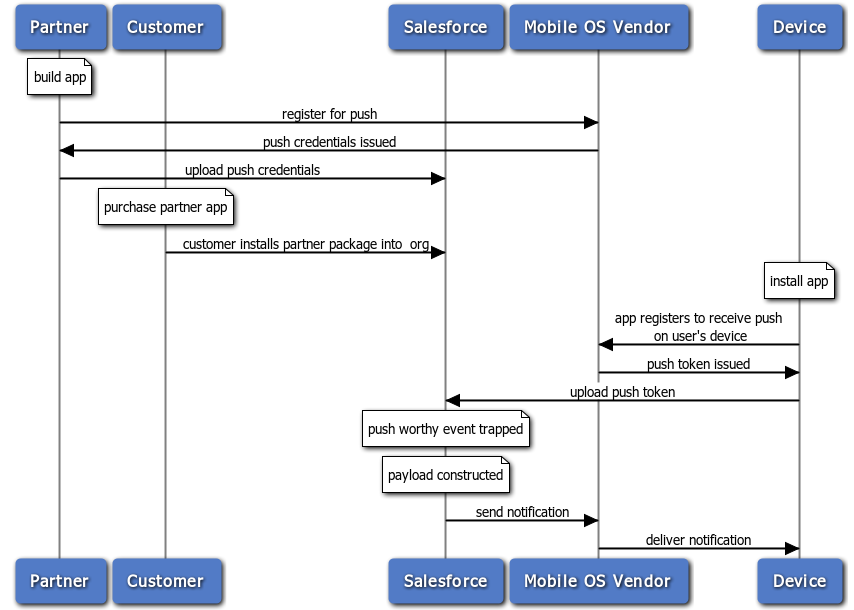
This next figure illustrates the complete push notification flow for partners and customers. In addition to the flow represented in the previous diagram, this flow includes steps for customers who have installed the partner’s package. It includes purchase of the partner app, and installation of the partner’s package to get the connected app and the Apex triggers. The last few steps of sending and delivering the push notification are similar to the previous flow.