Tableau CRM SAQL Developer Guide
 j
jNewer Version Available
Append Datasets using union
You can append data from two or more data streams into a single data stream using
union. The data streams must have the same
field names and structure.
To use union, first load the dataset and then use foreach to do the projection. Repeat the process with another dataset. If the two resulting data streams have an identical structure, you can append them using union.
Let’s say that you have two opportunity datasets from different regions that you brought together using the Salesforce mulit-org connector. You want to add these datasets together to look at your pipeline as a whole.
The OppsRegion1 data stream contains these fields.

The OppsRegion2 data stream contains these fields.

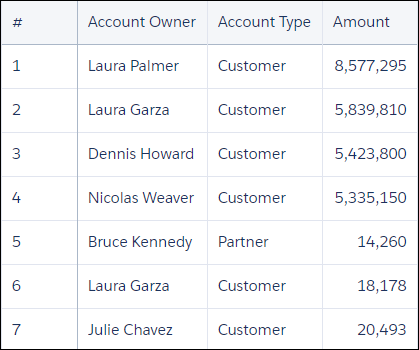
Use union to combine the two data
streams.
1ops1 = load "OppsRegion1";
2
3ops1 = foreach ops1 generate 'Account_Owner', 'Account_Type', 'Amount';
4
5ops2 = load  "OppsRegion2";
6ops2 = foreach ops2 generate 'Account_Owner', 'Account_Type', 'Amount';
7
8-- ops1 and ops2 have the same structure, so we can use union
9opps_total = union ops1, ops2;
The resulting data stream contains both sets of data.