


LWR Sites for Experience Cloud
 j
jNewer Version Available
Create Custom Record Components
Although many Aura template components aren’t available as Lightning web components, you can extend existing Lightning web components, as detailed in the Lightning Web Components Reference. However, User Interface APIs aren’t yet available for related record lists, so you can’t fully construct these types of components.
Create a Custom Cell for Record Lists
Let’s say you want to add a custom column to the data table in your record list
component—in this case, the Account Name column.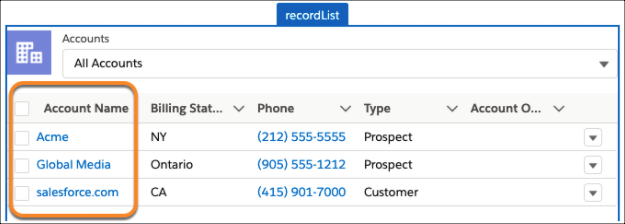
To add a custom cell to your record list, you can extend LightningDatatable to define a custom data type. In this example, the name of the record is displayed in the table with a hyperlink to its record page.
1import { LightningDatatable } from ‘lightning/datatable;
2
3export default class RecordTable extends LightningDatatable {
4   // define a new custom type… the custom cell will have a markup
5   // represented by the template attribute
6   static customTypes = {
7      ‘name’: {
8         template: ‘./name.html’
9   };
10}
We then define the markup for the custom type inside our template. To display a hyperlink to a record page, we create a separate record link component and provide the values supplied by the record table component.
1// inside name.html
2<template>
3   <c-record-link
4      object-api-name={value.objectApiName}
5      record-id={value.id}
6      label={value.name}>
7   </c-record-link>
8</template>
Navigate to a Record Page or Custom Action
Record components can extend NavigationMixin from lightning/navigation, which allows your web component to generate a URL for navigating record and object pages.
1import { LightningElement } from 'lwc';
2import { NavigationMixin } from 'lightning/navigation';
3
4export default class RecordList extends NavigationMixin(LightningElement) {
5   ...
6}
Using NavigationMixin.Navigate, you provide the desired page type and route parameters. This function generates a new URL and navigates to it, which is useful for performing actions on another page. Record actionNames other than view require a custom page.
Here’s an example for navigating to a custom page to edit a record.
1handleEdit() {
2    // assumes you have created a custom page with API Name “record”
3    this[NavigationMixin.Navigate]({
4        type: 'comm__namedPage',
5        attributes: {
6            name: 'record__c'
7        },
8        state: {
9            objectApiName: this.objectApiName,
10            recordId,
11            actionName: 'edit'
12        }
13    });
14}
The result generates a URL that can be used for a new record page.