


Field Service Developer Guide
 j
jNewer Version Available
Field Service Pricing Data Model
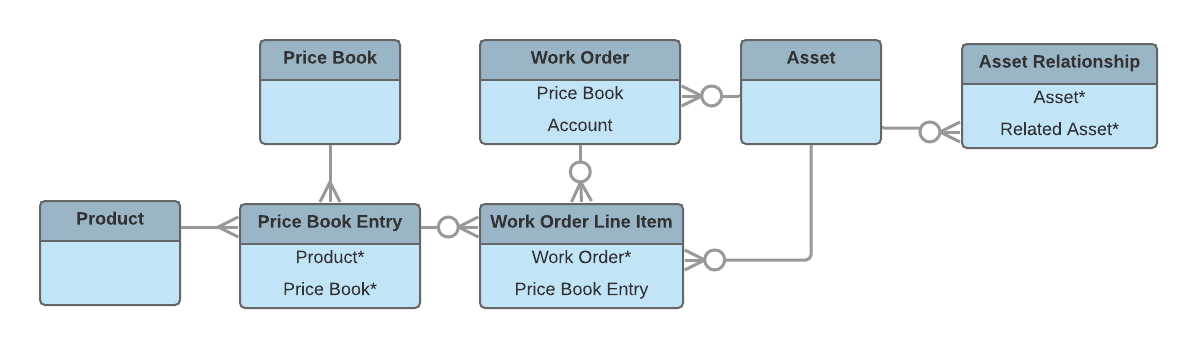
If you’ve set up a product catalog in Salesforce to track the goods and services your business offers, you can associate items in your price books with work orders and their line items, similar to the way you can associate products with opportunities or orders. If you specify a price book on a work order, this allows you to link each work order line item to a price book entry (product) from the price book. List price, discount, and quantity are defined at the line-item level.
For example, if you create a work order for a solar panel installation, select a price book in the Price Book lookup field on the work order. Then, use the Price Book Entry lookup field on its work order line items to select goods or services listed in your price book, such as Site Assessment, Solar Panel, and Inverter. A quick glance at a completed work order’s line items shows you which products from your product catalog were sold as part of the work order.
After a product is purchased and installed for a customer, it is typically tracked as an asset in Salesforce. The Asset lookup field on work orders and work order line items allows you to track work being performed on a specific asset. It also makes it possible to view a history of all work completed on the asset.
If an asset is replaced or upgraded, the relationship between the old and new asset is tracked in an asset relationship record. An asset relationship lists a start and end time—for instance, if the replacement asset is being leased—and a relationship type, which must be defined by the admin.