


Visualforce Developer Guide
 j
jNewer Version Available
An Example of Using Remote Method Overrides in Remote Objects
This example uses the jQuery, Bootstrap, and Mustache tool kits, loading them from an
external content distribution network (CDN).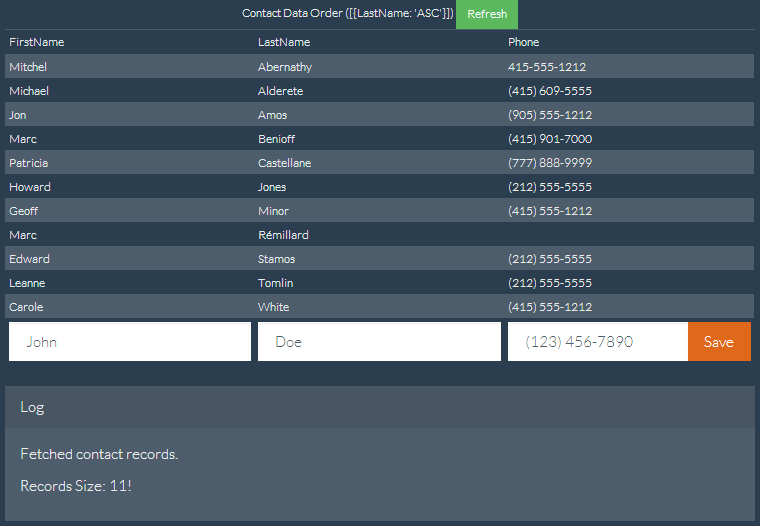
1<apex:page showHeader="false" standardStylesheets="false" docType="html-5.0"
2    title="Contacts—RemoteObjects Style" controller="RemoteObjectContactOverride">
3
4    <!-- Include in some mobile web libraries -->
5    <apex:stylesheet value="//netdna.bootstrapcdn.com/bootswatch/3.1.1/superhero/bootstrap.min.css"/>
6    <apex:includeScript value="//ajax.googleapis.com/ajax/libs/jquery/1.11.0/jquery.min.js"/>
7    <apex:includeScript value="//cdnjs.cloudflare.com/ajax/libs/mustache.js/0.7.2/mustache.min.js"/>
8
9    <!-- Set up Remote Objects, with an override for create() method -->
10    <apex:remoteObjects jsNamespace="$M">
11        <apex:remoteObjectModel name="Contact" fields="FirstName,LastName,Phone"
12            create="{!$RemoteAction.RemoteObjectContactOverride.create}"/>
13    </apex:remoteObjects>
14
15    <!-- Page markup -->
16    <div class="container">
17        <div class="row">
18            <div class="col-md-2"></div>
19            <div class="col-md-8">
20                <table id="myTable"
21                    class="table table-bordered table-striped table-condensed">
22                    <colgroup>
23                        <col class="col-md-3" />
24                        <col class="col-md-3" />
25                        <col class="col-md-3" />
26                    </colgroup>
27                    <caption>
28                        Contact Data Order ([ {LastName: 'ASC'}, {FirstName: 'DESC'} ])
29                        <button id="bRefresh" class="btn btn-success btn-sm"
30                            type="button">Refresh</button>
31                    </caption>
32                    <caption id="msgBox" class="alert alert-danger hidden"></caption>
33                    <thead>
34                        <tr><td>FirstName</td><td>LastName</td><td>Phone</td></tr>
35                    </thead>
36                    <tbody></tbody>
37                    <tfoot>
38                        <tr>
39                        <td><input type="text" name="FirstName" id="iFirstName"
40                            placeholder="John" class="form-control" /></td>
41                        <td><input type="text" name="LastName" id="iLastName"
42                            placeholder="Doe" class="form-control" /></td>
43                        <td>
44                            <div class="input-group">
45                              <input type="text" name="Phone" id="iPhone"
46                                placeholder="(123) 456-7890" class="form-control" />
47                              <span class="input-group-btn">
48                                <button id="bAdd" class="btn btn-primary"
49                                    type="button">Save</button>
50                              </span>
51                            </div>
52                        </td>
53                        </tr>
54                    </tfoot>
55                </table>
56                <div class="panel panel-default">
57                  <div class="panel-heading">Log</div>
58                  <div class="panel-body" id="log">
59                  </div>
60                </div>
61            </div>
62            <div class="col-md-2"></div>
63        </div>
64    </div>
65
66    <!-- Results template (table rows of Contacts) -->
67    <script id="tmpl" type="x-tmpl-mustache">
68        <tr><td>{{FirstName}}</td><td>{{LastName}}</td><td>{{Phone}}</td></tr>
69    </script>
70
71    <!-- Page functionality -->
72    <script>
73        var table = $('#myTable tbody');
74        var template = $('#tmpl').html();
75        Mustache.parse(template);
76
77        // Retrieve all contacts and add to results table on page
78        var fetchContacts = function() {
79            (new $M.Contact()).retrieve({
80                orderby: [ {LastName: 'ASC'}, {FirstName: 'DESC'} ],
81            }, function(err, records) {
82                if (!err) {
83                    // Add some status messages to the log panel
84                    $('#log')
85                    .append('<p>Fetched contact records.</p>')
86                    .append('<p>Records Size: '+ records.length + '!</p>');
87
88                    // Update the table of contacts with fresh results
89                    table.empty();
90                    records.forEach(function(rec) {
91                        table.append(Mustache.render(template, rec._props));
92                    });
93                } else {
94                    $('#msgBox').text(err.message).removeClass('hidden');
95                }
96            });
97        };
98
99        var addContact = function() {
100            // Create a new Remote Object from form values
101            (new $M.Contact({
102                FirstName: $('#iFirstName').val(),
103                LastName: $('#iLastName').val(),
104                Phone: $('#iPhone').val()
105            })).create(function(err, record, event) {
106                // New record created...
107                if (!err) {
108                    // Reset the New Record form fields, for the next create
109                    $('input').each(function() {
110                        $(this).val('');
111                    });
112
113                    // Add some status messages to the log panel
114                    $('#log')
115                    .append('<p>Contact created!</p>')
116                    // Custom data added to event.result by override function
117                    .append('<p>Got custom data: ' + event.result.custom + '</p>');
118
119                    // Redraw the results list with current contacts
120                    fetchContacts();
121                } else {
122                    $('#msgBox').text(err.message).removeClass('hidden');
123                }
124            });
125        };
126
127        // Bind application functions to UI events
128        $('#bRefresh').click(fetchContacts);
129        $('#bAdd').click(addContact);
130
131        // Initial load of the contacts list
132        fetchContacts();
133    </script>
134</apex:page>1create="{!$RemoteAction.RemoteObjectContactOverride.create}"1public with sharing class RemoteObjectContactOverride {
2
3 @RemoteAction
4 public static Map<String, Object> create(String type, Map<String, Object> fields) {
5 System.debug(LoggingLevel.INFO, 'Before calling create on: ' + type);
6
7 // Invoke the standard create action
8 // For when you want mostly-normal behavior, with a little something different
9 Map<String, Object> result = RemoteObjectController.create(type, fields);
10
11 System.debug(LoggingLevel.INFO, 'After calling create on: ' + type);
12 System.debug(LoggingLevel.INFO, 'Result: ' + result);
13
14 // Here's the little something different, adding extra data to the result
15 Map<String, Object> customResult =
16 new Map<String, Object> {'custom' => 'my custom data' };
17 customResult.putAll(result);
18
19 return customResult;
20 }
21}This method logs the @RemoteAction call and then uses the standard RemoteObjectController.create() call to perform the create. It’s performing the same data manipulation language (DML) commands to create the record that the built-in version would, because it’s using the built-in version. After performing the create, the method does a little more logging. Finally it adds some extra data to the return payload that will be received by the JavaScript callback function on the Visualforce page.
It’s adding the extra data that’s interesting and makes overriding the built-in method useful. The extra data that’s added by the preceding controller is trivial, for the purposes of illustration only. A real-world override can include more complex logic—the result of a calculation, other method calls, and so on. What’s important to understand is that the new custom override method can do additional things behind the scenes, and can return extra data that the built-in version can’t.