


Secure Coding Guide
 j
jNewer Version Available
Secure Coding Cross Site Request Forgery
Cross Site Request Forgery (CSRF) - What Is It?
Web browsers allow GET and POST requests to be made between different web sites. Cross-site request forgery (CSRF) occurs when a user visits a malicious web page that makes their browser send requests to your application that the user did not intend. This can be done with the src attribute of the IMG, IFRAME or other tags and more complicated requests, including POSTs, can be made using JavaScript. Because the browser always sends the relevant cookies when making requests, requests like this appear to originate from an authenticated user. The malicious site isn’t able to see the results of these requests, but if create, update or delete functionality can be triggered, the malicious site may be able to perform unauthorized actions.
Sample Vulnerability
1<iframe src="https://example.com/addressBook?action=deleteAll&confirm=yes">Is My Application Vulnerable?
All web applications are vulnerable to CSRF by default. Unless you have specifically engineered protections or are automatically protected by your framework, your application is probably vulnerable. Applications built on the Apex and Visualforce platforms are protected by default. Anti-CSRF protections are available for most major application platforms but are often not enabled by default.
How Can I Test My Application?
If you are not using a framework that provides CSRF protection, or don’t know, the best way to test your applications is to use a proxy like Burp or Fiddler to manually examine the form data sent to your application.
Do actions that create, update or delete data or cause side-effects have completely predictable parameters? To be protected from CSRF, forms targeting these actions should include an un-guessable parameter. Removing or changing this parameter should cause the form submission to fail.
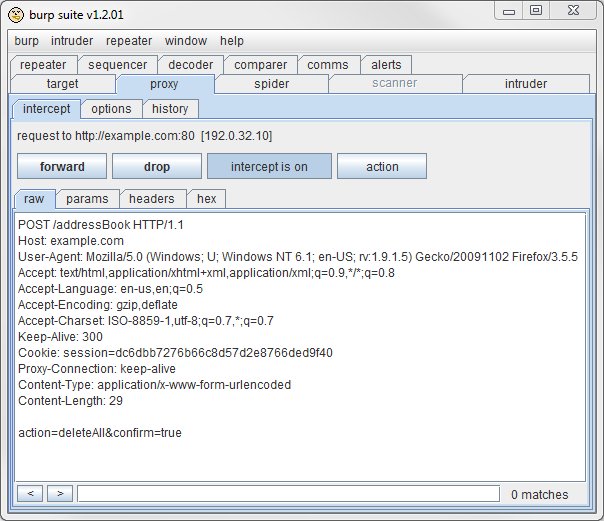
This screen shot of the Burp proxy shows an example of a request vulnerable to CSRF. All of the parameters to the application (action, confirm) are predictable.
The next screen shot has a parameter named antiForgery that looks hard to guess:

But if we log out as “bob” and log back in as “charlie”, we see that the antiForgery value stays the same.
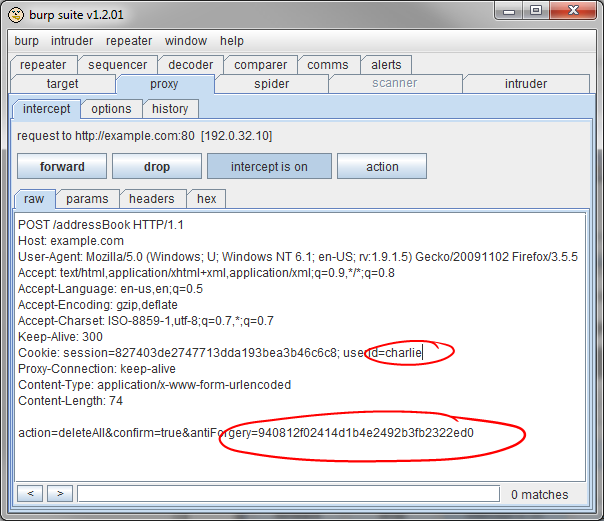
This application global anti-forgery token could be observed by one user and used to attack other users.
A secure anti-CSRF mechanism should create a different and unpredictable token for each user session — Bob should get a different antiforgery value each time he logs in, and so should Charlie. Be sure to use the capabilities of the proxy to test that actions fail if the token is removed or changed, or a valid token for another user is substituted.
Additional information on testing for CSRF can be found at: http://www.owasp.org/index.php/Testing_for_CSRF_(OWASP-SM-005)
How Do I Protect My Application?
Apex and Visualforce Applications
Within the Lightning Platform, we have implemented an anti-CSRF token to prevent this attack. Every form includes a parameter containing a random string of characters as a hidden field. When the user submits the form, the platform checks the validity of this string and will not execute the command unless the given value matches the expected value. This feature will protect you when using all of the standard controllers and methods — but only for POST requests. GET requests are not protected with the anti-forgery token.
(By protecting only POST requests, Salesforce follows the convention and recommendation that GET requests be safe in that they do not alter significant data on the server side or have other significant side-effects. That is, you should not be using GET requests to change application state, and so GET requests should not need CSRF protection. See Section 9.1 of RFC 2616, HTTP 1.1 for more discussion of this distinction.)
1<apex:page controller="myClass" action="{!init}"></apex:page>
2
3public with sharing class myClass {
4 public void init() {
5 Id id = ApexPages.currentPage().getParameters().get('id');
6 Account obj = [select id, Name FROM Account WHERE id = :id];
7 if (Account.sObjectType.getDescribe().isDeletable()){
8 delete obj;
9 }
10 return ;
11 }
12}In this case, the developer has unknowingly bypassed the anti-CSRF controls by writing code that changes state on a GET request. The id parameter is read and used in the code. The anti-CSRF token is never read or validated. An attacker web page may have sent the user to this page via CSRF attack and could have provided any value they wish for the id parameter.
1public with sharing class MyController {
2
3    private final Account account;
4
5    public MyController() {
6        account = [select id, name, site from Account
7            where id =:ApexPages.currentPage().getParameters().get('id')];
8    }
9
10    public Account getAccount() {
11        return account;
12    }
13
14    public PageReference save() {
15        if (Schema.sObjectType.Account.fields.Name.isUpdateable()){
16            update account;
17        }
18        return null;
19    }
20}
21
22<apex:page controller="myController" tabStyle="Account">
23   <apex:form>
24      <apex:pageBlock title="Congratulations {!$User.FirstName}">
25         You belong to the Account Name: <apex:inputField value="{!account.name}"/>
26         <apex:commandButton action="{!save}" value="save"/>
27      </apex:pageBlock>
28   </apex:form>
29</apex:page>
General Guidance
All requests that create, update or delete data or have side-effects require protection against CSRF.
The most reliable method is to include an anti-CSRF token as a hidden input with every application action.
This token should be included in all forms built by the genuine application and validated to be present and correct before form data is accepted and acted upon.
Use the POST method for requests requiring protection to avoid disclosing the token value in Referer headers.
Token values must be unique per user session and unpredictable.
ASP.NET
ASP.NET provides two strategies for preventing CSRF. Applications that use the ASP.NET ViewState mechanism can protect against CSRF by setting a ViewStateUserKey during Page_Init.
If using the AntiForgeryToken, it must be added to and validated for every sensitive action in the application. Again, a “sensitive” action for these purposes is one that changes server-side state, like creating, updating, or deleting data.
Java
- http://www.owasp.org/index.php/Category:OWASP_CSRFGuard_Project
PHP
Ruby on Rails
Ruby on Rails 2.0 provides a protect_from_forgery feature. This implementation does not meet Salesforce's requirements for CSRF protection if used with the :secret option because the token value will be the same for all users. See General Guidance, above, for anti-CSRF token requirements. Use of the protect_from_forgery feature without the :secret option with Ruby on Rails 3.3 and above creates a random token that meets Salesforce security requirements. See the documentation for ActionController::RequestForgeryProtection for more information.