


Customer 360 Data Manager Data Jobs API Developer Guide
 j
jData Jobs API Implementation
Global Profile Round Trip
Customer 360 Data Manager imports data from connected data sources, creates global profiles, and exports global profile IDs. The global profile IDs are injected back into the original data sources. The global profile IDs can then be used to create Lightning Web Component (LWC) components or apps that can query customer data across data sources.
- Three records and addresses from B2C Commerce orders
- One record in your European org
- One record in your North American org.
Authorize
Identify Data Sources
Use the Data Sources resource to identify the data sources connected to Customer 360 that you can pull data from. If a data source isn’t available, ask your Customer 360 admin to connect it.
Investigate Data Quality by Pushing Global Profiles to an Analytics Snapshot
After you create global profiles, you can run a job to push them to one of the two analytic snapshots. Use the Customer 360 Data Manager dashboards to evaluate data quality and the performance of the match rules.
- For your data source, successfully complete the jobs necessary to create global profiles.
- Push global profiles to the Customer 360 Data Manager analytics dashboard using the Jobs resource.
Add Global Party IDs to Commerce Cloud
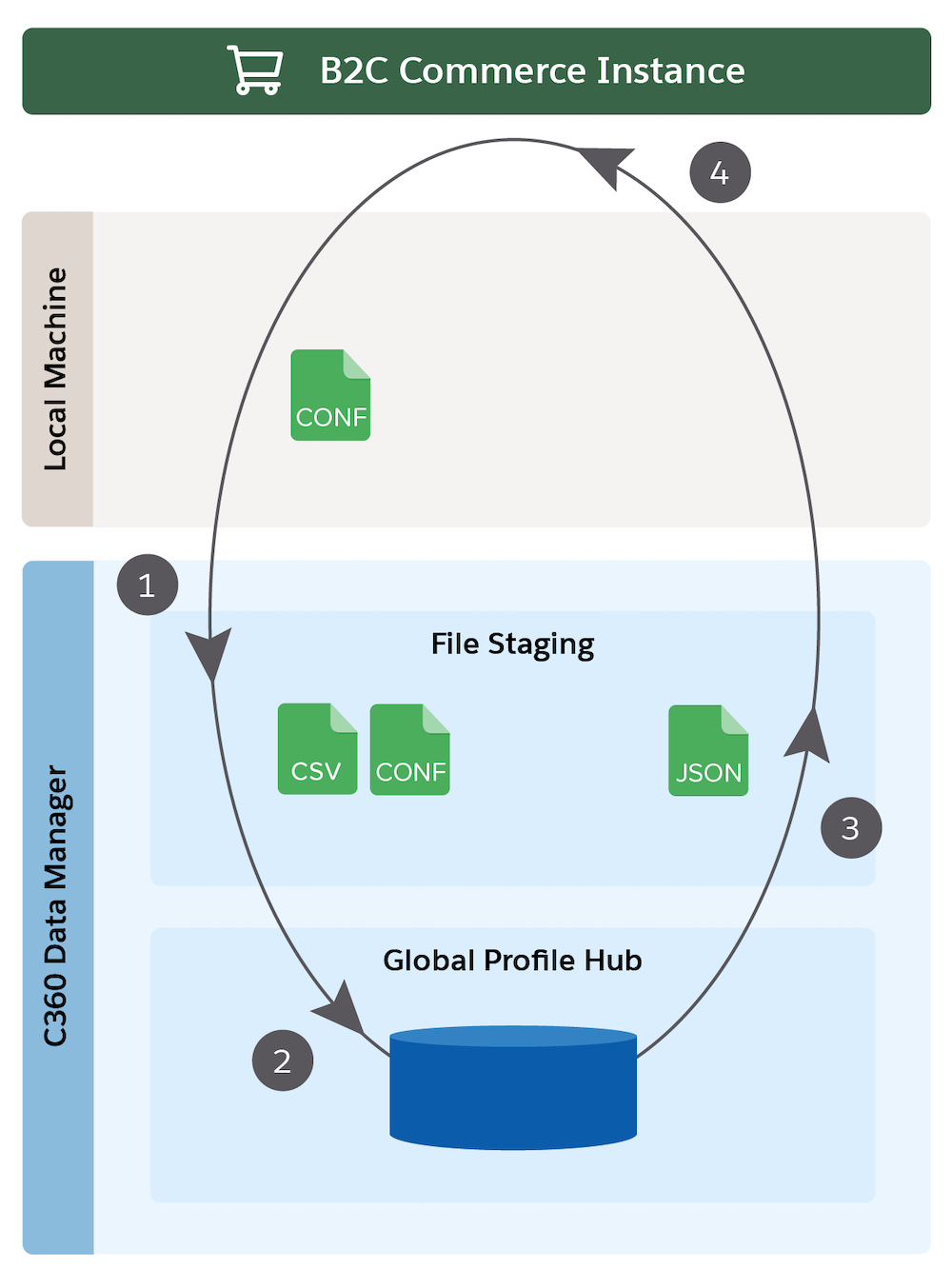
- B2C Commerce to file staging. This job produces a Customer export file and an Order export file.
- Create a file staging to global profile hub for each object data file.
- File staging to global profile hub for the Customer object export file.
- File staging to global profile hub for the Order object export file.
- Global profile hub to file staging. This job produces a .json file that contains Global Party IDs.
- File staging to B2C Commerce IDs. This job inserts the Global Party IDs back into the B2C Commerce instance.
To run any of these jobs, aside from the Bulk API job, use the Jobs resource POST method.
Add Global Party IDs to Service Cloud
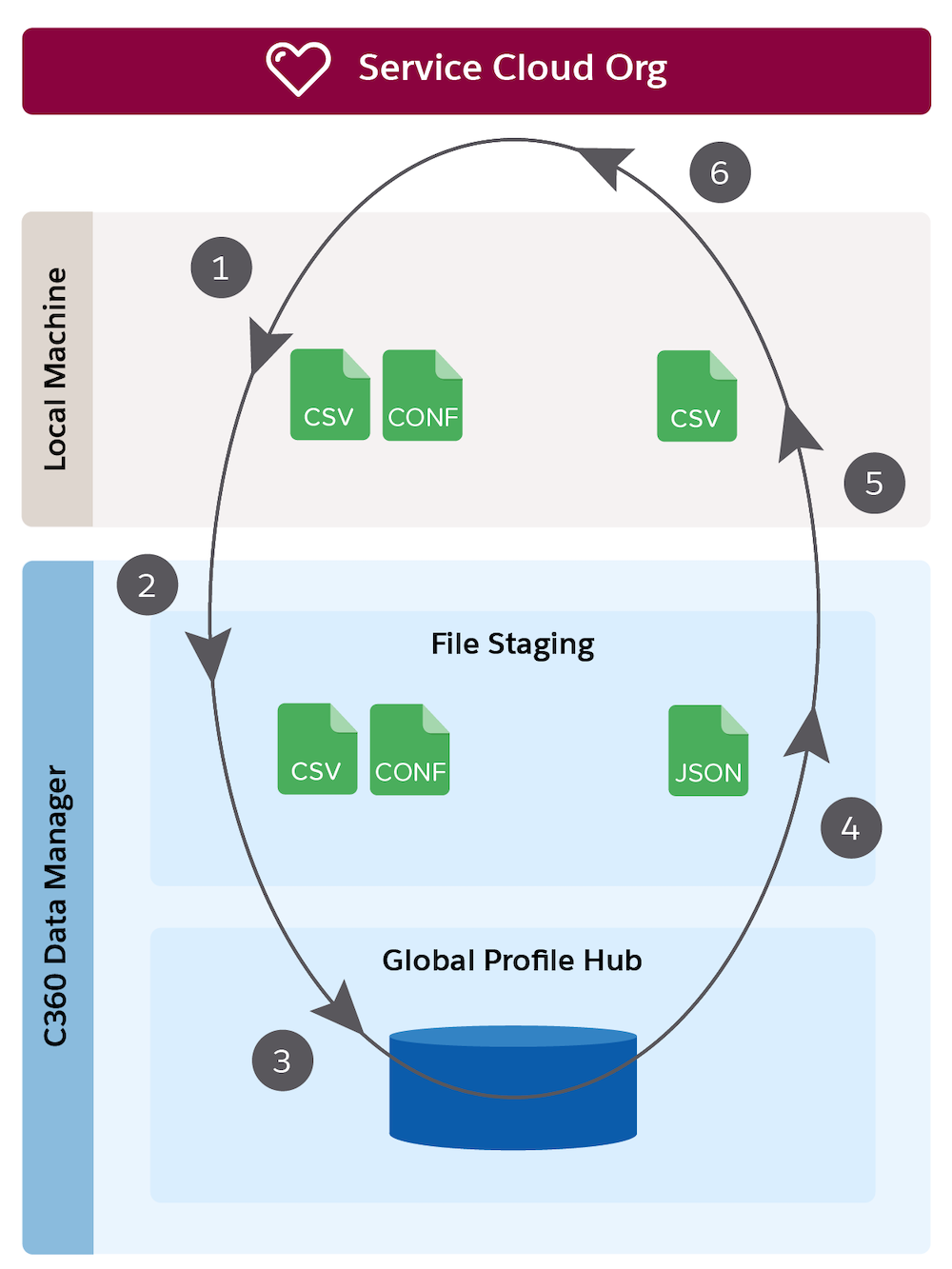
- Bulk API data export for Accounts, Contacts, and Leads. This job produces a .csv export file for each object.
- File upload to file staging. Running this job to upload all export files and the configuration files you create to map them.
- File staging to global profile hub. This job processes data and configuration files into global profiles.
- Global profile hub to file staging. This job exports a Global Party ID file for a specific data source into file staging.
- File download from file staging. This job downloads the Global Party ID file to your local machine.
- Bulk API data import for Global Party ID export files. Use the Bulk API documentation for more information about using the API to import the Global Party ID file from your local machine into your org.
To run any of these jobs, aside from the Bulk API job, use the Jobs resource POST method.
Monitor Jobs and Files
List all jobs and get information about a specific job or file.
- List jobs. Use the resource GET method.
- Get Information about specific jobs. Use the Job resource.
- List files. Use the Files method for listing all files in the file staging area and the Job Files method for listing files associated with a job.
- Get information about a file. Use the Job File or File method to get information about a file.
Clean up Files
Clean up jobs from a round-trip run.
- Delete files. Use the Job File, Job Files, File, or Files DELETE method.