


LWR Sites for Experience Cloud
 j
jNewer Version Available
Use Expressions in LWR Sites
With expressions, you can make calculations and access property values and other data
to pass into the component's attributes. Use expressions for dynamic output or for passing
values into components by assigning them to attributes.
An expression is any set of literal values, variables, subexpressions, or operators that can be resolved to a single value. Method calls aren’t allowed in expressions.
The expression syntax is: {!expression} where expression is a placeholder for the expression.
Data Binding Expressions
Use these expressions to bind data from Salesforce to your LWR site and dynamically populate content.
You can use an HTML Editor component to a CMS or record detail page. In this case, we want
to show an image in the banner.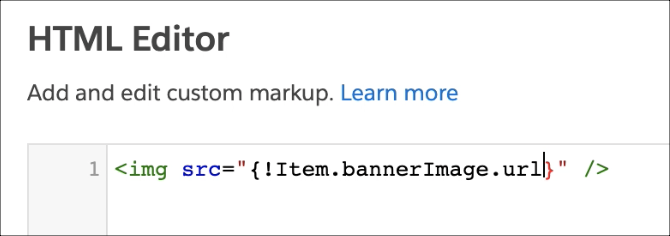
When the page loads on the live site, the relevant value replaces the expression.
| Expression | Description | Supported Pages and Components |
|---|---|---|
| {!Item.field} | Gets the data for the field on the current bound data. | Anything that’s bound to data. Can include Salesforce CMS or record data. |
| {!Item.field._rawValue} | Gets the raw value for the data field. | Anything that’s bound to CRM data. |
| {!Item.field._displayValue} | Gets the formatted and localized value for the data field. | Anything that’s bound to CRM data. |
| {!Item._detailURL} | Gets the URL of a Salesforce CMS data item. | Anything that’s bound to a CMS item, including CMS detail pages. |
| {!Label.namespace.name} | Defines the label’s localized value when you specify labels in Experience Builder. | First, you have to create a translated custom label in Salesforce Setup. For more information, see Translate Custom Labels. Then, use the label expression in any Experience Builder component that has a text field to see the localized label. |
Other Expressions
Use other expressions to query parameters or resolve the correct basePath for a site.
| Expression | Description | Supported Pages and Components |
|---|---|---|
| {!Route.param} | Gets a query parameter from the URL. |
|
| {!Site.basePath} | Resolves to the basePath of the LWR site. |
|