


Second-Generation Managed Packaging Developer Guide
 j
jCreate Dependencies Between Second-Generation Managed Packages
How to Specify a Managed 2GP Package Dependency
To specify dependencies between managed packages associated with the same Dev Hub, use either the package version alias or a combination of the package name and the version number.
1"dependencies": [
2   {
3      "package": "MyPackageName@0.1.0.1"
4   }
5]1"dependencies": [
2 {
3 "package": "MyPackageName",
4 "versionNumber": "1.0.0.RELEASED"
5 }
6]1"dependencies": [
2 {
3 "package": "04txxx"
4 }
5]To denote dependencies with package IDs instead of package aliases, use:
- The 0Ho ID if you specify the package ID along with the version number
- The 04t ID if you specify only the package version ID
Specifying Multiple Package Dependencies
If your package has more than one dependency, provide a comma-separated list of packages in the order of installation.
1"dependencies": [
2   {
3      "package" : "External Apex Library - 1.0.0.4"
4
5    },
6   {
7      "package": "Expense Manager - Util",
8      "versionNumber": "4.7.0.RELEASED"
9
10   }
11]
If the package has multilevel dependencies, you can optionally set the calculateTransitiveDependencies parameter to true in the sfdx-project.json file. When calculateTransitiveDependencies is true, you can specify the package’s direct dependencies only, and the indirect (transitive) dependencies are calculated for you.
For example, if calculateTransitiveDependencies is enabled and the package depends on the package Expense Manager - Util, which in turn depends on the package External Apex Library, the package dependency is:
1"dependencies": [
2   {
3      "package": "Expense Manager - Util",
4      "versionNumber": "4.7.0.RELEASED"
5
6   }
7]
Which Types of Dependencies Are Supported?
- Circular Dependencies
- Circular dependencies among packages aren’t supported.
- A circular dependency occurs when pkgC depends on pkgB, pkgB depends on pkgA, and pkgA depends on pkgC.
- Multi-level Dependencies
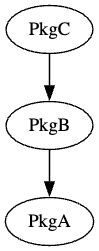
- Multi-level package dependencies are supported.
- A multi-level dependency occurs when pkgC depends on pkgB, and pkgB depends on
pkgA.
- By default, you list all dependencies at all levels in the sfdx-project.json file. To specify only the package’s direct dependencies and have the indirect (transitive) dependencies calculated for you, you can optionally set calculateTransitiveDependencies to true in the sfdx-project.json file.
- When calculateTransitiveDependencies is not enabled, list all dependencies in the sfdx-project.json file in the package installation order. In this example, pkgA must be installed first, followed by pkgB, and then pkgC. The dependencies specified for pkgC are both pkgA and pkgB.
-
1{ 2 "packageDirectories": [ 3 { 4 "path": "pkgA-wsp", 5 "default": true, 6 "package": "pkgA", 7 "versionName": "ver 1.3", 8 "versionNumber": "1.3.0.NEXT", 9 "ancestorVersion": "1.1.0.RELEASED" 10 }, 11 { 12 "path": "pkgB-wsp", 13 "default": false, 14 "package": "pkgB", 15 "versionName": "ver 2.3", 16 "versionNumber": "2.3.0.NEXT", 17 "ancestorVersion": "2.0.0.RELEASED", 18 "dependencies": [ 19 { 20 "package": "pkgA@1.1.0.RELEASED" 21 } 22 ] 23 }, 24 { 25 "path": "pkgC-wsp", 26 "default": false, 27 "package": "pkgC", 28 "versionName": "ver 0.1", 29 "versionNumber": "0.1.0.NEXT", 30 "dependencies": [ 31 { 32 "package": "pkgA@1.1.0.RELEASED" 33 }, 34 { 35 "package": "pkgB@2.0.0.RELEASED" 36 } 37 38 ] 39 } 40 41 ], 42 43} - When calculateTransitiveDependencies is set to
true, specify each package’s direct dependencies
only. In this example, pkgC depends on pkgB, pkgB depends on pkgA, and pkgC’s
indirect dependency on pkgA is calculated for
you.
1{ 2 "packageDirectories": [ 3 { 4 "path": "pkgA-wsp", 5 "default": true, 6 "package": "pkgA", 7 "versionName": "ver 1.3", 8 "versionNumber": "1.3.0.NEXT", 9 "ancestorVersion": "1.1.0.RELEASED" 10 }, 11 { 12 "path": "pkgB-wsp", 13 "default": false, 14 "package": "pkgB", 15 "versionName": "ver 2.3", 16 "versionNumber": "2.3.0.NEXT", 17 "ancestorVersion": "2.0.0.RELEASED", 18 "dependencies": [ 19 { 20 "package": "pkgA@1.1.0.RELEASED" 21 } 22 ] 23 }, 24 { 25 "path": "pkgC-wsp", 26 "default": false, 27 "package": "pkgC", 28 "versionName": "ver 0.1", 29 "versionNumber": "0.1.0.NEXT", 30 "calculateTransitiveDependencies": true, 31 "dependencies": [ 32 { 33 "package": "pkgB@2.0.0.RELEASED" 34 } 35 ] 36 } 37 ], 38} - The specified package version number also impacts the installation of package dependencies. Before pkgB can be installed, pkgA version 1.1 or higher must first be installed. If this condition isn’t met, the installation of pkgB fails.