


What’s the Difference Between Bulk API 2.0 and Bulk API?
Although Bulk API 2.0’s predecessor, “Bulk API”, is available, use Bulk API 2.0 instead of Bulk API if you want a more streamlined workflow. Bulk API 2.0 provides a simple interface to load large amounts of data into your Salesforce org and to perform bulk queries on your org data. Its design is more consistent and better integrated with other Salesforce APIs. Bulk API 2.0 also has the advantage of future innovation.
Bulk API 2.0 allows for:
- Less client-side code writing.
- Easy-to-monitor job status.
- Automatic retry of failed records.
- Support for parallel processing.
- Fewer calls are required to complete ingest or query workflows.
- Easier batch management.
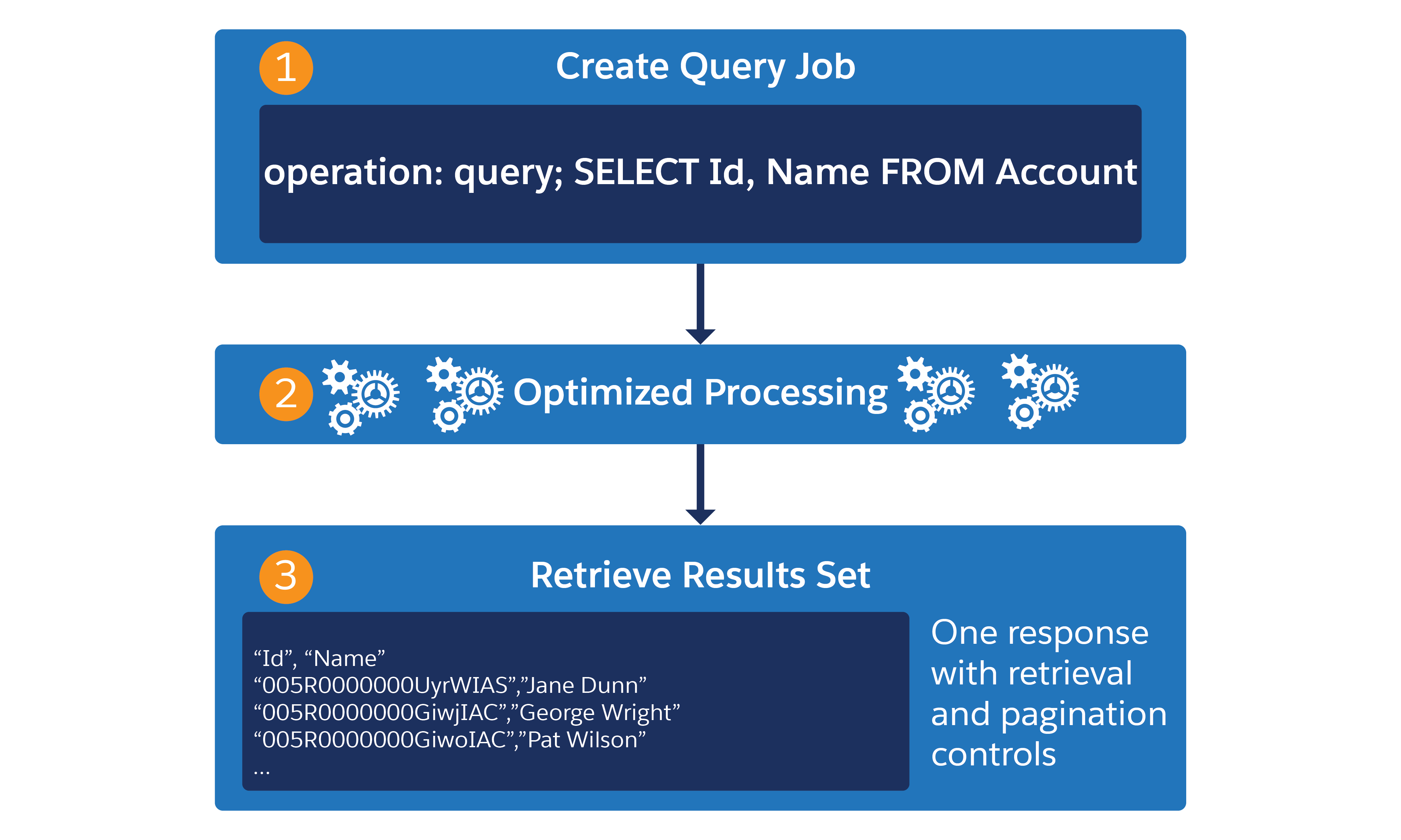
Here’s an example of the Bulk API 2.0 query workflow:
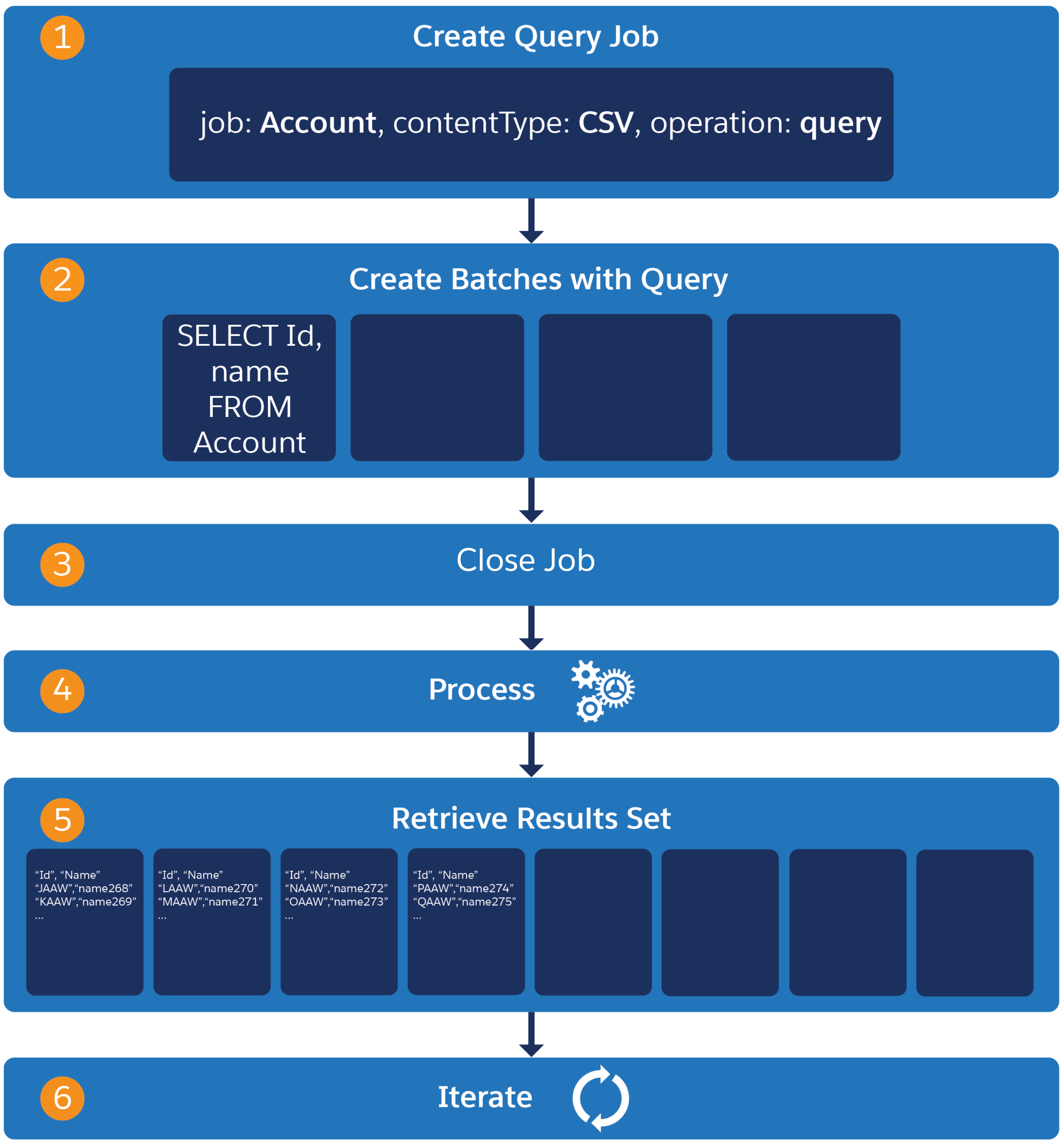
Bulk API’s query workflow is more complex - requiring the creation of batches and iterating through the retrieval of result sets:
Bulk API 2.0’s ingest workflow is the same for insert, update, delete, hard delete, and upsert operations. You:
- Create a job
- Upload job data
- Set job state to
UploadComplete - Get results
If the feature set and limits are a unique match to your project requirements, use Bulk API.
This table shows a basic feature set comparison between Bulk API 2.0 and Bulk API.
| Feature | Bulk API 2.0 | Bulk API |
|---|---|---|
| Ingest Availability | 41.0 and later | 16.0 and later |
| Query Availability | 47.0 and later | 21.0 and later |
| Authentication | Supports all OAuth 2.0 flows supported by other Salesforce REST APIs. | None. Requires a special X-SFDC-Session header fetched with SOAP API’s login() call. |
| Ingest Data Format | CSV | CSV, XML, JSON, and binary attachment processing |
| Feed Tracking | Disabled during the operation | Disabled during the operation |
| Large File Batching | Simplifies uploading large amounts of data by breaking the data into batches and providing parallelism automatically. Upload a CSV file with your record data and check back when the results are ready. All results are returned from one endpoint. | Large files must be batched manually, either with custom code or by hand. |
| Support for big objects |
|
|
| Query Job Optimization | Automatically performs PK chunking. | PK chunking is manually invoked and configured. |
| Query Results Retrieval | All in a single endpoint. | Iterate through the retrieval of individual result sets. |
| Daily Upload Limits | Limits by total records uploaded per day. Available to clients via REST API /limits endpoint. | Limits by quantity of batches per day |
| Data Loader Compatibility | Yes | Yes |
For a detailed comparison of Bulk API 2.0 and Bulk API limits, see Bulk API and Bulk API 2.0 Limits and Allocations.
 j
j