Newer Version Available
Composite Graphs
-
Regular composite requests allow you to execute a series of REST API requests in a single call. And you can use the output of one request as the input to a subsequent request.
-
Composite graphs extend regular composite requests by allowing you to assemble a more complicated and complete series of related objects and records.
-
Composite graphs also enable you to ensure that the steps in a given set of requests are either all completed or all not completed. If you use this option, you don’t have to check which requests were successful.
-
Regular composite requests have a limit of 25 subrequests. Composite graphs increase this limit to 500.
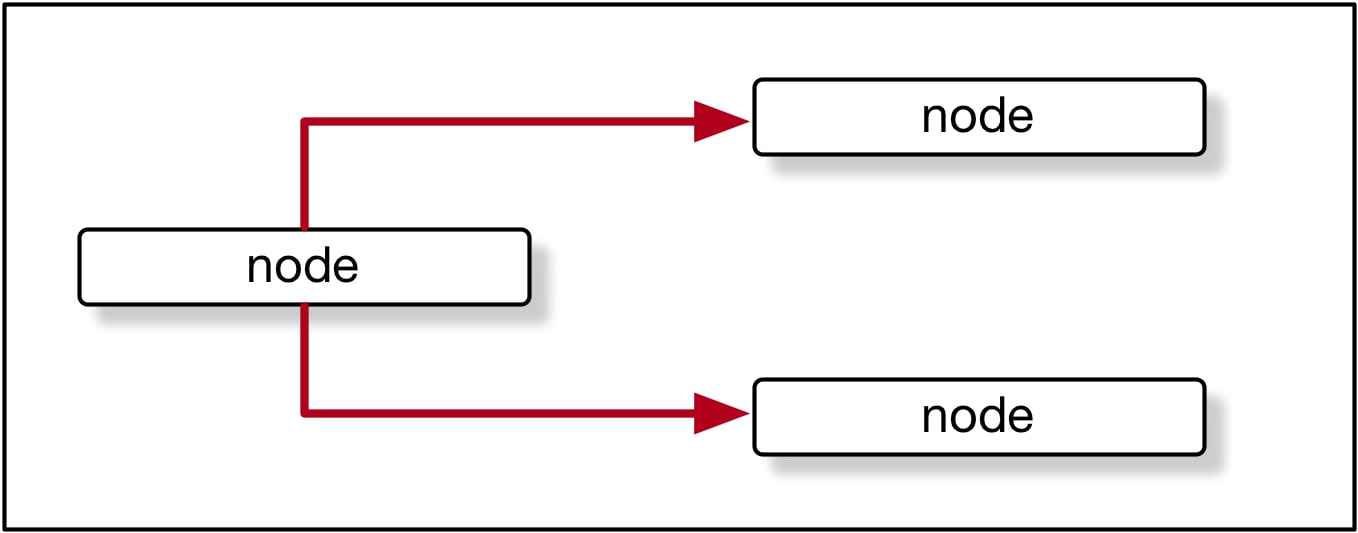
In general, a graph is a collection of connected nodes.

In the context of composite graph operations, the nodes are composite subrequests. For example, a node can be a composite subrequest like this:
1{
2 "url" : "/services/data/v56.0/sobjects/Account/",
3 "body" : {
4 "name" : "Cloudy Consulting"
5 },
6 "method" : "POST",
7 "referenceId" : "reference_id_account_1"
8}Each node features an endpoint representing a record.
Composite graph requests support only these URLs.
| URL | Supported HTTP Methods |
|---|---|
| /services/data/vXX.X/sobjects/sObject | POST |
| /services/data/vXX.X/sobjects/sObject/id | DELETE, GET, PATCH See sObject Rows. |
| /services/data/vXX.X/sobjects/sObject/customFieldName/externalId | DELETE, GET, PATCH, POST |
A composite graph can be directed meaning that some nodes use information from other nodes. For example, a node that creates a Contact can use the ID of an Account node to link the Contact with the Account.

For example:
1{
2 "graphs": [{
3 "graphId": "graph1",
4 "compositeRequest": [{
5 "body": {
6 "name": "Cloudy Consulting"
7 },
8 "method": "POST",
9 "referenceId": "reference_id_account_1",
10 "url": "/services/data/v56.0/sobjects/Account/"
11 },
12 {
13 "body": {
14 "FirstName": "Nellie",
15 "LastName": "Cashman",
16 "AccountId": "@{reference_id_account_1.id}"
17 },
18 "method": "POST",
19 "referenceId": "reference_id_contact_1",
20 "url": "/services/data/v56.0/sobjects/Contact/"
21 }
22 ]
23 }]
24}Defining Composite Graphs in JSON
A composite graph is defined in JSON like this:
1{
2 "graphId" : "graphId",
3 graph
4}1{
2 "graphId" : "graphId",
3 "compositeRequest" : [
4 compositeSubrequest,
5 compositeSubrequest,
6 ...
7 ]
8}- They must be unique within each composite graph operation.
- They must begin with an alphanumeric character.
- They must be less that 40 characters long.
- They can’t contain a period (’.’).
A single composite graph request can use one or more composite graphs. See Using a Composite Graph.
Example: Create Accounts, Contacts, Campaigns, Opportunities, Leads, and CampaignMembers with a Composite Graph Request
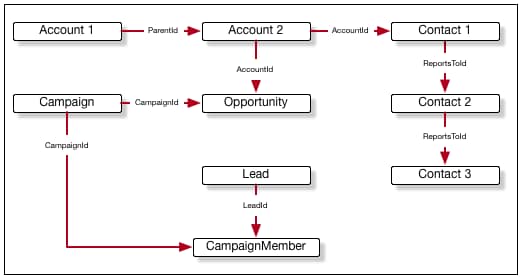
This example shows a composite graph that performs the following actions:
- Create Account 1.
- Create Account 2 as a child of Account 1.
- Create:
- Contact 1, linked to Account 2.
- Contact 2, who reports to Contact 1.
- Contact 3 who reports to Contact 2.
- Create a Campaign.
- Create an Opportunity linked to Account 2 and the Campaign.
- Create a Lead.
- Create a CampaignMember linked to the Lead and the Campaign.

The JSON for this graph is:
1{
2 "graphId" : "1",
3 "compositeRequest" : [
4 {
5 "url" : "/services/data/v56.0/sobjects/Account/",
6 "body" : {
7 "name" : "Cloudy Consulting",
8 "description" : "Parent account"
9 },
10 "method" : "POST",
11 "referenceId" : "reference_id_account_1"
12 },
13 {
14 "url" : "/services/data/v56.0/sobjects/Account/",
15 "body" : {
16 "name" : "Easy Spaces",
17 "description" : "Child account",
18 ."ParentId" : "@{reference_id_account_1.id}"
19 },
20 "method" : "POST",
21 "referenceId" : "reference_id_account_2"
22 },
23 {
24 "url" : "/services/data/v56.0/sobjects/Contact/",
25 "body" : {
26 "FirstName" : "Sam",
27 "LastName" : "Steele",
28 "AccountId" : "@{reference_id_account_2.id}"
29 },
30 "method" : "POST",
31 "referenceId" : "reference_id_contact_1"
32 },
33 {
34 "url" : "/services/data/v56.0/sobjects/Contact/",
35 "body" : {
36 "FirstName" : "Charlie",
37 "LastName" : "Dawson",
38 "ReportsToId" : "@{reference_id_contact_1.id}"
39 },
40 "method" : "POST",
41 "referenceId" : "reference_id_contact_2"
42 },
43 {
44 "url" : "/services/data/v56.0/sobjects/Contact/",
45 "body" : {
46 "FirstName" : "Nellie",
47 "LastName" : "Cashman",
48 "ReportsToId" : "@{reference_id_contact_2.id}"
49 },
50 "method" : "POST",
51 "referenceId" : "reference_id_contact_3"
52 },
53 {
54 "url" : "/services/data/v56.0/sobjects/Campaign/",
55 "body" : {
56 "name" : "Spring Campaign"
57 },
58 "method" : "POST",
59 "referenceId" : "reference_id_campaign"
60 },
61 {
62 "url" : "/services/data/v56.0/sobjects/Opportunity/",
63 "body" : {
64 "name" : "Opportunity",
65 "stageName" : "Value Proposition",
66 "closeDate" : "2025-12-31",
67 "CampaignId" : "@{reference_id_campaign.id}",
68 "AccountId" : "@{reference_id_account_2.id}"
69 },
70 "method" : "POST",
71 "referenceId" : "reference_id_opportunity"
72 },
73 {
74 "url" : "/services/data/v56.0/sobjects/Lead/",
75 "body" : {
76 "FirstName" : "Belinda",
77 "LastName" : "Mulroney",
78 "Company" : "Klondike Quarry",
79 "Email" : "bmulroney@example.com"
80 },
81 "method" : "POST",
82 "referenceId" : "reference_id_lead"
83 },
84 {
85 "url" : "/services/data/v56.0/sobjects/CampaignMember/",
86 "body" : {
87 "CampaignId" : "@{reference_id_campaign.id}",
88 "LeadId" : "@{reference_id_lead.id}"
89 },
90 "method" : "POST",
91 "referenceId" : "reference_id_campaignmember"
92 }
93 ]
94}Example: GET Details About a Resource and Then Use Them in a Composite Graph Request
This example shows how you can use GET on a resource, and then use properties of that resource in subsequent requests.
1{
2 "graphs" : [
3 {
4 "graphId" : "graph1",
5 "compositeRequest" : [
6 {
7 "method" : "GET",
8 "url" : "/services/data/v56.0/sobjects/Account/001R0000003fSRrIAM",
9 "referenceId" : "refAccount"
10 },
11 {
12 "body" : {
13 "name" : "Amazing opportunity for @{refAccount.Name}",
14 "StageName" : "Stage 1",
15 "CloseDate" : "2025-06-01T23:28:56.782Z",
16 "AccountId" : "@{refAccount.Id}"
17 },
18 "method" : "POST",
19 "url" : "/services/data/v56.0/sobjects/Opportunity",
20 "referenceId" : "newOpportunity"
21 }
22 ]
23 }
24 ]
25}Graph Depth
-
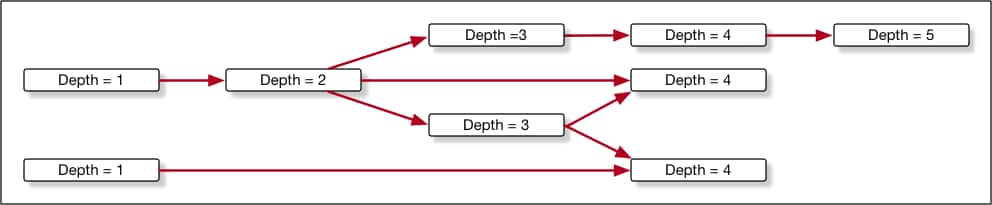
Nodes with no parents are considered to be at depth 1.
-
The depth of another node is the maximum number of edges in the graph from depth 1 to that node. An edge between two nodes occurs when the one node uses a property (such as @{reference_account.id} ) from another node.

The AllOrNone Parameter
In standard composite operations, the only control over what happens if an error occurs is the allOrNone parameter. If the value is true, the entire composite request is rolled back. If the value is false, the remaining subrequests that don’t depend on the failed subrequest are executed. Dependent subrequests aren’t executed, which can lead to a mix of processed and unprocessed records.
Composite graphs have the advantage that each graph is guaranteed to either complete all its subrequests successfully or to be rolled back completely. In other words, the allOrNone parameter is implicitly considered to be true for each graph. A composite graph request never results in a mix of processed and unprocessed records.
To ensure that graphs are independent, the following rules apply.
- Subrequests in one graph can’t reference subrequests from another graph.
- Each graph in one composite graph operation must be independent. If one graph can’t be processed successfully, that must not prevent other graphs in the same operation from being processed.
Best Practices
- If one item in a graph fails, only the items in that graph are rolled back. It’s easier to identify and handle errors in smaller graphs.
- The server can process multiple, smaller graphs faster and more efficiently.
Example: Submitting a Composite Graph Job
For an example showing how to submit a composite graph job, see Using a Composite Graph.