


Streaming API Developer Guide
 j
jNewer Version Available
Message Durability
Event Bus
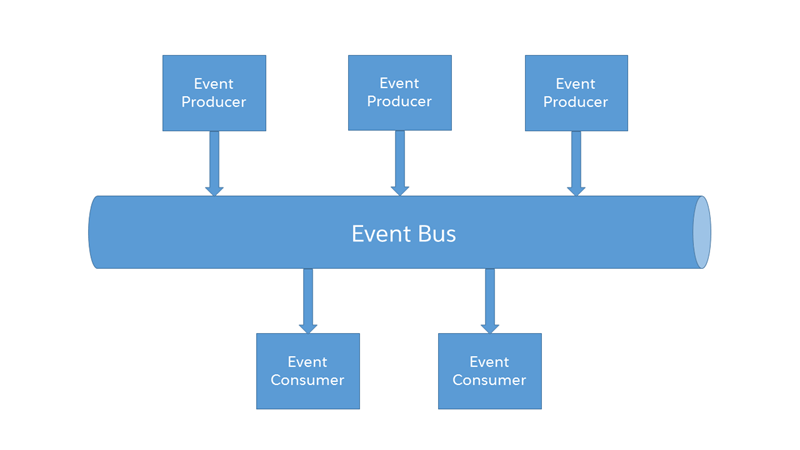
With API version 37.0 and later, events are published to the event bus. Subscribers retrieve events from a channel on the event bus, including past events that are stored temporarily. The event bus decouples event publishers from event subscribers.
Event Replay Process
Each event message is assigned an opaque ID contained in the ReplayId field. The ReplayId field value, which is populated by the system when the event is delivered to subscribers, refers to the position of the event in the event stream. Replay ID values are not guaranteed to be contiguous for consecutive events. For example, the event following the event with ID 999 can have an ID of 1,025. A subscriber can store a replay ID value and use it on resubscription to retrieve events that are within the retention window. For example, a subscriber can retrieve missed events after a connection failure. Subscribers must not compute new replay IDs based on a stored replay ID to refer to other events in the stream.
This JSON message shows the replayId field in the event object for a generic event.
1{
2 "clientId":"a1ps4wpe52qytvcvbsko09tapc",
3 "data":{
4    "event":{
5            "createdDate":"2016-03-29T19:05:28.334Z",
6            "replayId":55
7        },
8    "payload":"This is a message."
9    },
10 "channel":"/u/TestStreaming"
11}
This JSON message shows the replayId field in the event object for a PushTopic event.
1{
2  "clientId":"2t80j2hcog29sdh9ihjd9643a",
3  "data":{
4    "event":{
5        "createdDate":"2016-03-29T16:40:08.208Z",
6        "replayId":13,
7        "type":"created"
8     },
9     "sobject":{
10         "Website":null,
11         "Id":"001D000000KnaXjIAJ",
12         "Name":"TicTacToe"
13     }
14  },
15  "channel":"/topic/TestAccountStreaming"
16}Platform event messages contain a replay ID when delivered to a CometD client. This JSON message shows the replayId field in the event object for the Low_Ink__e platform event.
1{
2  "data": {
3    "schema": "dffQ2QLzDNHqwB8_sHMxdA",
4    "payload": {
5      "CreatedDate": "2017-04-09T18:31:40.517Z",
6      "CreatedById": "005D0000001cSZs",
7      "Printer_Model__c": "XZO-5",
8      "Serial_Number__c": "12345",
9      "Ink_Percentage__c": 0.2
10    },
11    "event": {
12      "replayId": 2
13    }
14  },
15  "channel": "/event/Low_Ink__e"
16}
This JSON message shows the replayId field in the event object for a Change Data Capture event.
1{
2  "data": {
3    "schema": "IeRuaY6cbI_HsV8Rv1Mc5g",
4    "payload": {
5      "ChangeEventHeader": {
6        "entityName": "Account",
7        "recordIds": [
8          "<record_ID>"
9        ],
10        "changeType": "CREATE",
11        "changeOrigin": "com.salesforce.core",
12        "transactionKey": "001b7375-0086-250e-e6ca-b99bc3a8b69f",
13        "sequenceNumber": 1,
14        "isTransactionEnd": true,
15        "commitTimestamp": 1501010206653,
16        "commitNumber": 92847272780,
17        "commitUser": "<User_ID>"
18      },
19      "Name": "Acme",
20      "Description": "Everyone is talking about the cloud. But what does it mean?",
21      "OwnerId": "<Owner_ID>",
22      "CreatedDate": "2017-07-25T19:16:44Z",
23      "CreatedById": "<User_ID>",
24      "LastModifiedDate": "2017-07-25T19:16:44Z",
25      "LastModifiedById": "<User_ID>"
26    },
27    "event": {
28      "replayId": 6
29    }
30  },
31  "channel": "/data/ChangeEvents"
32}
Replaying Events
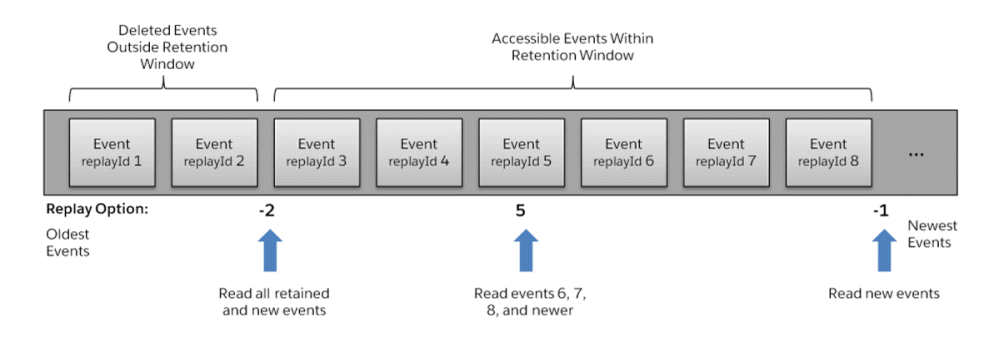
A subscriber can choose which events to receive, such as all events within the retention window or starting after a particular event. The default is to receive only the new events sent after subscribing. Events outside the retention period are discarded.
This high-level diagram shows how event consumers can read a stream of events by using various replay options.
To replay events, use the Streaming API endpoint.
1https://MyDomainName.my.salesforce.com/cometd/56.0/1// Register streaming extension
2var replayExtension = new cometdReplayExtension();
3replayExtension.setChannel(<Streaming Channel to Subscribe to>);
4replayExtension.setReplay(<Event Replay Option>);
5cometd.registerExtension('myReplayExtensionName', replayExtension);After calling the setReplay() function on the extension, the events that the subscriber receives depend on the replay value parameter passed to setReplay().
After a client times out because it hasn’t reconnected within 40 seconds or a network failure has occurred, it attempts a new handshake request and reconnects. The replay extension saves the replay ID of the last message received and uses it when resubscribing. That way, the client receives only messages that were sent after the timeout and doesn’t receive duplicate messages that were sent earlier.
Code Samples
- Java Sample
- For a Java client sample that uses the CometD extension, see Example: Subscribe to and Replay Events Using a Java Client (EMP Connector).
- Lightning Component Sample
- For a sample that uses the empApi Lightning component, see Example: Subscribe to and Replay Events Using a Lightning Component.
- Visualforce Sample
- For a sample and code walkthrough that uses Visualforce and a CometD extension in JavaScript, see Example: Subscribe to and Replay Events Using a Visualforce Page.