


Salesforce Security Guide
 j
jSimple Policy Migration Example
| Available in: Salesforce Classic and Lightning Experience |
| Available in: Enterprise, Unlimited, and
Developer Editions Requires Salesforce Shield or Salesforce Event Monitoring add-on subscriptions. |
Let’s start with the Apex code for a legacy transaction security policy that triggers when a user logs in with a specific IP address.
1global class SourceIpPolicyCondition implements TxnSecurity.PolicyCondition {
2    public boolean evaluate(TxnSecurity.Event e) {
3        String loginHistoryId = e.data.get('LoginHistoryId');
4        LoginHistory loginHistory = [SELECT SourceIp FROM LoginHistory WHERE Id = :loginHistoryId];
5        if (loginHistory.SourceIp.equals('1.1.1.1')) {
6            return true;
7        }
8        return false;
9    }
10}
To mimic the legacy behavior in the new enhanced policy, we start by choosing LoginEvent, the event object that monitors logins. The legacy policy gets the user’s source IP by executing a SOQL query that selects the SourceIP field from the LoginHistory object. We could code a similar query in the enhanced policy, but let’s do something better: Directly use the SourceIP field of LoginEvent. More good news: You can use Condition Builder.
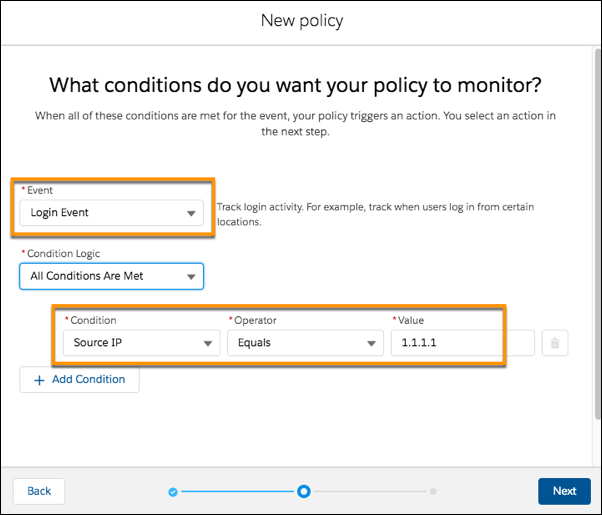
If you prefer to use Apex, here’s the code for the enhanced policy.
1global class SourceIpEventCondition implements TxnSecurity.EventCondition {
2    public boolean evaluate(SObject event) {
3        LoginEvent loginEvent = (LoginEvent) event;
4        if (loginEvent.SourceIp.equals('1.1.1.1')) {
5            return true;
6        }
7        return false;
8    }
9}
In the Apex class, you implement the TxnSecurity.EventCondition interface. The evaluate() method takes a generic sObject parameter, but we guarantee it’s always one of the Real-Time Event Monitoring event objects. Cast the sObject to the appropriate event object, in this case, LoginEvent. Then use its SourceIp field to determine the IP address of the user logging in. The rest of the code is similar to the legacy policy code.