


Apex Developer Guide
 j
jNewer Version Available
Make Long-Running Callouts with Continuations
An asynchronous callout is a callout that is made from a Visualforce page or a Lightning component for which the response is returned through a callback method. An asynchronous callout is also referred to as a continuation.
Visualforce Example
This diagram shows the execution path of an asynchronous callout, starting from a Visualforce page. A user invokes an action on a Visualforce page that requests information from a Web service (step 1). The app server hands the callout request to the Continuation server before returning to the Visualforce page (steps 2–3). The Continuation server sends the request to the Web service and receives the response (steps 4–7), then hands the response back to the app server (step 8). Finally, the response is returned to the Visualforce page (step 9).
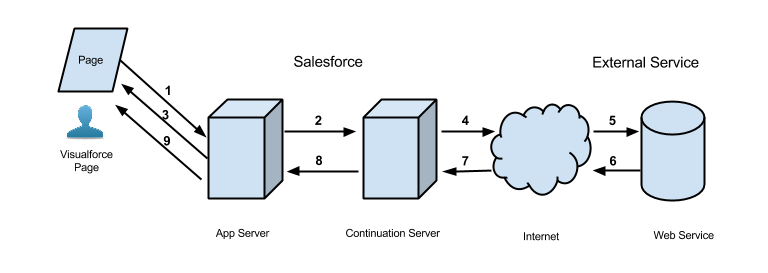
A typical Salesforce application that benefits from asynchronous callouts contains a Visualforce page with a button. Users click that button to get data from an external Web service. For example, a Visualforce page that gets warranty information for a certain product from a Web service. Thousands of agents in the organization can use this page. Therefore, a hundred of those agents can click the same button to process warranty information for products at the same time. These hundred simultaneous actions exceed the limit of concurrent long-running requests of 10. But by using asynchronous callouts, the requests aren’t subjected to this limit and can be executed.
In the following example application, the button action is implemented in an Apex controller method. The action method creates a Continuation and returns it. After the request is sent to the service, the Visualforce request is suspended. The user must wait for the response to be returned before proceeding with using the page and invoking new actions. When the external service returns a response, the Visualforce request resumes and the page receives this response.
This is the Visualforce page of our sample application. This page contains a button that invokes the startRequest method of the controller that’s associated with this page. After the continuation result is returned and the callback method is invoked, the button renders the outputText component again to display the body of the response.
1<apex:page controller="ContinuationController" showChat="false" showHeader="false">
2   <apex:form >
3      <!-- Invokes the action method when the user clicks this button. -->
4      <apex:commandButton action="{!startRequest}"
5              value="Start Request" reRender="result"/>
6   </apex:form>
7
8   <!-- This output text component displays the callout response body. -->
9   <apex:outputText id="result" value="{!result}" />
10</apex:page>
The following is the Apex controller that’s associated with the Visualforce page. This controller contains the action and callback methods.
1public with sharing class ContinuationController {
2    // Unique label corresponding to the continuation
3    public String requestLabel;
4    // Result of callout
5    public String result {get;set;}
6    // Callout endpoint as a named credential URL
7    // or, as shown here, as the long-running service URL
8    private static final String LONG_RUNNING_SERVICE_URL =
9        '<Insert your service URL>';
10
11   // Action method
12    public Object startRequest() {
13      // Create continuation with a timeout
14      Continuation con = new Continuation(40);
15      // Set callback method
16      con.continuationMethod='processResponse';
17
18      // Create callout request
19      HttpRequest req = new HttpRequest();
20      req.setMethod('GET');
21      req.setEndpoint(LONG_RUNNING_SERVICE_URL);
22
23      // Add callout request to continuation
24      this.requestLabel = con.addHttpRequest(req);
25
26      // Return the continuation
27      return con;
28    }
29
30    // Callback method
31    public Object processResponse() {
32      // Get the response by using the unique label
33      HttpResponse response = Continuation.getResponse(this.requestLabel);
34      // Set the result variable that is displayed on the Visualforce page
35      this.result = response.getBody();
36
37      // Return null to re-render the original Visualforce page
38      return null;
39    }
40}