


User Interface API Developer Guide
 j
jNewer Version Available
Build UI for Picklists
Picklists are complicated UI elements, and dependent picklists are especially tricky. The values in a dependent picklist field are filtered based on the selection in another field, called a controlling field. A controlling field can be a picklist field or a checkbox field. For example, imagine a Continents picklist that controls a Countries picklist that controls a Cities picklist and a Languages picklist field.
Dependent picklists exist in a field dependency tree that shows a
hierarchy of controlling and dependent fields. Each node in the tree can have any number of
child nodes. To build UI, you need to know the complete hierarchy.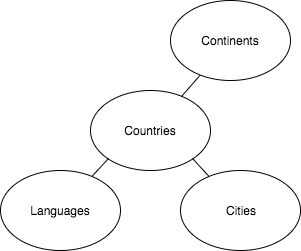
An object can have any number of field dependency trees. User Interface API exposes the collection of field dependency trees in a single property on each object called dependentFields. Each dependent field has a controllingFields property that lists the fields that control it. User Interface API also provides a batch resource to get all picklist values for a record type: /ui-api/object-info/{objectApiName}/picklist-values/{recordTypeId}.
Check for Picklists
- Parse the response for each field’s dataType. If the dataType is Picklist or MultiPicklist, the field is a picklist.
- If you find a picklist, grab the recordTypeId, you’ll use it in a request to get the picklist values.
- Parse the response for dependent picklists. If the field is a picklist and if the controllingFields property is non-null, the field is a dependent picklist.
- If the field is a dependent picklist, look at the dependentFields property on the object to see the tree structure of the object’s dependent and controlling fields. A dependent picklist can depend on (be controlled by) standard or and custom picklists and checkboxes.
1{
2  ...
3  "dependentFields" : {
4    "Continents__c" : {
5      "Countries__c" : {
6        "Cities__c" : { },
7        "Languages__c" : { },
8      }
9    }
10  },
11  ...
12 "fields" : {
13     "AccountSource" : {
14      ...
15      "controllingFields" : [ ],
16      ...
17      "dataType" : "Picklist",
18      ...
19     },
20    "Cities__c" : {
21      ...
22      "controllingFields" : [ "Countries__c", "Continents__c" ],
23      ...
24      "dataType" : "Picklist",
25      ...
26    },
27    "Continents__c" : {
28      ...
29      "controllingFields" : [ ],
30      ...
31      "dataType" : "Picklist",
32      ...
33    },
34    "Countries__c" : {
35      ...
36      "controllingFields" : [ "Continents__c" ],
37      ...
38      "dataType" : "Picklist",
39      ...
40    },
41    "Languages__c" : {
42      ...
43      "controllingFields" : [ "Countries__c", "Continents__c" ],
44      ...
45      "dataType" : "Picklist",
46      ...
47    },
48...
49  "recordTypeInfos" : {
50    "012000000000000AAA" : {
51      ...
52      "recordTypeId" : "012000000000000AAA"
53    }
54  },
55  ...
56}-
{Object}.dependentFields—A map of the dependent fields tree structure. Each
nested object is another Map<String, Object>. When the object is empty, it
indicates a leaf of the tree, which is a field that doesn’t control other fields.
An object can have multiple independent trees, which means this property can have
multiple root objects.
Imagine an object with the picklists Continents__c, Countries__c, and Cities__c. Continents__c is the root. Cities__c is a leaf. Continents__c and Countries__c are controlling fields. Countries__c and Cities__c are dependent picklists.
- {Field}.controllingFields—If this field is a dependent picklist, this property is a collection of fields that control the values in the picklist. When there’s a hierarchy of controlling fields, the collection starts with the immediate parent and moves up the tree.
Get Picklist Values
- Do one of the following:
- To retrieve the values for all picklists of a record type, make a request to GET /ui-api/object-info/${objectApiName}/picklist-values/${recordTypeId}. It’s handy to retrieve the values in a batch instead of requesting them for each field.
- To get the values for a single picklist, make a request to GET /ui-api/object-info/{objectApiName}/picklist-values/{recordTypeId}/{fieldApiName}.
- Get the values for independent picklists.
- To determine whether a picklist is independent, look at the {Field}.controllingFields property. If the property is empty, the picklist is independent.
- To populate a picklist in the UI, use the field’s label and value properties.
- Get the values for dependent picklists.
- If a picklist is dependent, its controllerValues property lists the values and indexes of its controlling field (except when the immediate controlling field is protected by FLS). The indexes are used in the validFor property to indicate which controlling field values map to which picklist value. For example, in controllerValues, Italy has index 5. In the values.validFor property, you see that Rome is valid for index 5.
- To populate a picklist in the UI, use the field’s label and value properties.
1{
2  "picklistFieldValues" : {
3    "AccountSource" : {
4      "controllerValues" : { },
5      "defaultValue" : null,
6      "url" : "/services/data/v58.0/ui-api/object-info/account/picklist-values/012000000000000AAA/AccountSource",
7      "values" : [ {
8        "attributes" : null,
9        "label" : "Advertisement",
10        "validFor" : [ ],
11        "value" : "Advertisement"
12      }, {
13        "attributes" : null,
14        "label" : "Employee Referral",
15        "validFor" : [ ],
16        "value" : "Employee Referral"
17      },
18     ...
19    }
20    "Cities__c" : {
21      "controllerValues" : {
22        "Australia" : 0,
23        "Brazil" : 1,
24        "China" : 2,
25        "Colombia" : 3,
26        "France" : 4,
27        "Italy" : 5,
28        "Mexico" : 6,
29        "New Zealand" : 7,
30        "Nigeria" : 8,
31        "Senegal" : 9,
32        "South Korea" : 10,
33        "US" : 11
34      },
35      "defaultValue" : null,
36      "url" : "/services/data/v58.0/ui-api/object-info/account/picklist-values/012000000000000AAA/Cities__c",
37      "values" : [ {
38        "attributes" : null,
39        "label" : "Cali",
40        "validFor" : [ 3 ],
41        "value" : "Cali"
42      }, {
43        "attributes" : null,
44        "label" : "Chicago",
45        "validFor" : [ 11 ],
46        "value" : "Chicago"
47      }, {
48        "attributes" : null,
49        "label" : "Dakar",
50        "validFor" : [ 9 ],
51        "value" : "Dakar"
52      }, {
53        "attributes" : null,
54        "label" : "Lagos",
55        "validFor" : [ 8 ],
56        "value" : "Lagos"
57      }, {
58        "attributes" : null,
59        "label" : "Los Angeles",
60        "validFor" : [ 11 ],
61        "value" : "Los Angeles"
62      }, {
63        "attributes" : null,
64        "label" : "Oaxaca",
65        "validFor" : [ 6 ],
66        "value" : "Oaxaca"
67      }, {
68        "attributes" : null,
69        "label" : "Wellington",
70        "validFor" : [ 7 ],
71        "value" : "Wellington"
72      } ]
73    },
Record Viewer Sample App
To view sample code that parses a response and displays dependent picklists, check out the Record Viewer sample app on GitHub. To contribute to the app, fork it and submit a pull request. We love to see what people do with User Interface API.