


Apex Reference Guide
 j
jNewer Version Available
Custom Settings Methods
Usage
Custom settings methods are all instance methods, that is, they are called by and operate on a specific instance of a custom setting. There are two types of custom settings: hierarchy and list. There are two types of methods: methods that work with list custom settings, and methods that work with hierarchy custom settings.
For more information on creating custom settings in the Salesforce user interface, see “Create Custom Settings” in the Salesforce online help.
Custom Setting Examples
The following example uses a list custom setting called Games. The Games setting has a field called GameType. This example determines if the value of the first data set is equal to the string PC.
1List<Games__C> mcs = Games__c.getall().values();
2boolean textField = null;
3if (mcs[0].GameType__c == 'PC') {
4  textField = true;
5}
6system.assertEquals(textField, true);1Foundation_Countries__c myCS1 = Foundation_Countries__c.getValues('United States');
2String myCCVal = myCS1.Country_code__c;
3Foundation_Countries__c myCS2 = Foundation_Countries__c.getInstance('United States');
4String myCCInst = myCS2.Country_code__c;
5system.assertEquals(myCCinst, myCCVal);Hierarchy Custom Setting Examples
In the following example, the hierarchy custom setting GamesSupport has a field called Corporate_number. The code returns the value for the profile specified with pid.
1GamesSupport__c mhc = GamesSupport__c.getInstance(pid);
2string mPhone = mhc.Corporate_number__c;
The following example shows how to use hierarchy custom settings methods. For getInstance, the example shows how field values that aren't set for a specific user or profile are returned from fields defined at the next lowest level in the hierarchy. The example also shows how to use getOrgDefaults.
- Organization settings
- OverrideMe: Hello
- DontOverrideMe: World
- Profile settings
- OverrideMe: Goodbye
- DontOverrideMe is not set.
- User settings
- OverrideMe: Fluffy
- DontOverrideMe is not set.
1Hierarchy__c CS = Hierarchy__c.getInstance();
2System.Assert(CS.OverrideMe__c == 'Fluffy');
3System.assert(CS.DontOverrideMe__c == 'World');1Hierarchy__c CS = Hierarchy__c.getInstance(RobertId);
2System.Assert(CS.OverrideMe__c == 'Fluffy');
3System.assert(CS.DontOverrideMe__c == 'World');1Hierarchy__c CS = Hierarchy__c.getInstance(SysAdminID);
2System.Assert(CS.OverrideMe__c == 'Goodbye');
3System.assert(CS.DontOverrideMe__c == 'World');1Hierarchy__c CS = Hierarchy__c.getOrgDefaults();
2System.Assert(CS.OverrideMe__c == 'Hello');
3System.assert(CS.DontOverrideMe__c == 'World');1Hierarchy__c CS = Hierarchy__c.getValues(RobertId);
2System.Assert(CS.OverrideMe__c == 'Fluffy');
3// Note how this value is null, because you are returning
4// data specific for the user
5System.assert(CS.DontOverrideMe__c == null);1Hierarchy__c CS = Hierarchy__c.getValues(SysAdminID);
2System.Assert(CS.OverrideMe__c == 'Goodbye');
3// Note how this value is null, because you are returning
4// data specific for the profile
5System.assert(CS.DontOverrideMe__c == null);Country and State Code Custom Settings Example
This example illustrates using two custom setting objects for storing related information, and a Visualforce page to display the data in a set of related picklists.
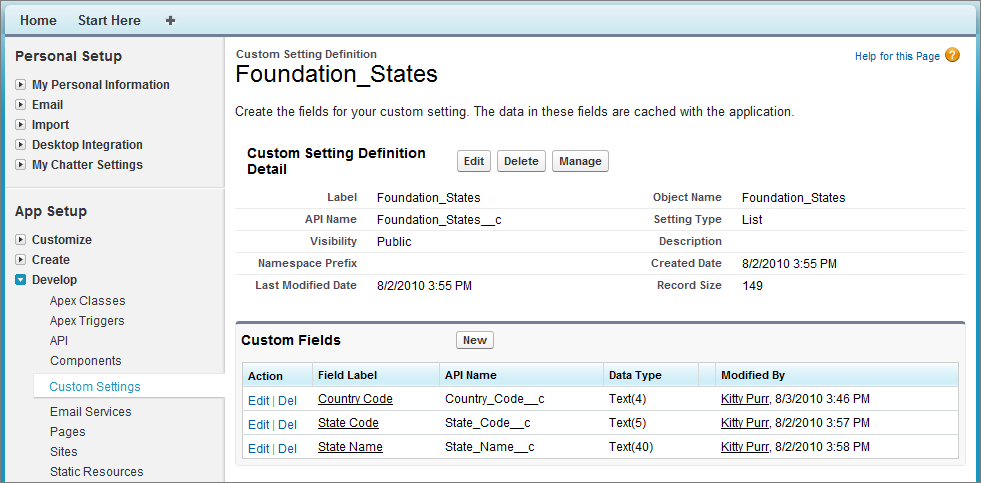
In the following example, country and state codes are stored in two different custom settings: Foundation_Countries and Foundation_States.
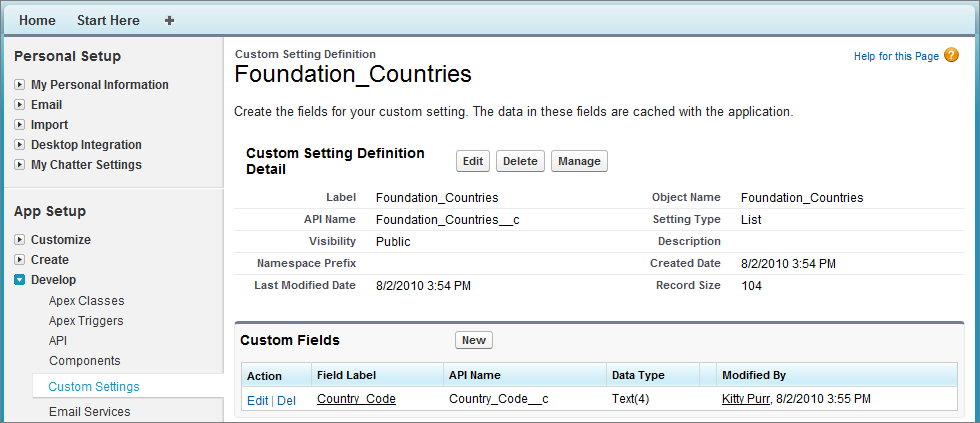
- Country Code
- State Code
- State Name

1<apex:page controller="CountryStatePicker">
2   <apex:form >
3      <apex:actionFunction name="rerenderStates" rerender="statesSelectList" >
4          <apex:param name="firstParam" assignTo="{!country}" value="" />
5      </apex:actionFunction>
6
7   <table><tbody>
8      <tr>
9        <th>Country</th>
10          <td>
11             <apex:selectList id="country" styleclass="std" size="1"
12                value="{!country}" onChange="rerenderStates(this.value)">
13                    <apex:selectOptions value="{!countriesSelectList}"/>
14             </apex:selectList>
15          </td>
16      </tr>
17      <tr id="state_input">
18        <th>State/Province</th>
19          <td>
20            <apex:selectList id="statesSelectList" styleclass="std" size="1"
21                 value="{!state}">
22                   <apex:selectOptions value="{!statesSelectList}"/>
23            </apex:selectList>
24          </td>
25      </tr>
26   </tbody></table>
27   </apex:form>
28</apex:page>1public with sharing class CountryStatePicker {
2
3// Variables to store country and state selected by user
4 public String state { get; set; }
5 public String country {get; set;}
6
7 // Generates country dropdown from country settings
8 public List<SelectOption> getCountriesSelectList() {
9 List<SelectOption> options = new List<SelectOption>();
10 options.add(new SelectOption('', '-- Select One --'));
11
12 // Find all the countries in the custom setting
13 Map<String, Foundation_Countries__c> countries = Foundation_Countries__c.getAll();
14
15 // Sort them by name
16 List<String> countryNames = new List<String>();
17 countryNames.addAll(countries.keySet());
18 countryNames.sort();
19
20 // Create the Select Options.
21 for (String countryName : countryNames) {
22 Foundation_Countries__c country = countries.get(countryName);
23 options.add(new SelectOption(country.country_code__c, country.Name));
24 }
25 return options;
26 }
27
28 // To generate the states picklist based on the country selected by user.
29 public List<SelectOption> getStatesSelectList() {
30 List<SelectOption> options = new List<SelectOption>();
31 // Find all the states we have in custom settings.
32 Map<String, Foundation_States__c> allstates = Foundation_States__c.getAll();
33
34 // Filter states that belong to the selected country
35 Map<String, Foundation_States__c> states = new Map<String, Foundation_States__c>();
36 for(Foundation_States__c state : allstates.values()) {
37 if (state.country_code__c == this.country) {
38 states.put(state.name, state);
39 }
40 }
41
42 // Sort the states based on their names
43 List<String> stateNames = new List<String>();
44 stateNames.addAll(states.keySet());
45 stateNames.sort();
46
47 // Generate the Select Options based on the final sorted list
48 for (String stateName : stateNames) {
49 Foundation_States__c state = states.get(stateName);
50 options.add(new SelectOption(state.state_code__c, state.state_name__c));
51 }
52
53 // If no states are found, just say not required in the dropdown.
54 if (options.size() > 0) {
55 options.add(0, new SelectOption('', '-- Select One --'));
56 } else {
57 options.add(new SelectOption('', 'Not Required'));
58 }
59 return options;
60 }
61}List Custom Setting Methods
The following are instance methods for list custom settings.
getAll()
Signature
public Map<String, CustomSetting__c> getAll()
Return Value
Type: Map<String, CustomSetting__c>
Usage
If no data set is defined, this method returns an empty map.
getInstance(dataSetName)
Signature
public CustomSetting__c getInstance(String dataSetName)
Parameters
- dataSetName
- Type: String
Return Value
Type: CustomSetting__c
getValues(dataSetName)
Signature
public CustomSetting__c getValues(String dataSetName)
Parameters
- dataSetName
- Type: String
Return Value
Type: CustomSetting__c
Usage
If no data is defined for the specified data set, this method returns null.
Hierarchy Custom Setting Methods
The following are instance methods for hierarchy custom settings.
getInstance()
Signature
public CustomSetting__c getInstance()
Return Value
Type: CustomSetting__c
Usage
This method is equivalent to a method call to getInstance(User_Id) for the current user.
Example
- Custom setting data set defined for the user: If you have a custom setting data set defined for the user “Uriel Jones,” for the profile “System Administrator,” and for the organization as a whole, and the user running the code is Uriel Jones, this method returns the custom setting record defined for Uriel Jones.
- Merged fields: If you have a custom setting data set with fields A and B for the user “Uriel Jones” and for the profile “System Administrator,” and field A is defined for Uriel Jones, field B is null but is defined for the System Adminitrator profile, this method returns the custom setting record for Uriel Jones with field A for Uriel Jones and field B from the System Administrator profile.
- No custom setting data set record defined for the user: If the current user is “Barbara Mahonie,” who also shares the “System Administrator” profile, but no data is defined for Barbara as a user, this method returns a new custom setting record with the ID set to null and with fields merged based on the fields defined in the lowest level in the hierarchy.
getInstance(userId)
Signature
public CustomSetting__c getInstance(ID userId)
Parameters
- userId
- Type: ID
Return Value
Type: CustomSetting__c
Usage
If no custom setting data is defined for the user, this method returns a new custom setting object. The new custom setting object contains an ID set to null and merged fields from higher in the hierarchy. You can add this new custom setting record for the user by using insert or upsert. If no custom setting data is defined in the hierarchy, the returned custom setting has empty fields, except for the SetupOwnerId field which contains the user ID.
getInstance(profileId)
Signature
public CustomSetting__c getInstance(ID profileId)
Parameters
- profileId
- Type: ID
Return Value
Type: CustomSetting__c
Usage
If no custom setting data is defined for the profile, this method returns a new custom setting record. The new custom setting object contains an ID set to null and with merged fields from your organization's default values. You can add this new custom setting for the profile by using insert or upsert. If no custom setting data is defined in the hierarchy, the returned custom setting has empty fields, except for the SetupOwnerId field which contains the profile ID.
getOrgDefaults()
Signature
public CustomSetting__c getOrgDefaults()
Return Value
Type: CustomSetting__c
Usage
If no custom setting data is defined for the organization, this method returns an empty custom setting object.
getValues(userId)
Signature
public CustomSetting__c getValues(ID userId)
Parameters
- userId
- Type: ID
Return Value
Type: CustomSetting__c
Usage
Use this if you only want the subset of custom setting data that has been defined at the user level. For example, suppose you have a custom setting field that has been assigned a value of "alpha" at the organizational level, but has no value assigned at the user or profile level. Using getValues(UserId) returns null for this custom setting field.
getValues(profileId)
Signature
public CustomSetting__c getValues(ID profileId)
Parameters
- profileId
- Type: ID
Return Value
Type: CustomSetting__c
Usage
Use this if you only want the subset of custom setting data that has been defined at the profile level. For example, suppose you have a custom setting field that has been assigned a value of "alpha" at the organizational level, but has no value assigned at the user or profile level. Using getValues(ProfileId) returns null for this custom setting field.