When you’re ready to test changes to your source code, you can run Apex tests in an org using Salesforce CLI on the command line. You can also run Apex tests from Salesforce Extensions for VS Code or from within third-party continuous integration tools, such as Jenkins or CircleCI.
Minimum User Permissions and Settings Required
The user running Apex tests must have these user permissions in the org:
View Setup and Configuration
API Enabled
Also ensure that the Enable Streaming API setting is enabled in the org’s user interface. The setting is enabled by default.
This command runs all Apex tests in the specified org asynchronously, which is the default behavior.
1sf apex run test --target-org myscratch
The command outputs the apex get test command with a job ID that you can then run to view the full results. For example:
1sf apex get test --test-run-id 7078HzRMVV --target-org myscratch
For more examples, see the help for the commands by running sf apex run test --help and sf apex get test --help CLI commands, or read the Salesforce CLI Reference, which contains the same information as the help output.
Determine Code Coverage in Orgs With Large Volumes of Apex Code
Before deploying Apex classes and triggers to your production org, or including them in an AppExchange managed package, you must write unit tests that cover 75% of the total Apex code in your org. You can retrieve information about your current code coverage percentage using one of these tools:
Salesforce CLI: Specify the --code-coverage flag of the apex run test command. Or
VS Code: Check the retrieve-test-code-coverage setting.
Both methods produce a report with detailed information about the code coverage of all Apex classes in your org.
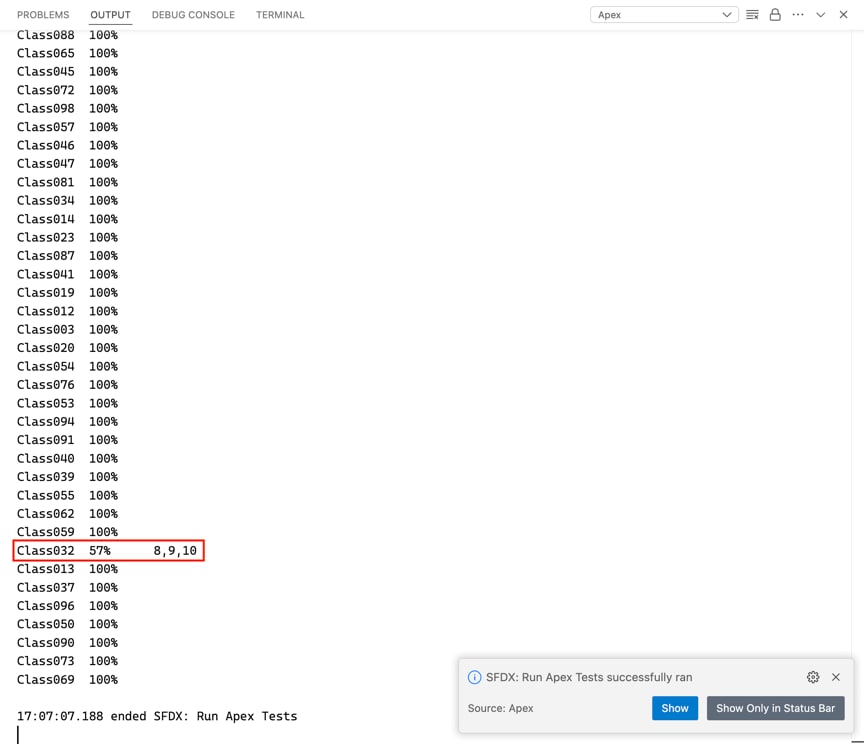
To improve the performance for large test runs, check the Store Only Aggregate Code Coverage setting in your org from Setup | Apex Test Execution | Options…. This setting improves the performance of gathering code coverage information for large orgs with many Apex classes by turning off per-class code coverage. When the setting is checked, the Apex Code Coverage by Class table in the Apex test results contains all Apex classes and triggers listed in ApexCodeCoverageAggregate, including classes that aren’t covered by the tests in the current Apex test run. You can drill down and check which classes aren’t covered, and then adjust your unit tests to reach the required code coverage.
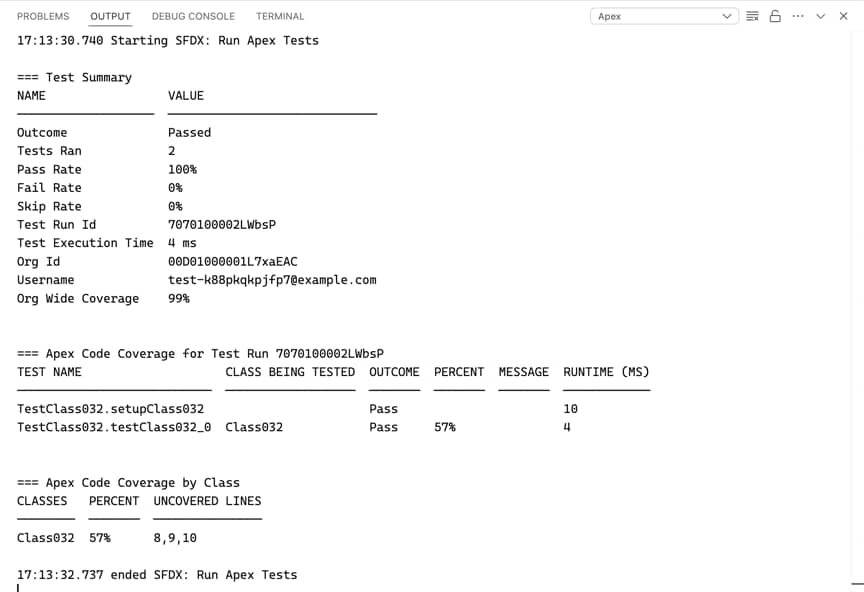
To minimize scrolling while viewing your code coverage information when you run only a handful of Apex tests, we recommend unchecking the Store Only Aggregate Code Coverage setting. The Apex Code Coverage by Class table then shows only the Apex classes and triggers covered by the current Apex test run. The calculation of per-class code coverage filters the entries in this table to include only classes that were directly touched by the test methods in the run.
Here’s an example of how you can use the Store Only Aggregate Code Coverage setting to investigate and resolve code coverage issues. A nightly build with the setting checked shows that the Class032 has only 57% code coverage.
Uncheck the setting and run the test on Class032 to get code coverage information for just that class. Use this information to write more unit tests for the class with low coverage. As you keep checking the new code coverage percentage of Class032, you no longer have to scroll through the long results of all your Apex tests.
If you use Salesforce Extensions for Visual Studio Code (VS Code) for your development tasks, you have a choice of Apex Debugger extensions. Whichever debugger you chose, you set breakpoints in your Apex classes and step through their execution to inspect your code in real time to find bugs. You can run Apex tests in VS Code or on the command line.
Apex debug logs can record database operations, system processes, and errors that occur when executing a transaction or running unit tests in any authenticated org. Enable the Debug Log in Salesforce Extensions for VS Code, then view the logs with VS Code or Salesforce CLI.


 j
j