


Second-Generation Managed Packaging Developer Guide
 j
jNewer Version Available
Package Ancestors for Second-Generation Managed Packages
When package versioning is linear, the package version number (formatted as major.minor.patch.build) always increments to an increasing number. For example, looking at just the major and minor version numbers, linear versioning looks something like 1.0 → 1.1 → 1.2 → 2.0. The next package version created in this linear versioning example must be higher than 2.0.
How Managed 2GP Package Versioning Affects Package Upgrades
Before we dig into package ancestry and how managed 2GP lets you break your linear versioning, let’s clarify how package versioning impacts package upgrades. Let’s use our previous example of a package version history that looks like this, 1.0 → 1.1 → 1.2 → 2.0. A customer could install version 1.0 and upgrade through each of the subsequent package versions, or they could skip versions and upgrade from say 1.0 to 2.0. As long as they upgrade from a lower package version number to a higher package version number, the package upgrade succeeds.
But what if during your development process you create a package version that you don’t want to build upon? Managed 2GP lets you break free from linear versioning and select a different package version to build upon.
Say your team creates version 1.0, then 1.1, then 1.2 and oops! 1.2 made a mess of 1.1. Not a problem. When you create a package version, you specify which package version is the ancestor. So you abandon 1.2, and make 1.1 the ancestor of 1.3. And this process can be repeated. For example, the illustration shows how to abandon 1.5, and build 1.6 off 1.4.
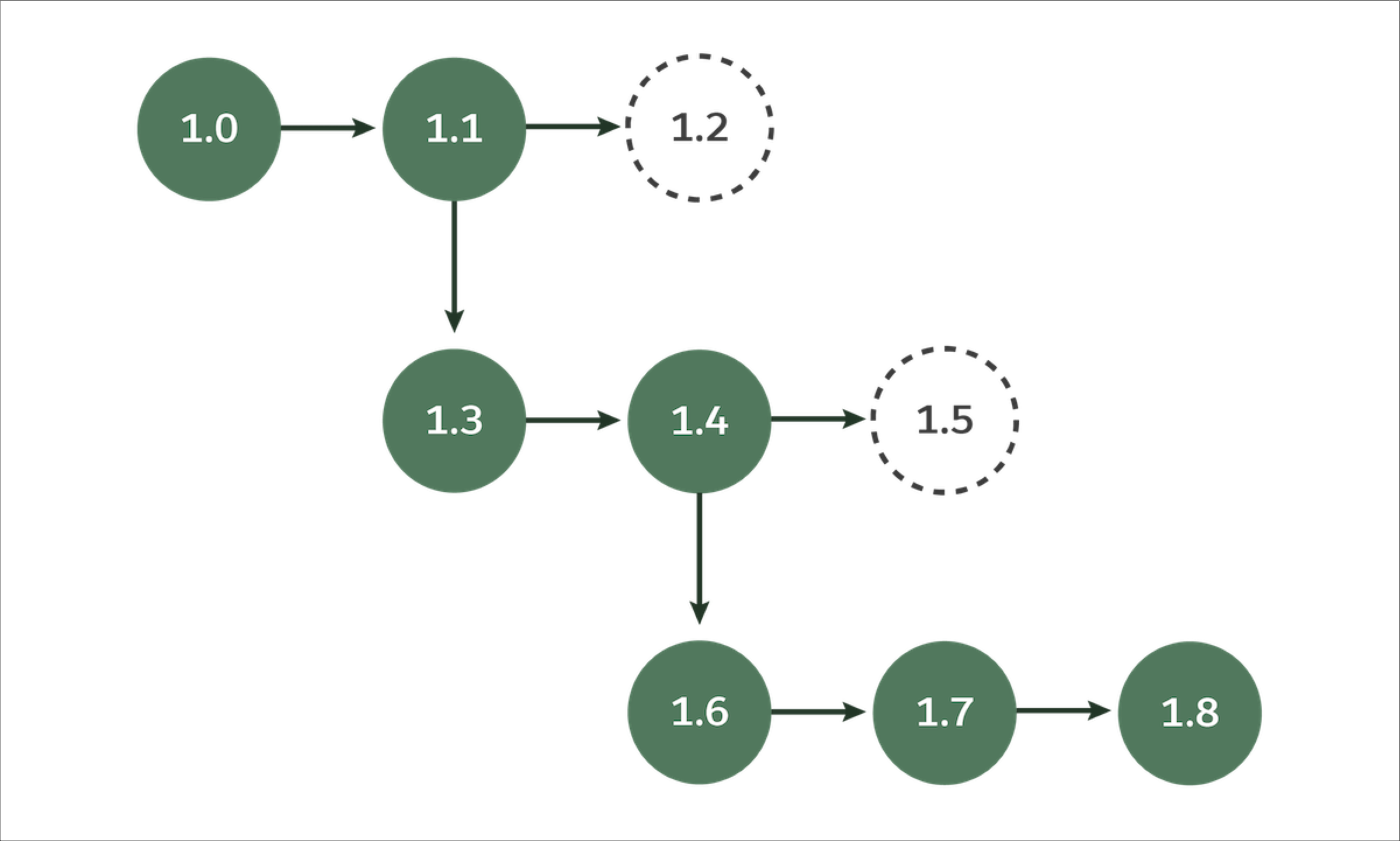
This more complex and tree-like versioning has a secondary benefit, because it makes it possible for two or more development teams to do parallel package development.
With Great Power Comes Great Responsibility
The flexibility to break from linear versioning is powerful, but remember that if abandoned versions like 1.2 and 1.5 are installed in customer orgs, those customers no longer have an upgrade path. Packages can only upgrade along the ancestry line. For example, you can upgrade from version 1.1 to 1.7, but not from version 1.5 to 1.7.