


Analytics SAQL Developer Guide
 j
jNewer Version Available
Searched case Operator
Syntax
1case
2  when search_condition then result_expr
3  [when search_condition2 then result_expr2 ]
4  [else default_expr ]
5end
case...end opens and closes the case operator.
when...then defines a conditional statement. A case expression can contain one or more conditional statements.
search_condition can be any scalar expression that returns a boolean value. It can be a complex boolean expression or a nested case, as long as the result is boolean. For a list of supported operators, see Comparison Operators.
result_expr is any expression that takes a single input value and returns a single output value. Can contain values, identifiers, and scalar functions (including date and math functions). The expression must return the same data type as specified in the search condition.
else default_expr (optional) is any expression that takes a single input value and returns a single output value. Can contain values, identifiers, and scalar functions (including date and math functions). The expression can return a number, string, or date.
Usage
You can use else to specify a default expression. For example, if no industry is specified, you can use the string "No Industry Specified". If you don't specify a default statement, then null is returned.
You can use case expressions in foreach statements. You cannot use case in order, group, or filter statements.
Example
Suppose that you want to see the median deal size for each of your reps. You want to bin their median deal size into the buckets "Small", "Medium", and "Large". Use case to assign values to the median deal size.
1q = load "data";
2q = group q by 'Account_Owner';
3q = foreach q generate 'Account_Owner' as 'Account_Owner', median('Amount') as 'Median Amount', (case
4
5  when median('Amount') < 1000000 then "Small"
6  when median('Amount') > 1600000 then "Large"
7  else "Medium"
8
9end ) as 'Category';
The resulting data shows the median deal size for each rep, along with the appropriate bin label.
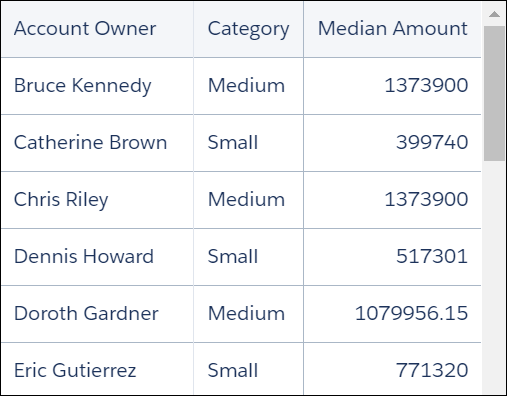
If you want to group the data by the field assigned by the case statement, add a group by statement to the end of the query. For example, to group the data by the Category field, add the following line to the end of the above example:
1q = group q by 'Category';Handling Null Values
In general, null values can’t be compared. When the search condition evaluates to null, the default_expr is returned. If no default expression is specified, null is returned.