Analytics SAQL Developer Guide
 j
jNewer Version Available
arimax
Usage
arimax is a variant of the timeseries statement that provides a different algorithm to predict data points. Use arimax when you want predictions performed with a more general model that can take multiple variables.
Syntax
1result = arimax resultSet generate measure1 as fmeasure1 with (parameters);parameters can have these values:
-
arimaOrder (required if seasonalOrder isn’t specified) Specify the order for the ARIMA model. For example, arimaOrder=(p,d,q), where p, d, and q are integers. The integer values must be between 0 and 5.
-
seasonalOrder (required if arimaOrder isn’t specified) Specify the seasonal order for the ARIMA model. For example, seasonalOrder=(P,D,Q,s), where P, D, Q are integers and s is the period. The integer values must be between 0 and 5. The s value must be 0 or between 2 and 24. s can only be 0 when P, D, and Q are also all 0.
-
xreg (optional) External regressors or co-factors. For example, xreg=('col1','col2',...). The values for xreg must be measures. The maximum number of xreg fields allowed is 10.
-
xregFutures (optional) Future scenario data for the xreg parameter as a map of values arrays. The number of values in each array must match the value for the length parameter. The key for each array value is the name of an xreg measure.
arimax also supports the following timeseries parameters, with the same meaning and behavior.
-
length (required) Number of points to predict. For example, if length is 6 and the dateCols type string is Y-M, arimax predicts data for 6 months.
-
dateCols (optional) Date fields to use for grouping the data, plus the date column type string. For example, dateCols=(CloseDate_Year, CloseDate_Month, "Y-M"). Date columns are projected automatically. Allowed values are:
- YearField, MonthField, "Y-M"
- YearField, QuarterField, "Y-Q"
- YearField, "Y"
- YearField, MonthField, DayField "Y-M-D"
- YearField, WeekField "Y-W"
-
ignoreLast (optional) If true, arimax doesn't use the last time period in the calculations. The default is false.
Set this parameter to true to improve the accuracy of the forecast if the last time period contains incomplete data. For example, if you’re partway through the quarter, arimax forecasts more accurately if you set this parameter to true.
-
order (optional) Specify the field to use for ordering the data. Mandatory if dateCols isn’t used. By default, this field is sorted in ascending order. Use desc to specify descending order, for example order=('Type' desc). You can also order by multiple fields, for example order=('Type' desc, 'Group' asc).
For example, suppose that your data has no date columns, but it has a measure column called Week. Use order='Week'.
-
partition (optional) Specify the column used to partition the data. The column must be a dimension. The arimax calculation is done separately for each partition to ensure that each partition uses the most accurate algorithm. For example, data in one partition can have a seasonal variation while data in another partition doesn't. The partition columns are projected automatically.
For example, suppose that your sales data for raw materials contains the date sold, type of raw material, and the weight sold. To predict the future weight sold for each type of raw material, use partition='Type'.
-
predictionInterval (optional) Specify the uncertainty, or confidence interval, to display at each point. Allowed values are 80 and 95. The upper and lower bounds of the confidence interval are projected in columns named column_name_low_95 and column_name_high_95.
Syntax Examples
- Use arimax with the arimaOrder parameter.
1q = arimax q generate 'Value' as 'fValue' with (length=10, dataCols=('Year', 'Month', 'Day', "Y-M-D"), arimaOrder=(1,0,1)); - Use arimax with the arimaOrder, xreg, and ignoreLast parameters.
1q = arimax q generate 'Value' as 'fValue' with (length=10, dataCols=('Year', 'Month', 'Day', "Y-M-D"), arimaOrder=(1,0,1), xreg=('Price', 'Cost'), ignoreLast=true); - Use multiple columns in the arimax forecast. If xreg is specified, multiple columns aren’t allowed. = arimax q generate 'Value' as 'fValue', 'Value2' as 'fValue2' with (length=10, dataCols=('Year', 'Month', 'Day', "Y-M-D"), arimaOrder=(1,0,1));
- Use arimax with the arimaOrder, seasonalOrder, and xreg parameters.
1q = arimax q generate 'Value' as 'fValue' with (length=10, dataCols=('Year', 'Month', 'Day', "Y-M-D"), arimaOrder=(1,0,1), seasonalOrder=(1,0,1,4), xreg=('Price', 'Cost'));
| seasonality | dateCols | Type of Seasonality |
|---|---|---|
| seasonalOrder=(1,0,1,4) | dateCols=('Year','Quarter',"Y-Q") | Yearly seasonality, because there are 4 quarters in a year. |
| seasonalOrder=(1,0,1,12) | dateCols=('Year','Month',"Y-M") | Yearly seasonality, because there are 12 months in a year. |
| seasonalOrder=(1,0,1,7) | dateCols=('Year','Month','Day',"Y-M-D") | Weekly seasonality, because there are 7 days in a week. |
Use Case Examples
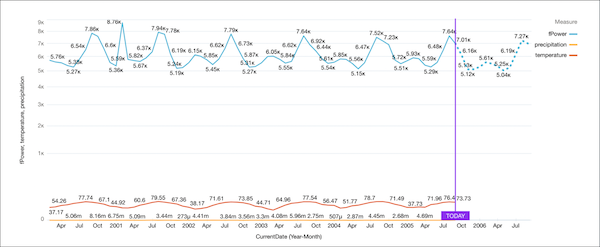
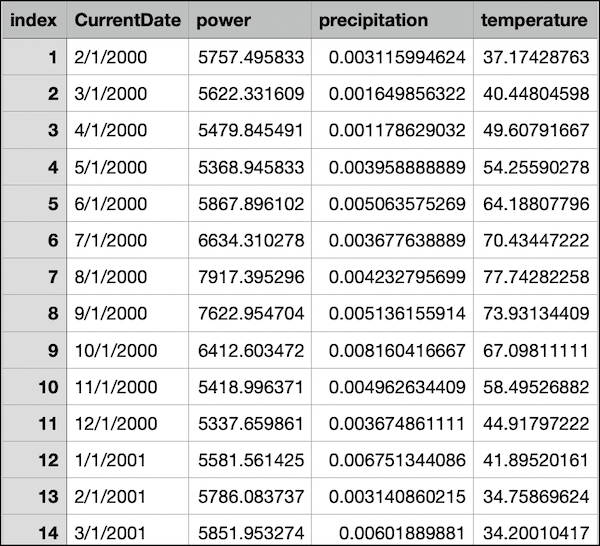
Suppose you have a dataset with 5 years of monthly power usage for a city, along with the corresponding average temperature and precipitation for each month.
You can use a seasonal arimax query to predict the next 12 months of power usage, refining each prediction by adding more parameters to your query. Start with a single variable prediction, then make it multivariate by adding xreg, and finally, create a what-if analysis by adding xregFutures. For each visualization, a timeline chart is used, with Axis Mode set to Single Axis, Show Value As set to Compact Number, and a predictive line added to the X-Axis.
Seasonal Query
1q = load "nyc_power_dates3";
2q = group q by (CurrentDate_Year, CurrentDate_Month);
3q = foreach q generate CurrentDate_Year, CurrentDate_Month, sum(power) as power;
4q = arimax q generate power as fPower with (length=12, dateCols=(CurrentDate_Year, CurrentDate_Month, "Y-M"), arimaOrder=(0,1,1), seasonalOrder=(0,1,1,12));
5q = foreach q generate 'CurrentDate_Year' + "~~~" + 'CurrentDate_Month' as 'CurrentDate_Year~~~CurrentDate_Month', fPower;
Multivariate Seasonal Query
Use a seasonal multivariate arimax query to predict how much power the city will use, using the temperature and precipitation measures in the calculation of the predicted values.
1q = load "nyc_power_dates3";
2q = group q by (CurrentDate_Year, CurrentDate_Month);
3q = foreach q generate CurrentDate_Year, CurrentDate_Month, sum(power) as power, sum(temperature) as temperature, sum(precipitation) as precipitation;
4q = arimax q generate power as fPower with (length=12, dateCols=(CurrentDate_Year, CurrentDate_Month, "Y-M"), xreg=(temperature, precipitation), arimaOrder=(0,1,1), seasonalOrder=(0,1,1,12));
5q = foreach q generate 'CurrentDate_Year' + "~~~" + 'CurrentDate_Month' as 'CurrentDate_Year~~~CurrentDate_Month', fPower, temperature, precipitation;
Multivariate Seasonal Query with Prediction Interval
Use a seasonal multivariate arimax query to predict how much power the city will use, using the temperature and precipitation measures in the calculation of the predicted values. Then, add a predictionInterval to show the prediction with 95% accuracy
1q = load "nyc_power_dates3";
2q = group q by (CurrentDate_Year, CurrentDate_Month);
3q = foreach q generate CurrentDate_Year, CurrentDate_Month, sum(power) as power, sum(temperature) as temperature, sum(precipitation) as precipitation;
4q = arimax q generate power as fPower with (length=12, predictionInterval=95 dateCols=(CurrentDate_Year, CurrentDate_Month, "Y-M"), xreg=(temperature, precipitation), arimaOrder=(0,1,1), seasonalOrder=(0,1,1,12));
5q = foreach q generate 'CurrentDate_Year' + "~~~" + 'CurrentDate_Month' as 'CurrentDate_Year~~~CurrentDate_Month', fPower, fPower_high_95, fPower_low_95;
What-If Analysis Query
Use the xregFutures parameter to provide possible future values for xreg fields to see what the effects are on the forecasted fields for different sets of values
1q = arimax q generate 'Value' as 'fValue' with (length=6, dateCols=('Year','Month','Day', "Y-M-D"),
2 arimaOrder=(1,0,1), xreg=('col1', 'col2'), xregFutures=(col1: [1.0, 2.0, 3.0, 4.0, 5.0, 6.0], col2: [1.1, 2.2 3.3, 4.4, 5.5, 6.6]));
The user can pass in values for xreg fields that they want to do the what-if analysis on.
Add xregFutures to the seasonal multivariate arimax query to predict how much power the city will use with future temperature and precipitation values. In this query, the final 6 temperature future values have been increased by 10 degrees each to alter the calculated values in the visualization.
1q = load "nyc_power_dates3";
2q = group q by (CurrentDate_Year, CurrentDate_Month);
3q = foreach q generate CurrentDate_Year, CurrentDate_Month, sum(power) as power, sum(temperature) as temperature, sum(precipitation) as precipitation;
4q = arimax q generate power as fPower with (length=12, dateCols=(CurrentDate_Year, CurrentDate_Month, "Y-M"),
5xreg=(temperature, precipitation), arimaOrder=(0,1,1), seasonalOrder=(0,1,1,12),
6xregFutures=(temperature: [67.09, 58.49, 44.91, 41.89, 34.75, 34.20, 39.18, 61.51, 70.59, 82.13, 89.54, 84.12],
7precipitation: [0.0081, 0.0049, 0.0036, 0.0067, 0.0031, 0.0060, 0.0053, 0.0015, 0.0050, 0.0079, 0.0028, 0.0034]));
8q = foreach q generate 'CurrentDate_Year' + "~~~" + 'CurrentDate_Month' as 'CurrentDate_Year~~~CurrentDate_Month', fPower, temperature, precipitation;