


Apex Developer Guide
 j
jNewer Version Available
Working with Logs in the Developer Console
Logs open in Log Inspector. Log Inspector is a context-sensitive execution viewer in the Developer Console. It shows the source of an operation, what triggered the operation, and what occurred next. Use this tool to inspect debug logs that include database events, Apex processing, workflow, and validation logic.
To learn more about working with logs in the Developer Console, see Log Inspector in the Salesforce online help.
- Log category
- The type of information logged, such as information from Apex or workflow rules.
- Log level
- The amount of information logged.
- Event type
- The combination of log category and log level that specify which events get logged. Each event can log additional information, such as the line and character number where the event started, fields associated with the event, and duration of the event.
Debug Log Categories
Each debug level includes a debug log level for each of these log categories. The amount of information logged for each category depends on the log level.
Debug Log Levels
Each debug level includes one of these log levels for each log category. The levels are listed from lowest to highest. Specific events are logged based on the combination of category and levels. Most events start being logged at the INFO level. The level is cumulative, that is, if you select FINE, the log also includes all events logged at the DEBUG, INFO, WARN, and ERROR levels.
- NONE
- ERROR
- WARN
- INFO
- DEBUG
- FINE
- FINER
- FINEST
Debug Event Types
This example shows what is written to the debug log. The event is USER_DEBUG. The format is timestamp | event identifier. This example shows a debug log line.
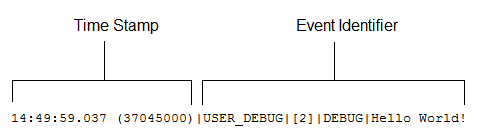
- timestamp: Consists of the time when the event occurred and a value between parentheses. The time is in the user’s time zone and in the format HH:mm:ss.SSS. The value in parentheses represents the time elapsed in nanoseconds since the start of the request. The elapsed time value is excluded from logs reviewed in the Developer Console when you use the Execution Log view. However, you can see the elapsed time when you use the Raw Log view. To open the Raw Log view, from the Developer Console’s Logs tab, right-click the name of a log and select Open Raw Log.
-
event identifier: Specifies the event that triggered the debug log entry, such
as SAVEPOINT_RESET or VALIDATION_RULE.
Also includes additional information logged with that event, such as the method name or the line and character number where the code was executed. If a line number can’t be located, [EXTERNAL] is logged instead. For example, [EXTERNAL] is logged for built-in Apex classes or code that’s in a managed package.
For some events, such as CODE_UNIT_STARTED, CODE_UNIT_FINISHED, VF_APEX_CALL_START, VF_APEX_CALL_END, CONSTRUCTOR_ENTRY, and CONSTRUCTOR_EXIT, the end of the event identifier includes a pipe (|) followed by a typeRef for an Apex class or trigger.
For a trigger, the typeRef begins with the SFDC trigger prefix __sfdc_trigger/. For example, __sfdc_trigger/YourTriggerName or __sfdc_trigger/YourNamespace/YourTriggerName.
For a class, the typeRef uses the format YourClass, YourClass$YourInnerClass, or YourNamespace/YourClass$YourInnerClass.
In this example, the event identifier consists of:
- Event name:
1USER_DEBUG - Line number of the event in the
code:
1[2] - Logging level the System.Debug method was set
to:
1DEBUG - User-supplied string for the System.Debug
method:
1Hello world!
This code snippet triggers this example log line.

115:51:01.071 (55856000)|DML_BEGIN|[5]|Op:Insert|Type:Invoice_Statement__c|Rows:1In this example, the event identifier consists of:
- Event name:
1DML_BEGIN - Line number of the event in the
code:
1[5] - DML operation type—Insert:
1Op:Insert - Object
name:
1Type:Invoice_Statement__c - Number of rows passed into the DML
operation:
1Rows:1
These event types are logged. The table lists which fields or other information are logged with each event, and which combination of log level and category causes an event to be logged.
| Event Name | Fields or Information Logged with Event | Category Logged | Level Logged |
|---|---|---|---|
| BULK_HEAP_ALLOCATE | Number of bytes allocated | Apex Code | FINEST |
| CALLOUT_REQUEST | Line number and request headers | Callout | INFO and above |
|
CALLOUT_REQUEST (External object access via cross-org and OData adapters for Salesforce Connect) |
External endpoint and method | Callout | INFO and above |
| CALLOUT_RESPONSE | Line number and response body | Callout | INFO and above |
|
CALLOUT_RESPONSE (External object access via cross-org and OData adapters for Salesforce Connect) |
Status and status code | Callout | INFO and above |
| CODE_UNIT_FINISHED | Line number, code unit name, such as MyTrigger on Account
trigger event BeforeInsert for [new], and:
|
Apex Code | ERROR and above |
| CODE_UNIT_STARTED | Line number, code unit name, such as MyTrigger on Account
trigger event BeforeInsert for [new], and:
|
Apex Code | ERROR and above |
| CONSTRUCTOR_ENTRY | Line number, Apex class ID, the string <init>() with the types of parameters (if any) between the parentheses, and a typeRef; for example, YourClass or YourClass.YourInnerClass | Apex Code | FINE and above |
| CONSTRUCTOR_EXIT | Line number, the string <init>() with the types of parameters (if any) between the parentheses, and a typeRef; for example, YourClass or YourClass.YourInnerClass | Apex Code | FINE and above |
| CUMULATIVE_LIMIT_USAGE | None | Apex Profiling | INFO and above |
| CUMULATIVE_LIMIT_USAGE_END | None | Apex Profiling | INFO and above |
| CUMULATIVE_PROFILING | None | Apex Profiling | FINE and above |
| CUMULATIVE_PROFILING_BEGIN | None | Apex Profiling | FINE and above |
| CUMULATIVE_PROFILING_END | None | Apex Profiling | FINE and above |
| DATA_ACCESS_EVALUATION | Request and Response for the data access request. Used regardless of the data space or policy being accessed. | Data Access | FINE |
| DML_BEGIN | Line number, operation (such as Insert or Update), record name or type, and number of rows passed into DML operation | DB | INFO and above |
| DML_END | Line number | DB | INFO and above |
| EMAIL_QUEUE | Line number | Apex Code | INFO and above |
| ENTERING_MANAGED_PKG | Package namespace | Apex Code | FINE and above |
| EVENT_SERVICE_PUB_BEGIN | Event Type | Workflow | INFO and above |
| EVENT_SERVICE_PUB_DETAIL | Subscription IDs, ID of the user who published the event, and event message data | Workflow | FINER and above |
| EVENT_SERVICE_PUB_END | Event Type | Workflow | INFO and above |
| EVENT_SERVICE_SUB_BEGIN | Event type and action (subscribe or unsubscribe) | Workflow | INFO and above |
| EVENT_SERVICE_SUB_DETAIL | ID of the subscription, ID of the subscription instance, reference data (such as process API name), ID of the user who activated or deactivated the subscription, and event message data | Workflow | FINER and above |
| EVENT_SERVICE_SUB_END | Event type and action (subscribe or unsubscribe) | Workflow | INFO and above |
| EXCEPTION_THROWN | Line number, exception type, and message | Apex Code | INFO and above |
| EXECUTION_FINISHED | None | Apex Code | ERROR and above |
| EXECUTION_STARTED | None | Apex Code | ERROR and above |
| FATAL_ERROR | Exception type, message, and stack trace | Apex Code | ERROR and above |
| FLOW_ACTIONCALL_DETAIL | Interview ID, element name, action type, action enum or ID, whether the action call succeeded, and error message | Workflow | FINER and above |
| FLOW_ASSIGNMENT_DETAIL | Interview ID, reference, operator, and value | Workflow | FINER and above |
| FLOW_BULK_ELEMENT_BEGIN | Interview ID and element type | Workflow | FINE and above |
| FLOW_BULK_ELEMENT_DETAIL | Interview ID, element type, element name, number of records | Workflow | FINER and above |
| FLOW_BULK_ELEMENT_END | Interview ID, element type, element name, number of records, and execution time | Workflow | FINE and above |
| FLOW_BULK_ELEMENT_LIMIT_USAGE | Incremented usage toward a limit for this bulk element. Each event displays the usage
for one of these limits. |
Workflow | FINER and above |
| FLOW_BULK_ELEMENT_NOT_SUPPORTED | Operation, element name, and entity name that doesn’t support bulk operations | Workflow | INFO and above |
| FLOW_CREATE_INTERVIEW_BEGIN | Organization ID, definition ID, and version ID | Workflow | INFO and above |
| FLOW_CREATE_INTERVIEW_END | Interview ID and flow name | Workflow | INFO and above |
| FLOW_CREATE_INTERVIEW_ERROR | Message, organization ID, definition ID, and version ID | Workflow | ERROR and above |
| FLOW_ELEMENT_BEGIN | Interview ID, element type, and element name | Workflow | FINE and above |
| FLOW_ELEMENT_DEFERRED | Element type and element name | Workflow | FINE and above |
| FLOW_ELEMENT_END | Interview ID, element type, and element name | Workflow | FINE and above |
| FLOW_ELEMENT_ERROR | Message, element type, and element name (flow runtime exception) | Workflow | ERROR and above |
| FLOW_ELEMENT_ERROR | Message, element type, and element name (spark not found) | Workflow | ERROR and above |
| FLOW_ELEMENT_ERROR | Message, element type, and element name (designer exception) | Workflow | ERROR and above |
| FLOW_ELEMENT_ERROR | Message, element type, and element name (designer limit exceeded) | Workflow | ERROR and above |
| FLOW_ELEMENT_ERROR | Message, element type, and element name (designer runtime exception) | Workflow | ERROR and above |
| FLOW_ELEMENT_FAULT | Message, element type, and element name (fault path taken) | Workflow | WARNING and above |
| FLOW_ELEMENT_LIMIT_USAGE | Incremented usage toward a limit for this element. Each event displays the usage for
one of these limits. |
Workflow | FINER and above |
| FLOW_INTERVIEW_FINISHED_LIMIT_USAGE | Usage toward a limit when the interview finishes. Each event displays the usage for
one of these limits. |
Workflow | FINER and above |
| FLOW_INTERVIEW_PAUSED | Interview ID, flow name, and why the user paused | Workflow | INFO and above |
| FLOW_INTERVIEW_RESUMED | Interview ID and flow name | Workflow | INFO and above |
| FLOW_LOOP_DETAIL | Interview ID, index, and value The index is the position in the collection variable for the item that the loop is operating on. |
Workflow | FINER and above |
| FLOW_RULE_DETAIL | Interview ID, rule name, and result | Workflow | FINER and above |
| FLOW_START_INTERVIEW_BEGIN | Interview ID and flow name | Workflow | INFO and above |
| FLOW_START_INTERVIEW_END | Interview ID and flow name | Workflow | INFO and above |
| FLOW_START_INTERVIEWS_BEGIN | Requests | Workflow | INFO and above |
| FLOW_START_INTERVIEWS_END | Requests | Workflow | INFO and above |
| FLOW_START_INTERVIEWS_ERROR | Message, interview ID, and flow name | Workflow | ERROR and above |
| FLOW_START_INTERVIEW_LIMIT_USAGE | Usage toward a limit at the interview’s start time. Each event displays the usage for
one of these limits. |
Workflow | FINER and above |
| FLOW_START_SCHEDULED_RECORDS | Message and number of records that the flow runs for | Workflow | INFO and above |
| FLOW_SUBFLOW_DETAIL | Interview ID, name, definition ID, and version ID | Workflow | FINER and above |
| FLOW_VALUE_ASSIGNMENT | Interview ID, key, and value | Workflow | FINER and above |
| FLOW_WAIT_EVENT_RESUMING_DETAIL | Interview ID, element name, event name, and event type | Workflow | FINER and above |
| FLOW_WAIT_EVENT_WAITING_DETAIL | Interview ID, element name, event name, event type, and whether conditions were met | Workflow | FINER and above |
| FLOW_WAIT_RESUMING_DETAIL | Interview ID, element name, and persisted interview ID | Workflow | FINER and above |
| FLOW_WAIT_WAITING_DETAIL | Interview ID, element name, number of events that the element is waiting for, and persisted interview ID | Workflow | FINER and above |
| HEAP_ALLOCATE | Line number and number of bytes | Apex Code | FINER and above |
| HEAP_DEALLOCATE | Line number and number of bytes deallocated | Apex Code | FINER and above |
| IDEAS_QUERY_EXECUTE | Line number | DB | FINEST |
| LIMIT_USAGE_FOR_NS | Namespace and these
limits: |
Apex Profiling | FINEST |
| METHOD_ENTRY | Line number, the Lightning Platform ID of the class, and method signature (with namespace, if applicable) | Apex Code | FINE and above |
| METHOD_EXIT | Line number, the Lightning Platform ID of the class, and method signature (with
namespace, if applicable) For constructors, this information is logged: line number and class name. |
Apex Code | FINE and above |
| NAMED_CREDENTIAL_REQUEST | Named Credential Id, Named Credential Name, Endpoint, Method, External Credential
Type, Http Header Authorization, Request Size bytes, and Retry on 401. If using an outbound network connection, these fields are also logged: Outbound Network Connection Id, Outbound Network Connection Name, Outbound Network Connection Status, Host Type, Host Region, and Private Connect Outbound Hourly Data Usage Percent. |
Callout | INFO and above |
| NAMED_CREDENTIAL_RESPONSE | Truncated section of the response body that’s returned from the NamedCredential callout. | Callout | INFO and above |
| NAMED_CREDENTIAL_RESPONSE_DETAIL | Named Credential Id, Named Credential Name, Status Code, Response Size bytes, Overall
Callout Time ms, and Connect Time ms. If using an outbound network connection, these fields are also logged: Outbound Network Connection Id, Outbound Network Connection Name, and Private Connect Outbound Hourly Data Usage Percent. |
Callout | FINER and above |
| NBA_NODE_BEGIN | Element name, element type | NBA | FINE and above |
| NBA_NODE_DETAIL | Element name, element type, message | NBA | FINE and above |
| NBA_NODE_END | Element name, element type, message | NBA | FINE and above |
| NBA_NODE_ERROR | Element name, element type, error message | NBA | ERROR and above |
| NBA_OFFER_INVALID | Name, ID, reason | NBA | FINE and above |
| NBA_STRATEGY_BEGIN | Strategy name | NBA | FINE and above |
| NBA_STRATEGY_END | Strategy name, count of outputs | NBA | FINE and above |
| NBA_STRATEGY_ERROR | Strategy name, error message | NBA | ERROR and above |
| POLICY_RULE_DEFINITION_CONDITION_EVALUATION_RESPONSE | Condition evaluation response for a policy. Used for identifying conditions that match the policy. | Data Access | FINER |
| POLICY_RULE_EVALUATION_REQUEST | Request received for the evaluation of access via the policy. | Data Access | FINE |
| POLICY_RULE_EVALUATION_RESPONSE | Response for the evaluation of access via the policy, including why access is granted or denied. | Data Access | FINER |
| POLICY_RULE_EVALUATION_SKIPPED | Object for which the policy evaluation is skipped. If the policy evaluation is skipped, the user is allowed access to the object. | Data Access | FINER |
| POLICY_RULE_EVALUATION_START | Rule being evaluated. | Data Access | FINER |
| POP_TRACE_FLAGS | Line number, the Lightning Platform ID of the class or trigger that has its log levels set and that is going into scope, the name of this class or trigger, and the log level settings that are in effect after leaving this scope | System | INFO and above |
| PUSH_NOTIFICATION_INVALID_APP | App namespace, app name This event occurs when Apex code is trying to send a notification to an app that doesn't exist in the org, or isn’t push-enabled. |
Apex Code | ERROR |
| PUSH_NOTIFICATION_INVALID_CERTIFICATE | App namespace, app name This event indicates that the certificate is invalid. For example, it’s expired. |
Apex Code | ERROR |
| PUSH_NOTIFICATION_INVALID_NOTIFICATION | App namespace, app name, service type (Apple or Android GCM), user ID, device, payload
(substring), payload length. This event occurs when a notification payload is too long. |
Apex Code | ERROR |
| PUSH_NOTIFICATION_NO_DEVICES | App namespace, app name This event occurs when none of the users we’re trying to send notifications to have devices registered. |
Apex Code | DEBUG |
| PUSH_NOTIFICATION_NOT_ENABLED |
This event occurs when push notifications aren’t enabled in your org. |
Apex Code | INFO |
| PUSH_NOTIFICATION_SENT | App namespace, app name, service type (Apple or Android GCM), user ID, device, payload
(substring) This event records that a notification was accepted for sending. We don’t guarantee delivery of the notification. |
Apex Code | DEBUG |
| PUSH_TRACE_FLAGS | Line number, the Salesforce ID of the class or trigger that has its log levels set and that is going out of scope, the name of this class or trigger, and the log level settings that are in effect after entering this scope | System | INFO and above |
| QUERY_MORE_BEGIN | Line number | DB | INFO and above |
| QUERY_MORE_END | Line number | DB | INFO and above |
| QUERY_MORE_ITERATIONS | Line number and the number of queryMore iterations | DB | INFO and above |
| SAVEPOINT_ROLLBACK | Line number and Savepoint name | DB | INFO and above |
| SAVEPOINT_SET | Line number and Savepoint name | DB | INFO and above |
| SLA_END | Number of cases, load time, processing time, number of case milestones to insert, update, or delete, and new trigger | Workflow | INFO and above |
| SLA_EVAL_MILESTONE | Milestone ID | Workflow | INFO and above |
| SLA_NULL_START_DATE | None | Workflow | INFO and above |
| SLA_PROCESS_CASE | Case ID | Workflow | INFO and above |
| SOQL_EXECUTE_BEGIN | Line number, number of aggregations, and query source | DB | INFO and above |
| SOQL_EXECUTE_END | Line number, number of rows, and duration in milliseconds | DB | INFO and above |
| SOQL_EXECUTE_EXPLAIN | Query Plan details for the executed SOQL query. To get feedback on query performance, see Get Feedback on Query Performance. | DB | FINEST |
| SOSL_EXECUTE_BEGIN | Line number and query source | DB | INFO and above |
| SOSL_EXECUTE_END | Line number, number of rows, and duration in milliseconds | DB | INFO and above |
| STACK_FRAME_VARIABLE_LIST | Frame number and variable list of the form: Variable number |
Value. For example: |
Apex Profiling | FINE and above |
| STATEMENT_EXECUTE | Line number | Apex Code | FINER and above |
| STATIC_VARIABLE_LIST | Variable list of the form: Variable number |
Value. For example: |
Apex Profiling | FINE and above |
| SYSTEM_CONSTRUCTOR_ENTRY | Line number and the string <init>() with the types of parameters, if any, between the parentheses | System | FINE and above |
| SYSTEM_CONSTRUCTOR_EXIT | Line number and the string <init>() with the types of parameters, if any, between the parentheses | System | FINE and above |
| SYSTEM_METHOD_ENTRY | Line number and method signature | System | FINE and above |
| SYSTEM_METHOD_EXIT | Line number and method signature | System | FINE and above |
| SYSTEM_MODE_ENTER | Mode name | System | INFO and above |
| SYSTEM_MODE_EXIT | Mode name | System | INFO and above |
| TESTING_LIMITS | None | Apex Profiling | INFO and above |
| TOTAL_EMAIL_RECIPIENTS_QUEUED | Number of emails sent | Apex Profiling | FINE and above |
| USER_DEBUG | Line number, logging level, and user-supplied string | Apex Code | DEBUG and above by default. If the user sets the log level for the System.Debug method, the event is logged at that level instead. |
| USER_INFO | Line number, user ID, username, user timezone, and user timezone in GMT | Apex Code | ERROR and above |
| VALIDATION_ERROR | Error message | Validation | INFO and above |
| VALIDATION_FAIL | None | Validation | INFO and above |
| VALIDATION_FORMULA | Formula source and values | Validation | INFO and above |
| VALIDATION_PASS | None | Validation | INFO and above |
| VALIDATION_RULE | Rule name | Validation | INFO and above |
| VARIABLE_ASSIGNMENT | Line number, variable name (including the variable’s namespace, if applicable), a string representation of the variable’s value, and the variable’s address | Apex Code | FINEST |
| VARIABLE_SCOPE_BEGIN | Line number, variable name (including the variable’s namespace, if applicable), type, a value that indicates whether the variable can be referenced, and a value that indicates whether the variable is static | Apex Code | FINEST |
| VARIABLE_SCOPE_END | None | Apex Code | FINEST |
| VF_APEX_CALL_START | Element name, method name, return type, and the typeRef for the Visualforce controller (for example, YourApexClass) | Apex Code | INFO and above |
| VF_APEX_CALL_END | Element name, method name, return type, and the typeRef for the Visualforce controller (for example, YourApexClass) | Apex Code | INFO and above |
| VF_DESERIALIZE_VIEWSTATE_BEGIN | View state ID | Visualforce | INFO and above |
| VF_DESERIALIZE_VIEWSTATE_END | None | Visualforce | INFO and above |
| VF_EVALUATE_FORMULA_BEGIN | View state ID and formula | Visualforce | FINER and above |
| VF_EVALUATE_FORMULA_END | None | Visualforce | FINER and above |
| VF_PAGE_MESSAGE | Message text | Apex Code | INFO and above |
| VF_SERIALIZE_VIEWSTATE_BEGIN | View state ID | Visualforce | INFO and above |
| VF_SERIALIZE_VIEWSTATE_END | None | Visualforce | INFO and above |
| WF_ACTION | Action description | Workflow | INFO and above |
| WF_ACTION_TASK | Task subject, action ID, rule name, rule ID, owner, and due date | Workflow | INFO and above |
| WF_ACTIONS_END | Summary of actions performed | Workflow | INFO and above |
| WF_APPROVAL | Transition type, EntityName: NameField Id, and process node name | Workflow | INFO and above |
| WF_APPROVAL_REMOVE | EntityName: NameField Id | Workflow | INFO and above |
| WF_APPROVAL_SUBMIT | EntityName: NameField Id | Workflow | INFO and above |
| WF_APPROVAL_SUBMITTER | Submitter ID, submitter full name, and error message | Workflow | INFO and above |
| WF_ASSIGN | Owner and assignee template ID | Workflow | INFO and above |
| WF_CRITERIA_BEGIN | EntityName: NameField Id, rule name, rule ID, and (if rule respects trigger types) trigger type and recursive count | Workflow | INFO and above |
| WF_CRITERIA_END | Boolean value indicating success (true or false) | Workflow | INFO and above |
| WF_EMAIL_ALERT | Action ID, rule name, and rule ID | Workflow | INFO and above |
| WF_EMAIL_SENT | Email template ID, recipients, and CC emails | Workflow | INFO and above |
| WF_ENQUEUE_ACTIONS | Summary of actions enqueued | Workflow | INFO and above |
| WF_ESCALATION_ACTION | Case ID and escalation date | Workflow | INFO and above |
| WF_ESCALATION_RULE | None | Workflow | INFO and above |
| WF_EVAL_ENTRY_CRITERIA | Process name, email template ID, and Boolean value indicating result (true or false) | Workflow | INFO and above |
| WF_FIELD_UPDATE | EntityName: NameField Id and the object or field name | Workflow | INFO and above |
| WF_FLOW_ACTION_BEGIN | ID of flow trigger | Workflow | INFO and above |
| WF_FLOW_ACTION_DETAIL | ID of flow trigger, object type and ID of record whose creation or update caused the workflow rule to fire, name and ID of workflow rule, and the names and values of flow variables | Workflow | FINE and above |
| WF_FLOW_ACTION_END | ID of flow trigger | Workflow | INFO and above |
| WF_FLOW_ACTION_ERROR | ID of flow trigger, ID of flow definition, ID of flow version, and flow error message | Workflow | ERROR and above |
| WF_FLOW_ACTION_ERROR_DETAIL | Detailed flow error message | Workflow | ERROR and above |
| WF_FORMULA | Formula source and values | Workflow | INFO and above |
| WF_HARD_REJECT | None | Workflow | INFO and above |
| WF_NEXT_APPROVER | Owner, next owner type, and field | Workflow | INFO and above |
| WF_NO_PROCESS_FOUND | None | Workflow | INFO and above |
| WF_OUTBOUND_MSG | EntityName: NameField Id, action ID, rule name, and rule ID | Workflow | INFO and above |
| WF_PROCESS_FOUND | Process definition ID and process label | Workflow | INFO and above |
| WF_PROCESS_NODE | Process name | Workflow | INFO and above |
| WF_REASSIGN_RECORD | EntityName: NameField Id and owner | Workflow | INFO and above |
| WF_RESPONSE_NOTIFY | Notifier name, notifier email, notifier template ID, and reply-to email | Workflow | INFO and above |
| WF_RULE_ENTRY_ORDER | Integer indicating order | Workflow | INFO and above |
| WF_RULE_EVAL_BEGIN | Rule type | Workflow | INFO and above |
| WF_RULE_EVAL_END | None | Workflow | INFO and above |
| WF_RULE_EVAL_VALUE | Value | Workflow | INFO and above |
| WF_RULE_FILTER | Filter criteria | Workflow | INFO and above |
| WF_RULE_INVOCATION | EntityName: NameField Id | Workflow | INFO and above |
| WF_RULE_NOT_EVALUATED | None | Workflow | INFO and above |
| WF_SOFT_REJECT | Process name | Workflow | INFO and above |
| WF_SPOOL_ACTION_BEGIN | Node type | Workflow | INFO and above |
| WF_TIME_TRIGGER | EntityName: NameField Id, time action, time action container, and evaluation Datetime | Workflow | INFO and above |
| WF_TIME_TRIGGERS_BEGIN | None | Workflow | INFO and above |
|
XDS_DETAIL (External object access via cross-org and OData adapters for Salesforce Connect) |
For OData adapters, the POST body and the name and evaluated formula for custom HTTP headers | Callout | FINER and above |
|
XDS_RESPONSE (External object access via cross-org and OData adapters for Salesforce Connect) |
External data source, external object, request details, number of returned records, and system usage | Callout | INFO and above |
|
XDS_RESPONSE_DETAIL (External object access via cross-org and OData adapters for Salesforce Connect) |
Truncated response from the external system, including returned records | Callout | FINER and above |
|
XDS_RESPONSE_ERROR (External object access via cross-org and OData adapters for Salesforce Connect) |
Error message | Callout | ERROR and above |