


ISVforce Guide
 j
jNewer Version Available
Submit Your AppExchange Solution for Periodic Security Re-Review
If we notified you that your AppExchange solution is due for a periodic security
re-review, use the security review wizard in the AppExchange Partner Console to submit the
required materials. If your solution passed our initial security review, you can voluntarily
request a security re-review of a later version.
For managed packages, you must first connect the Salesforce org that contains your package to the Partner Console. Follow the instructions in Connect Your Partner Business Org to the AppExchange Partner Console.
For API-only or Marketing Cloud Engagement API solutions, you must first create another solution and connect it to the Partner Console. After it's connected, it’s listed on the Solutions tab in the Partner Console. Submit the newly added solution for re-review.
| User Permissions Needed | |
|---|---|
| To manage AppExchange security reviews: | Manage Listings |
- Log in to the Salesforce Partner Community.
- Click .
- Click a solution name to show the related versions.
-
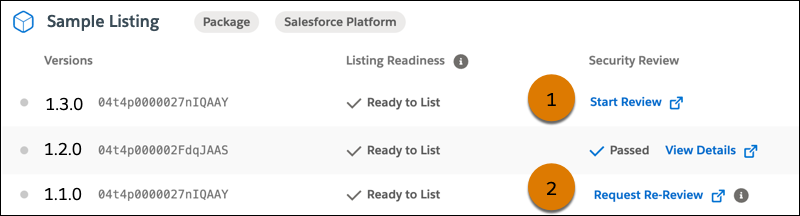
If we notified you that a solution version is due for a re-review, find the latest version
of the solution and click Start Review (1) or Request
Re-Review. To voluntarily request a re-review, find the version you want to submit
and click Request Re-Review (2).
 The security review wizard launches.
 - Provide the required details, pay the review fee, and submit your request.
After you submit the request, we verify that it includes the required materials and start our review. The re-review process takes up to 6 weeks.