Analytics SAQL Developer Guide
 j
jNewer Version Available
toDate()
Syntax
If a format argument isn’t provided, the function uses the format yyyy-MM-dd HH:mm:ss. format is only valid for converting date string values.
For the allowed formats, see Date Formats.
toDate(epoch_seconds)
The format argument is not valid for converting epoch_seconds numerical values.
Example: Display the Exact Date an Opportunity Opened
Suppose that you want to see the exact day that an opportunity opened. Use toDate() with CreatedDate_Year, CreatedDate_Month, CreatedDate_Day, and an accepted date format. This query will resemble the example below:
1q = load "oppty";
2q = foreach q generate toDate(CreatedDate_Year + "/" + CreatedDate_Month + "/" + CreatedDate_Day, "yyyy/MM/dd") as CreatedDate;
3q = order q by 'CreatedDate';
Example: Display the Number of Days Since an Opportunity Opened
Suppose that you have an opportunity dataset with the account name and the epoch seconds fields:

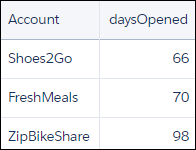
You want to see how many days ago an opportunity was opened. Use daysBetween() and now(). Use toDate() to convert the order date epoch seconds to a date format that can be passed to daysBetween().
1q = load "OpsDates1";
2
3q = foreach q generate Account, daysBetween(toDate(OrderDate_sec_epoch), now()) as 'daysOpened';
The resulting data stream displays the number of days since the opportunity was opened.