


Service Cloud Voice Implementation Guide
 j
jNewer Version Available
Sample Flows for Service Cloud Voice
- Access the sample flows directly in Amazon Connect. Log in to your Amazon Connect instance and select Routing > Contact flows.
- Get the JSON sample flow files from GitHub. Download the JSON files from the Sample Service Cloud Voice flows page in GitHub and import them into your Amazon Connect instance. For instructions on how to import flows, see the Import/export flows page in the Amazon Connect Administrator Guide.
Salesforce offers the following sample flows, which you can customize for your Service Cloud Voice contact center environment:
Inbound Flows
-
Sample SCV Inbound Flow: Creates a voice call record in Salesforce for the
inbound call and transfers the call to the SCV Omni-Channel subflow. Associate your
phone number with this flow so customers can reach your contact center. JSON file
If you customize the Sample SCV Inbound Flow, make sure it’s configured to support voice resiliency. See the Amazon Connect Flows Best Practices page for more information.
- Sample SCV Inbound Flow for Direct to Rep: Creates a voice call record in Salesforce for the inbound call and transfers the call to the SCV Direct to Rep subflow. This flow is for use cases where each rep has a unique assigned phone number and receives calls at that number. JSON file
Outbound Flows
- Sample SCV Outbound Flow With Transcription Using Amazon Transcribe: Starts media streaming. Also starts transcription using Amazon Transcribe, capturing and transcribing audio for outbound voice calls. If you use this preferred flow, you can’t use the Sample SCV Outbound Flow With Transcription Using Amazon Transcribe flow. Since the Sample SCV Outbound Flow With Transcription Using Contact Lens offers more robust transcription features, consider using that flow instead of this one. JSON file
- Sample SCV Outbound Flow With Transcription Using Contact Lens: Starts transcription using Contact Lens for Amazon Connect, capturing and transcribing audio for outbound voice calls. If you use this preferred flow, you can’t use the Sample SCV Outbound Flow With Transcription Using Amazon Transcribe flow. JSON file
- Sample SCV Outbound Flow From Rep With CallerId Override: Makes an outbound call with the caller ID displayed as the number assigned to a specific rep. JSON file
Transfer Flows
- Sample SCV Transfer Flow For Agent Transfers: Creates a voice call record and transfers the call from one rep to another specified rep. JSON file
- Sample SCV Transfer Flow For Omni-Channel Transfers: Creates a voice call record and transfers the call from a rep to a specified Omni-Channel flow. JSON file
- Sample SCV Transfer Flow For Omni Routing Transfers: Creates a voice call record and transfers the call from a rep to a specified rep or queue using Omni-Channel Unified Routing. JSON file
- Sample SCV Transfer Flow For Queue Transfers: Creates a voice call record and transfers the call from a rep to a specified queue. JSON file
If you customize the Sample SCV Transfer flows, make sure it’s configured to support voice resiliency. See the Amazon Connect Flows Best Practices page for more information.
Rep Whisper Flows
- Sample SCV Agent Whisper Flow For Amazon Transcribe: Starts media streaming. Also starts transcription using Amazon Transcribe to prepare for inbound voice calls and voice call transfers. JSON file
Subflows
-
Sample SCV Callback Subflow: Gives the caller the option to schedule a callback
if the queue is busy. If the caller chooses to schedule a callback, transfers the voice
call to the Callback queue. If the caller chooses to remain on the line, transfers the
call to one of the SCV Transcription Subflows. JSON
file
If the caller schedules a callback and then disconnects, the call can be incorrectly classified as abandoned. To correctly classify callback request drops, use a Callback Contact Attribute block in the flow.
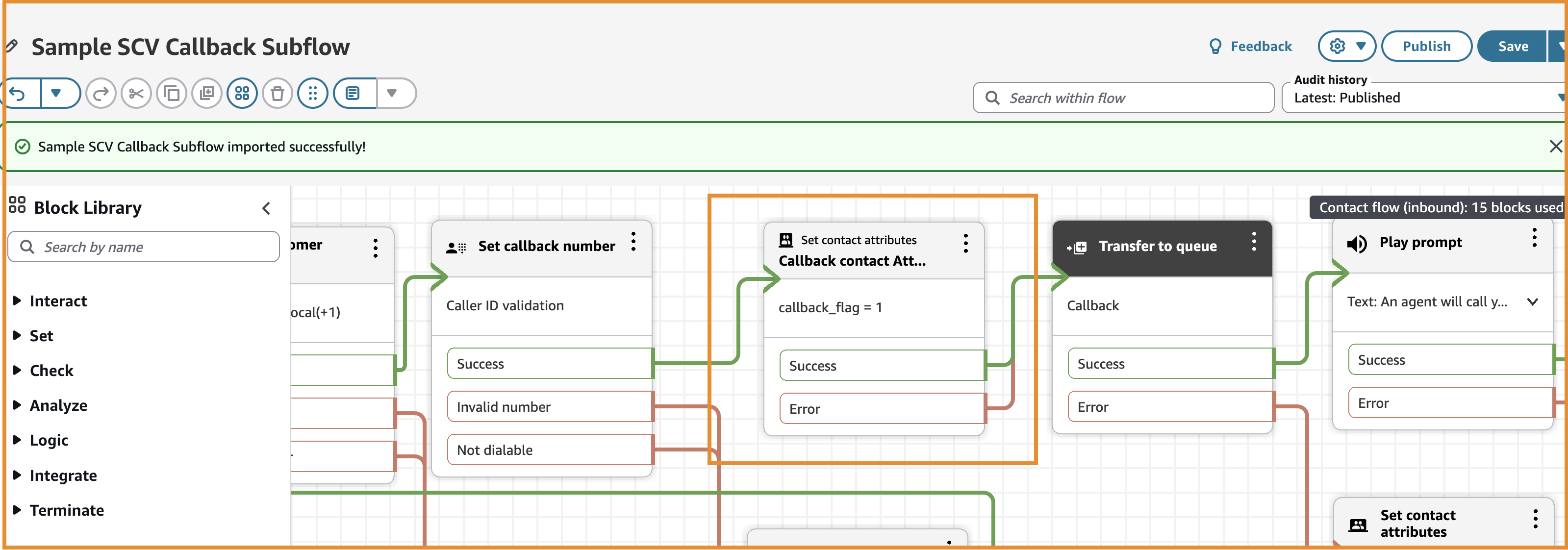
If you customize the Sample SCV Callback Subflow, make sure it’s configured to support voice resiliency. See the Amazon Connect Flows Best Practices page for more information.
- Sample SCV Direct to Rep Subflow: Routes the call to a specific rep associated with the dialed number and transfers the call to the Sample SCV Transcription Subflow With Contact Lens. JSON file
- Sample SCV Field Service Phone Call Subflow: Connects field reps to contact center reps. JSON file
- Sample SCV Omni-Channel Subflow - Basic Routing With Case Creation: Creates a case for each inbound voice call, routes the call to a queue, and opens a screen-pop for the new case record when a rep accepts the call. JSON file
- Sample SCV Omni-Channel Subflow - Omni Routing With Case Creation: Creates a case for each inbound voice call, routes the call using Omni-Channel Unified Routing, and opens a screen-pop for the new case record when a rep accepts the call. JSON file
- Sample SCV Omni-Channel Subflow - Omni Routing for Skills: Creates a case for each inbound voice call, routes the call to a rep with a skill using Omni-Channel Unified Routing, and opens a screen-pop for the new case record when a rep accepts the call. JSON file
- Sample SCV Transcription Subflow With Amazon Transcribe: Enables call recording and real-time transcription using Amazon Transcribe, and then transfers the voice call to the queue. JSON file
- Sample SCV Transcription Subflow With Contact Lens: Enables call recording and real-time transcription using Contact Lens, and then transfers the voice call to the queue. JSON file
- Sample SCV Voicemail Subflow: Gives the caller the option to leave a voicemail. Reps can play the recordings and read the transcriptions of all voicemails routed to them. JSON file
- Sample SCV Voicemail Subflow for Omni Routing: Gives the caller the option to leave a voicemail when using Omni-Channel Unified Routing. Reps can play the recordings and read the transcriptions of all voicemails routed to them. JSON file
Other Flows
- Sample_SCV_REST_Check_For_Open_Cases: Checks for open cases using the InvokeSalesforceRestApiFunction Lambda function. JSON file
- Sample_SCV_REST_Link_Call_To_Case: Links a voice call to an open case using the InvokeSalesforceRestApiFunction Lambda function. This flow adds on to the Sample SCV Invoke REST API Check For Open Cases flow. JSON file