


Service Cloud Voice Implementation Guide
 j
jNewer Version Available
ContactDataSync Lambda Function
Applies to this telephony model.
- Service Cloud Voice with Partner Telephony from Amazon Connect (Voice manually integrated with your Amazon Connect through XML import)
Configuration: This function is available if you have a Partner Amazon Contact Center with a multi-org set up created by running the multi-org cloudformation stack. This Lambda is installed with the Service Cloud Voice contact center version 19.0 and later versions.
Usage: Call this function manually from the AWS Console or by using the AWS CLI. From the AWS Console, select the contactDataSync Lambda function. From the Test tab, you can run the Lambda with a custom payload.
For the uploadTranscript operation, provide the secretName and accessTokenSecretName for the target Salesforce org. The contactId parameter in Amazon Connect is the unique ID of the voice call record, equivalent to vendorCallKey in Salesforce. The relatedRecords array lists the 15-digit VoiceCallId.
Here’s an example request payload for a multiorg setup:
1{ "operation": "uploadTranscript", "secretName": "callCenterApiName-salesforce-secret", // org. secret name is at the top payload level, and customer needs to make sure all the contactIds in this payload are for one org. for this corresponding org.'s secret "accessTokenSecretName": "callCenterApiName-salesforce-access-token-secret", "payload": [ { "contactId": "8c6258f0-66fa-4137-a61f-68311bb6d300", "relatedRecords": [ "0LQSB000001m5RR" ] }, { "contactId": "0e900fcd-6b3b-4445-8769-b32429eb3537", "relatedRecords": [ "0LQSB000001m1RQ" ] } ] } { "operation": "fetchUploadIdsStatus", "secretName": "callCenterApiName-salesforce-secret", "accessTokenSecretName": "callCenterApiName-salesforce-access-token-secret", "uploadIds": [ "f230e3d9-6c0f-3909-a0a8-1b78c634bbde", "68279b80-a394-3228-b99b-c60f02ff8227" ] }Contact Flow Configuration
In the contact flow, use a Set contact attributes block to define the secretName and accessSecretName attributes for each org. Because each Salesforce org has a different secret, these attribute values must be set accordingly whenever a call is redirected to an IVR for a specific org. Subsequent Lambda functions use these contact attributes to get the correct org-specific configuration.
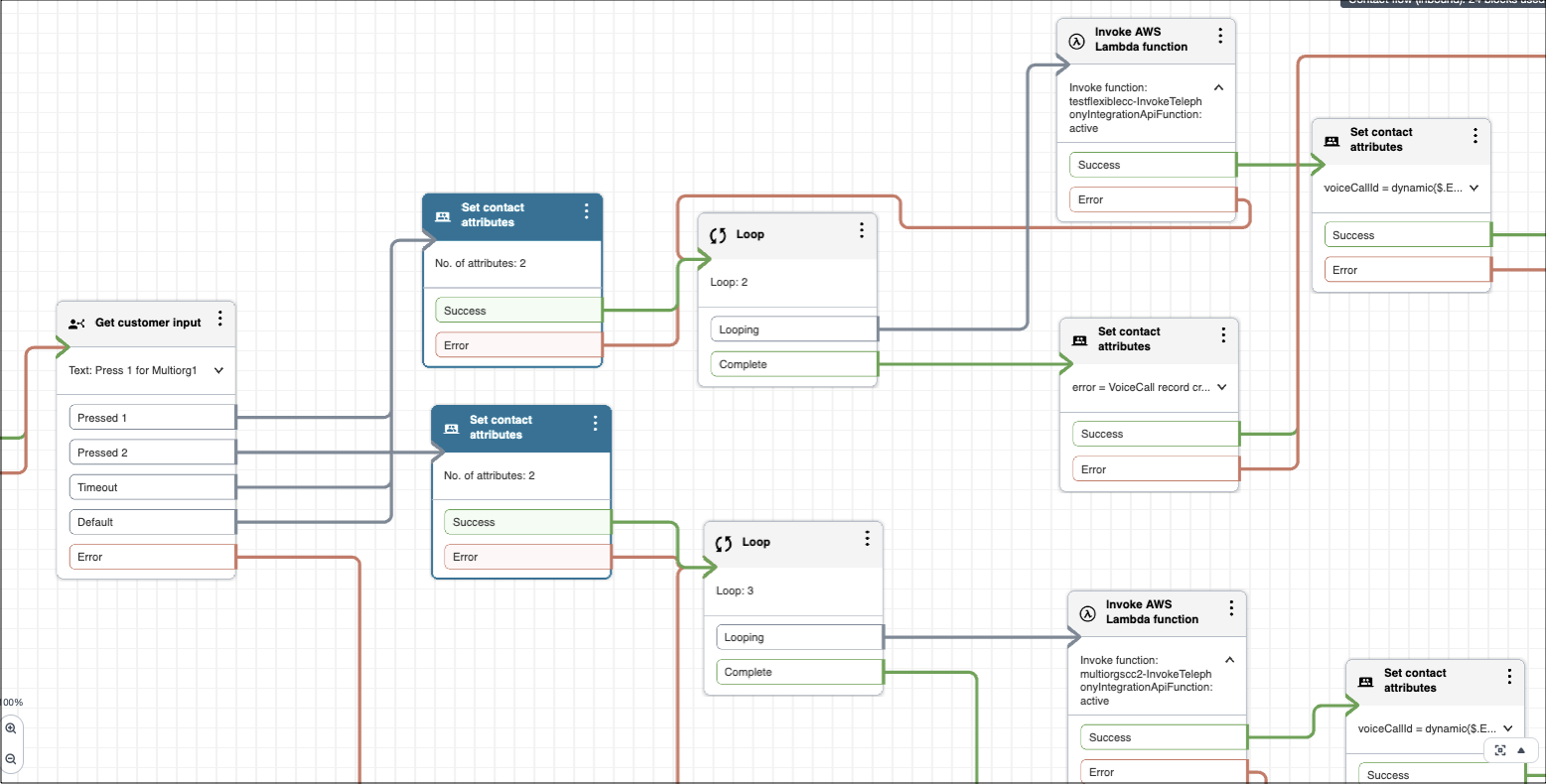
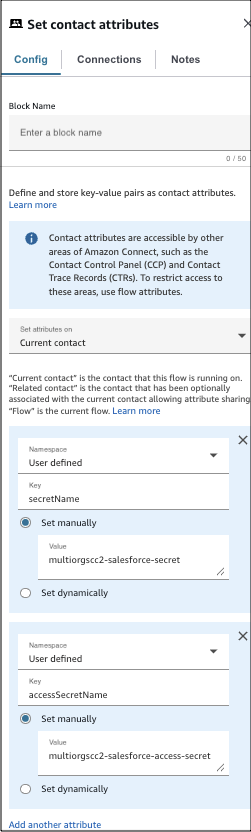
Within the Set contact attributes block, create two attributes with a User defined namespace.
- Key: secretName
Value: Set this to the name of the org's secret in AWS Secret Manager, for example, multiorgscc2-salesforce-secret.
- Key: accessSecretName
Value: Set this to the name of the org's access token secret, for example, multiorgscc2-salesforce-access-secret.
A sample contact flow is available in the GitHub.
Limitations of Multi-Org Setup
- Doesn’t support call transfers across orgs in a multi-org set up because of Salesforce multi-tenancy principles that prevent record transfers from one org to another without explicit consent from the user.
- Amazon S3 bucket TTL deletion delay might be more than one day, even if it is configured as one day.
- The real-time alerts from the RealtimeAlert stack for shared AWS resources such as Lambda functions and Amazon Connect aren't specific to any org. In a multi-org setup, the real-time alert metrics for shared AWS resources are available in the dashboard in the AWS, but no notifications are available for the individual orgs.