


Insurance Developer Guide
 j
jNewer Version Available
Cancel Policy
The policy cancellation process addresses the termination of an insurance policy before
its scheduled expiration date. Common reasons for canceling a policy include not paying the
premiums or a direct cancellation request from the policyholder.
Make sure you have these details.
- Policy ID of the active insurance policy to be canceled.
- Effective date of cancellation. This date determines when coverage ceases and is a required input for the policy cancellation API.
-
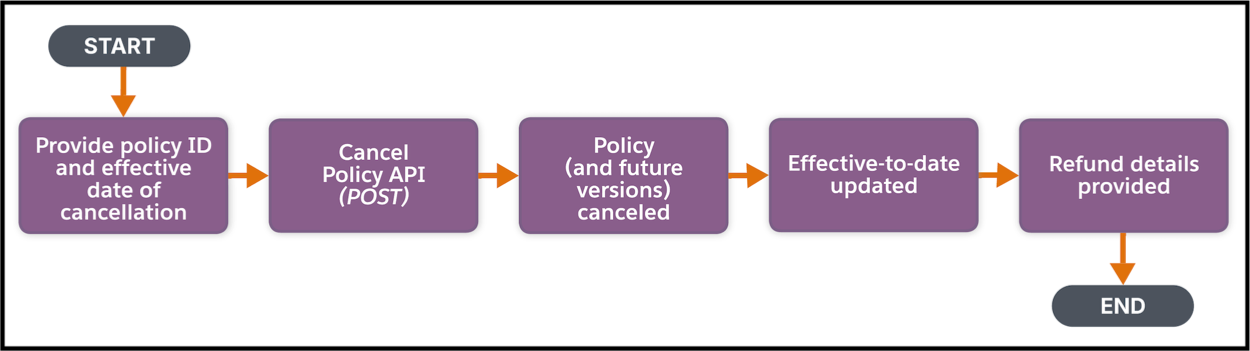
Use the policy ID to cancel the policy either by:
- Making a POST request on the Cancel Insurance Policy Connect API, or
- Using the Cancel Insurance Policy invocable action.
You can specify a name for the transaction record that’s created as part of the cancellation process. The transaction record is used for tracking financial implications, such as refunds.This process returns the details of the policy versions that are canceled, which include the current version and any future-dated versions. Details of any applicable refunds, such as premium refunds and tax refunds, calculated by the system based on the cancellation date and policy terms are also returned by the API.
Expected Results:
- The specified policy is marked as Cancelled in Salesforce.
- The policy's effective-to-date field is updated to the day immediately preceding the effective date of cancellation that's specified during the API call.
- Any future-dated policy versions associated with the canceled policy are also automatically canceled.
- Information regarding applicable premium and tax refunds are shown in the API response, which can then be used for downstream financial processing.
- A transaction record is created and linked to the cancellation event.