Service Cloud Chat Developer Guide
 j
jNewer Version Available
Chat Visualforce Components Code Sample
Use this code sample to test and preview how Visualforce components
can help you customize your chat windows.
The following code sample shows a chat window that uses the following components:
- liveAgent:clientChat
- liveAgent:clientChatMessages
- liveAgent:clientChatEndButton
- liveAgent:clientChatLog
- liveAgent:clientChatInput
1<apex:page showHeader="false">
2<style>
3#liveAgentClientChat.liveAgentStateWaiting {
4// The CSS class that is applied when the chat request is waiting to be accepted
5// See "Waiting State" screenshot below
6}
7#liveAgentClientChat {
8// The CSS class that is applied when the chat is currently engaged
9// See "Engaged State" screenshot below
10}
11#liveAgentClientChat.liveAgentStateEnded {
12// The CSS class that is applied when the chat has ended
13// See "Ended State" screenshot below
14}
15body { overflow: hidden; width: 100%; height: 100%; padding: 0; margin: 0 }
16#waitingMessage { height: 100%; width: 100%; vertical-align: middle; text-align: center;
17display: none; }
18#liveAgentClientChat.liveAgentStateWaiting #waitingMessage { display: table; }
19#liveAgentSaveButton, #liveAgentEndButton { z-index: 2; }
20.liveAgentChatInput {
21height: 25px;
22border-width: 1px;
23border-style: solid;
24border-color: #000;
25padding: 2px 0 2px 4px;
26background: #fff;
27display: block;
28width: 99%;
29}
30.liveAgentSendButton {
31display: block;
32width: 60px;
33height: 31px;
34padding: 0 0 3px;
35position: absolute;
36top: 0;
37right: -67px;
38}
39#liveAgentChatLog {
40width: auto;
41height: auto;
42top: 0px;
43position: absolute;
44overflow-y: auto;
45left: 0;
46right: 0;
47bottom: 0;
48}
49</style>
50<div style="top: 0; left: 0; right: 0; bottom: 0; position: absolute;">
51<liveAgent:clientChat>
52<liveAgent:clientChatSaveButton />
53<liveAgent:clientChatEndButton />
54<div style="top: 25px; left: 5px; right: 5px; bottom: 5px; position: absolute; z-index:
550;">
56<liveAgent:clientChatAlertMessage />
57<liveAgent:clientChatStatusMessage />
58<table id="waitingMessage" cellpadding="0" cellspacing="0">
59<tr>
60<td>Please wait while you are connected to an available agent.</td>
61</tr>
62</table>
63<div style="top: 0; right: 0; bottom: 41px; left: 0; padding: 0; position: absolute;
64word-wrap: break-word; z-index: 0;">
65<liveAgent:clientChatLog />
66</div>
67<div style="position: absolute; height: auto; right: 0; bottom: 0; left: 0; margin-right:
6867px;">
69<liveagent:clientChatInput /><liveAgent:clientChatSendButton />
70</div>
71</div>
72</liveAgent:clientChat>
73</div>
74</apex:page>
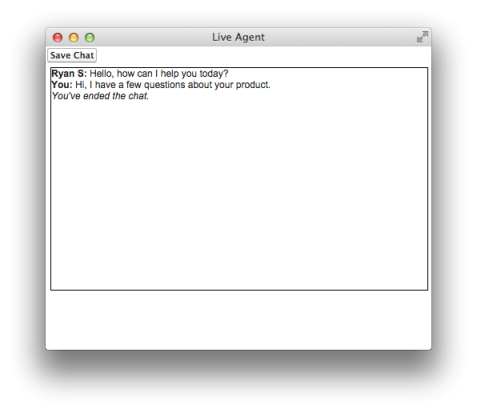
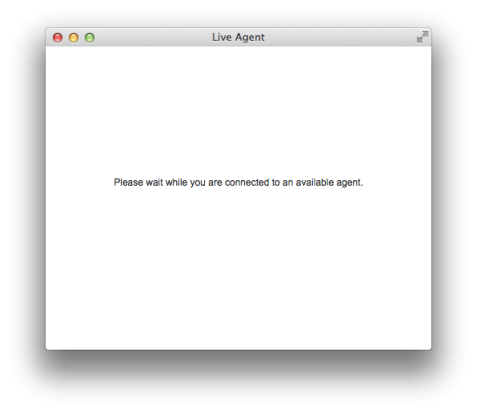
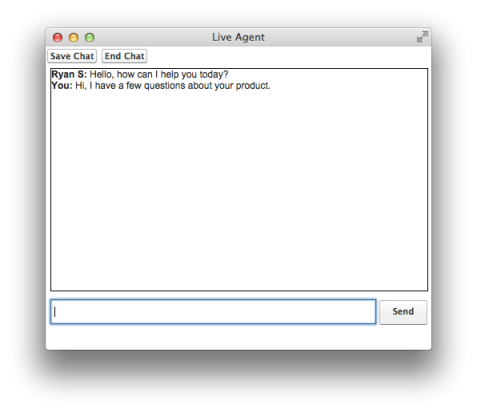
For an active chat, this code results in the following chat window states:
Chat Waiting
Chat in Progress
Chat Ended