


Platform Events Developer Guide
 j
jNewer Version Available
Platform Event Processing at Scale with Parallel Subscriptions for Apex Triggers
How Parallel Subscriptions Work
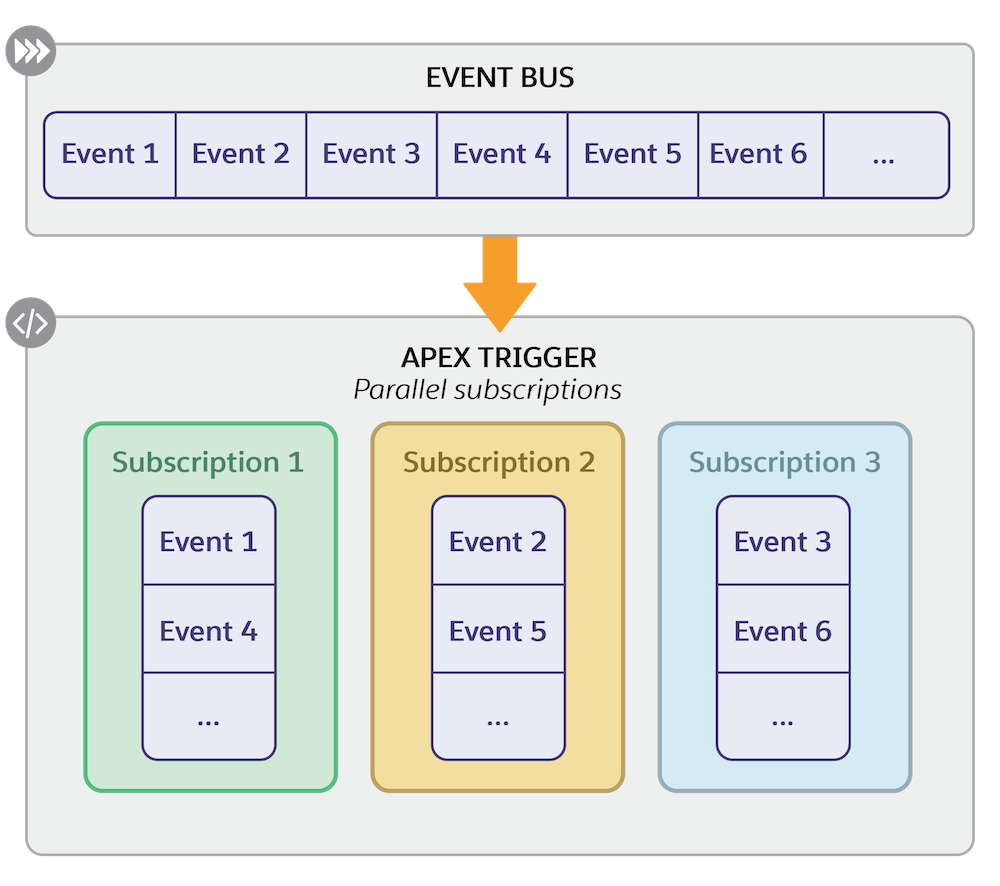
When you configure parallel subscriptions for a platform event Apex trigger, multiple subscriptions are created internally for the trigger. When events are received from the event bus that correspond to the platform event that the trigger is subscribed to, the events are distributed across the internal subscriptions. Referred to as partitions, the internal subscriptions run and process events simultaneously. You can specify up to 10 partitions for a trigger.
Each internal subscription processes unique events. Which events each subscription processes depends on the partition key that you specify—a platform-event custom field marked as required or the standard EventUuid field. The system uses a hash function to convert the value in the partition key field to a hash value that determines which subscription processes an event. Make sure to follow best practices when choosing a partition key. See Choosing a Partition Key.
This diagram shows the flow of events from the event bus to the parallel subscriptions. For simplicity, the event bus in the diagram contains events for only the custom platform event that the Apex trigger is subscribed to.
Parallel Subscriptions in Setup
When one or more Apex triggers are configured for parallel subscriptions, the Parallel Subscriptions related list shows up on the platform event detail page in Setup. An Apex trigger that’s enabled for parallel subscriptions shows up in the Parallel Subscriptions related list only and not in the Subscriptions related list.
This image shows a trigger configured with three partitions in the Parallel Subscriptions related list. The partition key for the trigger is the Order_Number__c custom field.
