Learn how to ensure application security outside Salesforce. Mandate HTTPS and setting the Secure flag for cookies that store sensitive data.
Secure Communications and Cookies - What is required?
Applications hosted outside Salesforce or which send or receive important information from other sites must use HTTPS. Any cookies set by your application for authentication, authorization, or which contain private or personally identifiable information must set the Secure flag to ensure they’re only sent over HTTPS.
When the server sets cookies without the Secure attribute, the browser will send the cookie back to the server over either HTTP or HTTPS connections.
For applications that are available over both HTTP and HTTPS, users that enroll or sign-in through Salesforce.com must be directed and restricted to use of the secure site only.
On your web server, disable weak cipher suites and vulnerable versions of SSL/TLS. Salesforce requires exclusive use of TLS 1.2 or greater. Disable all null, export, 40-bit, or DES cipher suites.
Sample Vulnerability
Failure to set the Secure flag for security-critical cookies is the most common vulnerability in this category. Simply setting a cookie over an HTTPS connection doesn’t prevent it from being returned over HTTP unless the Secure flag is set. Even if your site doesn’t have an HTTP version, malicious parties on the network will be able to steal session cookies.
For example, the attacker can insert references to HTTP URLs to your application into sites that your users are likely to visit. Assume your application is https://app.example.com, and your users frequent a discussion forum or blog at http://exampleappblog.com. ExampleAppBlog allows commenters to include limited HTML in their posts, including img tags. A commenter inserts HTML into one of their comments like the following:
When a user authenticated to app.example.com views this comment, their browser will fire off a request for example-logo.png over an insecure HTTP connection. Since the app.example.com cookie wasn’t set Secure, the browser will include the cookie over this connection — exposing it to the network.)
When logging into your website’s CMS over an insecure public Wi-Fi network at a coffee shop, an attacker on the same network could perform a Man-in-the-Middle (MiTM) attack. Logging into your site over HTTP without the Secure flag enabled allows attackers to steal your cookie. Even with HTTPS, attackers can sometimes downgrade your connection to HTTP using SSL stripping.
Is My Application Vulnerable?
After logging in, change the “https” in the URL bar of the browser to “http”. If you’re still logged in, your application is vulnerable.
Follow the simple test procedures for all applications to determine if they follow the guidelines.
How Can I Test My Application?
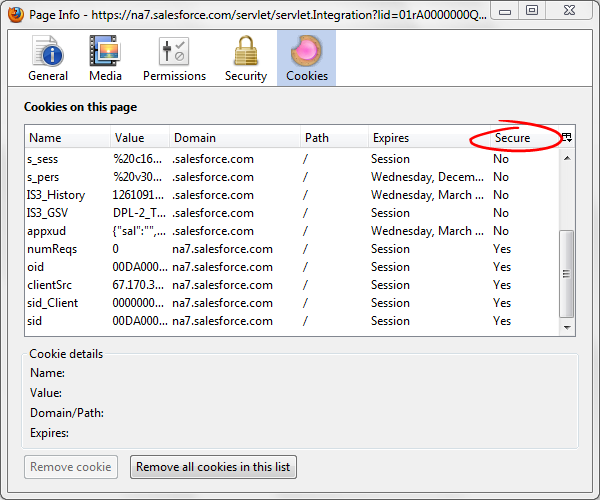
To test your application’s cookie status, you can use the Cookie Inspector or Cookie Manager add-ons for Firefox. These extensions allow you to view, edit, and manage cookies. You can install the Cookie Inspector or the Cookie Manager to see detailed information on cookies, including the secure flag settings. You’ll see a list of all the cookies sent to the page, and the last column will identify if the Secure flag was set with the cookie.
Session cookies that authenticate a user to the application must always be marked Secure.
Examine the contents of any cookies not identified as secure. Do they contain information, which is sensitive, personally identifiable (such as an email address), or which influences the behavior of the application? For any such cookies the server must set the Secure flag.
You can easily test web server configuration for HTTPS using the online tool provided by SSL Labs at https://www.ssllabs.com/ssldb/. Simply type in the URL for your server to get a detailed report.
If your assessment shows severe errors in the SSL Labs assessment, they must be corrected before your site can be integrated with AppExchange.
SSL Labs publish a list on their SSL server test page of the 10 most recent worst-rated sites. If your site scores poorly, it shows up onthatlist for a while. If your site scores well, it can appear on the list of recent best-rated sites.
How Do I Protect My Apex and Visualforce Applications?
Avoid loading any resources over http, instead load all resources over https, which includes images. All scripts must be loaded from static resources, which apply applies to sites, communities, as well as Lightning Components or Visualforce pages.
The general guidance is to try to use HTTPS exclusively for your web application. It’s difficult to properly secure sites that use HTTP for some features or pages. If HTTP is necessary, make the HTTP-accessible features unauthenticated or create a different session identifier for that portion of the site that isn’t tied to the secure session identifier. If your site or application has secure and insecure modes, Salesforce.com users must be automatically opted-in to use the secure version exclusively.
Developers are often concerned about the performance impact of using HTTPS, and try to limit their use of it on performance grounds. However, a review of an application’s performance will only rarely show HTTPS as the cause of significant performance problems. Many or even most web applications are far from optimally efficient, even over HTTP. For performance guidance, see:
Keep session cookie expiration times low (10–20 minutes). Don’t store secret information like a user’s password in cookies and don’t store information about user privilege levels (for example, admin=true) as it can be considered as tampering.
Applications must avoid URL rewriting for session management and prevent session fixation attacks by issuing a new session identifier cookie upon successful login. See:
When creating cookies programmatically in Java, the javax.servlet.http.Cookie API allows servlets and JSP pages to set the Secure flag for application-specific cookies using the call setSecure(true). Unfortunately, there’s no standardized way to communicate to the container that cookies such as JSESSIONID or JSESSIONIDSSO is set securely. Most containers will automatically set the secure flag when a session is created over an HTTPS link. But, you can verify this using the test procedures listed in the previous section.
To enable SSL in J2EE applications, use the web.xml configuration file. For each <web-app> entry, ensure that a <security-constraint> element exists with a <user-data-constraint>. In the <user-data-constraint>, set the following:
This signals to the container that user data must be kept confidential and implies the use of HTTPS for this application. Some additional configuration is required to support SSL — see the documentation specific to your web container.
The upcoming version of the Servlet Specification (Servlet 3.0) will provide additional support for programmatic configuration of session cookie security using the new javax.servlet.SessionCookieConfig class.
For PHP, always set the boolean parameter secure to true when calling setcookie. This value is set to false by default.
Use session_regenerate_id when logging in users to prevent session fixation attacks.
Configuring Web and Application Servers for Strong SSL Cipher Suites
Here’s how you can secure your web and application servers by configuring robust SSL cipher suites:
For IIS on Windows Server 2003 or older, SSL and TLS settings are managed in the Windows Registry. For instructions on modifying the configuration under HKEY_LOCAL_MACHINE\SYSTEM\CurrentControlSet\Control\SecurityProviders\SCHANNEL, see the following article from Microsoft Support: http://support.microsoft.com/kb/245030.
On Windows Server 2008 and Windows Server 2008 R2, SSL cipher suites are configured via Group Policy. Start gpedit.mscand go to Administrative Templates | Network | SSL Configuration Settings. Scroll to the bottom of the Help section for the property and follow the instructions on “How to modify this setting”. See http://msdn.microsoft.com/en-us/library/bb870930(VS.85).aspx for additional information.


 j
j