


Salesforce CLI Setup Guide
 j
jNewer Version Available
Specify Flag Values in Files
Let's say, for example, that you want to use the data create record command to create a record for a custom object that has over 100 fields. You use the --values flag of the data create record command to specify the values for the 100 fields, but there are so many fields that the command is too long to run in your shell.
You can work around this issue by first creating local text files that contain the flag values and storing them in a local directory in your Salesforce DX project. Then, when you run the command, use the --flags-dir <directory> flag to point to the directory. If the command finds a file in the specified directory with the same name as one of its flags, it uses the contents of the file as the flag value.
Let’s see how this feature works using this sample command to create an Account record in the org with alias my-scratch.
1sf data create record --sobject Account --values "Name='Universal Containers' Website=www.example.com Phone=1-415-555-1212" --target-org my-scratchFor simplicity, the previous sample command includes only three Account fields. But the Account object has over 30 fields, so you can imagine how the command can get very long. To change the command to use --flags-dir, first follow these steps in your Salesforce DX project:
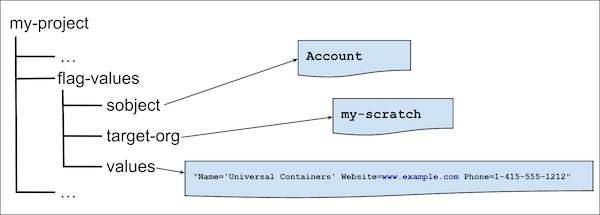
- Create a directory, such as flag-values.
- In the flag-values directory, create three files:
- A file called sobject, with no extension. Edit the file and add a single line of content: Account.
- A file called target-org, with no extension. Edit the file and add a single line of content: my-scratch.
- A file called values, with no extension. Edit the file and add a single line of content: "Name='Universal Containers' Website=www.example.com Phone=1-415-555-1212"
Here's a graphic that shows how to set up the directory, where the name of your DX project is my-project:
Then run the sample command from your DX project this way:
1sf data create record --flags-dir ./flag-valuesYou can combine the --flags-dir flag with actual command flags, but the actual flags take precedence over values in a file. For example, let’s say you run the command again, but this time specify --target-org my-other-scratch at the command line, like this:
1sf data create record --flags-dir ./flag-values --target-org my-other-scratchThe command now connects to the org with alias my-other-scratch, and not my-scratch.
Follow these guidelines when you create the files that contain the file values:
- Don't include a file extension. The only exception is if the file contains JSON content, in which case you must use the .json extension, such as values.json.
- For Boolean flags, create an empty file with the name of the Boolean flag. For example, to specify the --concise flag, create an empty file called concise.
- You can name files for Boolean flags no-<flagname>, as long as the Boolean flag supports it. For example, to use this feature with the org create scratch command and disable source tracking, create an empty file called no-track-source.
- To specify the equivalent of multiple flags, such as --metadata ApexClass --metadata CustomObject --metadata PermissionSet, specify each value in its own line in the metadata file.
- You can name the file using the flag's short name, such as m rather than metadata.