


Experience Cloud Developer Guide
 j
jCase Create Deflection Signal
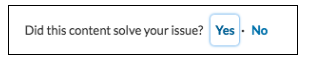
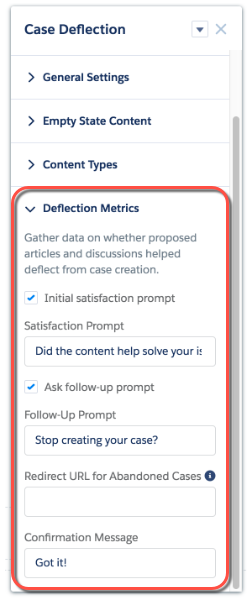
You can configure the Case Deflection component to fire this event automatically using the component’s Deflection Metrics properties in Experience Builder. The Case Deflection component works together with the Contact Support Form to register deflection interactions.
Attributes
The sourceType for deflection signals from the Case Deflection component is caseCreateDeflectionModal.
The source is what the user has typed into the subject field or the description of the Case Create Form. The destination is the ID of the Article or Discussion deflection item.
The payload is a JavaScript object key-value mapping. The following properties are used for this type of signal.
| Payload Property | Type | Description | Supported Values | Required |
|---|---|---|---|---|
| deflectionAnswer | string | The user’s answer to the first question, asking whether the deflection item was helpful. |
|
No |
| confirmationAnswer | string | The user’s answer to the second question, asking whether they wish to stop creating a case. |
|
No |
| state | string | The state the popup window was last left in before it was closed. |
|
No |
| caseCreated | boolean | Indicates whether the user created a case. |
|
No |
Examples
Custom Aura components can listen to this system event and handle it as required. For example, if the user didn’t find the content helpful the component can start another process.
Here’s a sample component that listens to the system event.
1<aura:component implements="forceCommunity:availableForAllPageTypes">
2    <aura:attribute name="message" type="String" required="false"/>
3    <aura:handler event="lightningcommunity:deflectionSignal" action="{!c.handleSignal}"/>
4    <lightning:formattedText value="{!v.message}"/>
5</aura:component>
This client-side controller example handles the system event and checks for failed case deflections. That is, the controller checks for interactions where the user didn’t find the deflection item helpful.
1({
2    handleSignal: function(component, event, helper) {
3        var signal = event.getParams() || {},
4            sourceType = signal.sourceType,
5            payload = signal.payload;
6        // Process case create deflection signals
7        if (sourceType && sourceType === "caseCreateDeflectionModal") {
8            if (payload && payload.deflectionAnswer === "NO") {
9                component.set("v.message", "Sorry you didn't find that helpful.");
10            }
11            if (payload && payload.caseCreated === true) {
12                component.set("v.message", "We Apologize For The Inconvenience. We'll get in touch with you shortly about your case.");
13            }
14        }
15    }
16})
Custom Aura components that act as case create forms and case deflection components can also fire this event. Given valid parameters, the event is automatically handled and processed for reporting. This example fires a lightningcommunity:deflectionSignal event with values from the component attributes.
1fireCaseDeflectionSignal : function(component, shouldSubmitSourceTypeSignals) {
2    var evt = $A.get("e.lightningcommunity:deflectionSignal");
3    evt.setParams({
4        sourceType: "caseCreateDeflectionModal",
5        source: cmp.get("v.deflectionTerm"),
6        destinationType: component.get("v.deflectionEntityType"),
7        destination: component.get("v.deflectionEntityId"),
8        payload: {
9            deflectionAnswer: component.get("v.deflectionAnswer"),
10            confirmationAnswer: component.get("v.confirmationAnswer"),
11            state: component.get("v.deflectionState"),
12            caseCreated: component.get("v.caseCreated")
13        },
14        shouldSubmitSourceTypeSignals: shouldSubmitSourceTypeSignals
15    });
16    evt.fire();
17}
A user can successively view multiple deflection items before ultimately deciding whether to create or abandon a case. Each view fires a lightningcommunity:deflectionSignal event. If you want to process all the events as a single batch, set shouldSubmitSourceTypeSignals=true for the final event in which the user abandons or creates the case. This example fires the last deflection signal event, based on whether the case was created or not.
1fireCaseCreatedSignal : function(component, caseCreated) {
2    // Send all accumulated signals to the server to be processed
3    var evt = $A.get("e.lightningcommunity:deflectionSignal");
4    evt.setParams({
5        sourceType: "caseCreateDeflectionModal",
6        payload: {
7            caseCreated: caseCreated
8        },
9        shouldSubmitSourceTypeSignals: true
10    });
11    evt.fire();
12}