


Analytics SAQL Developer Guide
 j
jNote: This release is in preview. Features described here don’t become generally available until the latest general availability date that Salesforce announces for this release. Before then, and where features are noted as beta, pilot, or developer preview, we can’t guarantee general availability within any particular time frame or at all. Make your purchase decisions only on the basis of generally available products and features.
number_to_string
Syntax
Usage
-
number_to_string(number,
number_format)
The format specified by number_format is used for both positive and negative numbers.
-
number_to_string(number,
<POSITIVE>;<NEGATIVE>)
If number is positive, the number format specified by <POSITIVE> is used. If number is negative, the number format specified by <NEGATIVE> is used. Note the semicolon separating the two specified formats.
- 0, #, decimal point (.)
- Thousands separator (,)
- Percentage (%)
- Leading and trailing characters: $, +, -, (, ), :, !, ^,&,’,~,{,}
Example
Display the number amount as a string, formatted as currency:
1q = foreach q generate 'Amount' as 'Amount', number_to_string('Amount',"$#,###.00") as 'NumberAmount';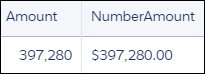
Example
Suppose that you have a measure field with the format shown in Number You Start With. Use the format shown in number_format to display this number as a shown in Resulting String.
| Initial Number | number_format | Resulting String |
|---|---|---|
| 1234.56 | ####.# | 1234.6 |
| 8.9 | #.000 | 8.900 |
| .631 | 0.# | 0.6 |
| 12 | #.0# | 12.0 |
| 1234.568 | #.0# | 1234.57 |
| 12000 | #,### | 12,000 |
| 12000 | #, | 12 |
| 12200000 | 0.0,, | 12.2 |
| 12 | 00000 | 00012 |
| 0.03457 | #.00% | 3.46% |
| 12.3 | $#.00;($#.00) | $12.30 |
| -12.3 | $#.00;($#.00) | ($12.30) |
| 32 | +;- | + |
| -32 | +;- | - |