


Analytics External Data API Developer Guide
 j
jExternal Data
You can integrate external data into CRM Analytics to make the data available for
queries from lenses and designer.
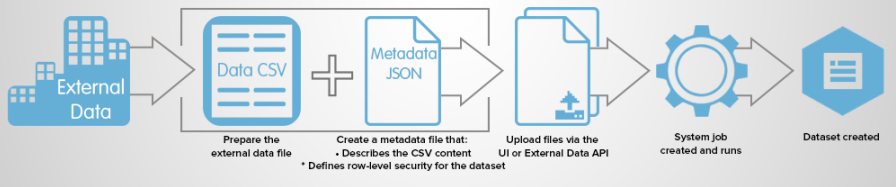
The External Data API enables you to upload external data files to CRM Analytics. The External Data API can upload .csv files, and you can optionally specify the structure of your data by defining metadata in JSON format.
The External Data API is available in API version 31 and later.
The high-level steps for uploading external data by using the API are:
- Prepare your data in CSV format, and then create a metadata file to specify the structure of the data.
- Connect programmatically to your Salesforce organization.
- Configure the upload by inserting a row into the InsightsExternalData object, and then set input values such as the name of the dataset, the format of the data, and the operation to perform on the data.
- Split your data into 10-MB chunks, and then upload the chunks to InsightsExternalDataPart objects.
- Start the upload by updating the Action field in the InsightsExternalData object.
- Monitor the InsightsExternalData object for status updates, and then verify that the file upload was successful.