Discover the relationship between channels and channel members with the Entity Relationship Diagram (ERD). Also, understand the benefits of using custom channels through the example diagrams.
Entity Relationship Diagram for Channel and Channel Member
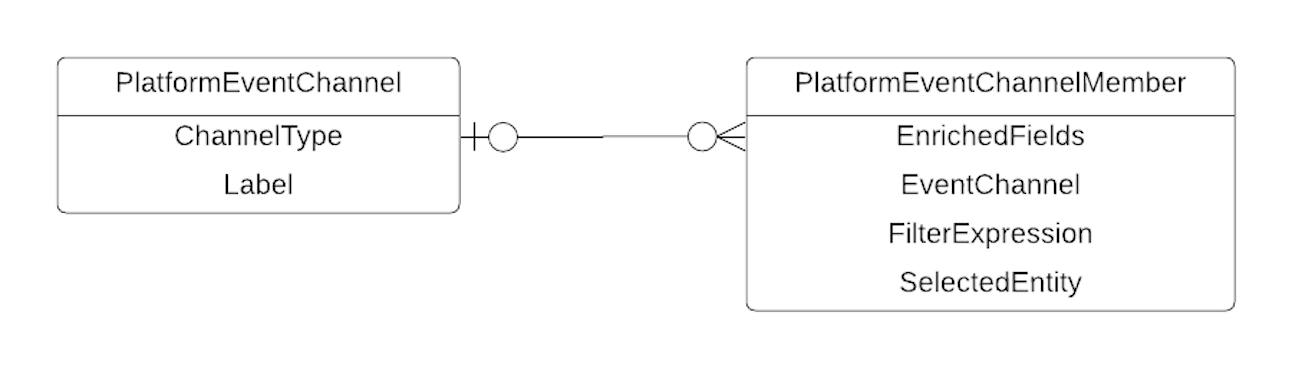
This ERD shows the channel and channel member entities and the relationships between them. You can access the entities by their corresponding types and objects in Metadata API and Tooling API. The entities in this diagram don’t include the FullName field. FullName is the unique name of the Metadata API component or Tooling API object and is used to perform operations on them.
A channel can have zero or more channel members. A channel member can have zero or more enriched fields, and zero or one filter expression. You can add and update enriched fields and filter expressions through the PlatformEventChannelMember entities in Metadata API or Tooling API.
In API version 47.0 and later, the PlatformEventChannel in Metadata API and Tooling API represents a custom channel but not the standard ChangeEvents channel. You can’t create the ChangeEvents standard channel. Also, you can’t modify the ChangeEvents standard channel attributes: ChannelType and Label.
The diagrams in the next sections show examples of selected entities on the default ChangeEvents channel and on custom channels. The examples show the benefits of using custom channels.
Example for the ChangeEvents Standard Channel
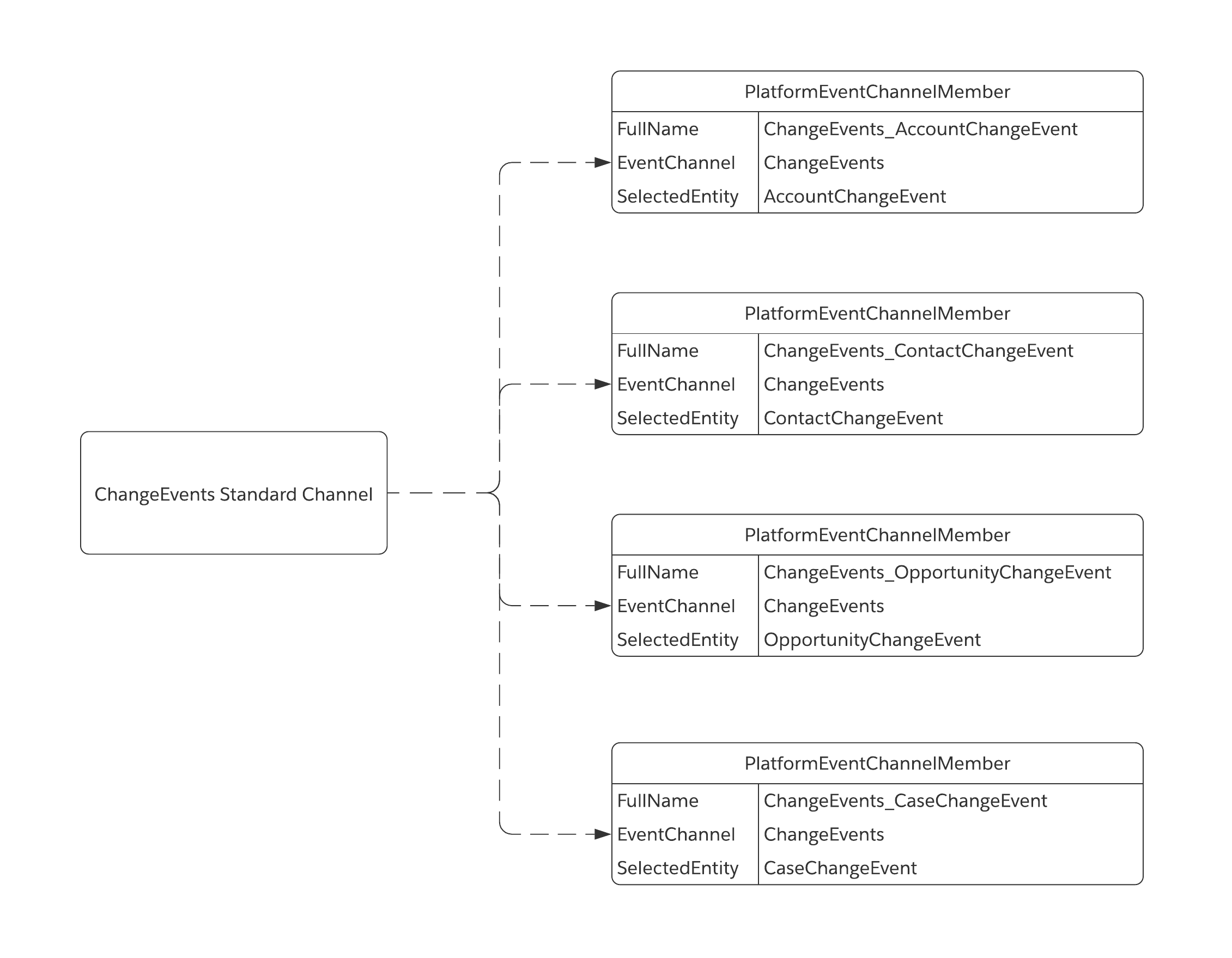
This diagram is an example of four entities selected for the ChangeEvents standard channel (Account, Contact, Opportunity, and Case). The channel members don’t contain enriched fields or filter expressions. Even though you can add them to members belonging to the ChangeEvents channel, it’s best to add them on custom channels. That way, you isolate change events with enriched fields when using multiple subscribers.
In this diagram, the ChangeEvents channel isn’t represented as a PlatformEventChannel entity. The reason is, in API version 47.0 and later, the ChangeEvents standard channel can’t be manipulated directly through Metadata API or Tooling API. After all, it’s a standard channel.
The AccountChangeEvent selected entity in one channel member is also part of custom channel examples in the next sections. On one custom channel, AccountChangeEvent contains enriched fields. On another custom channel, it contains a filter expression. These fields aren’t present on the ChangeEvents channel, so they aren’t sent to subscribers on this channel.
Example for SalesEvents__chn Custom Channel with Enriched Fields
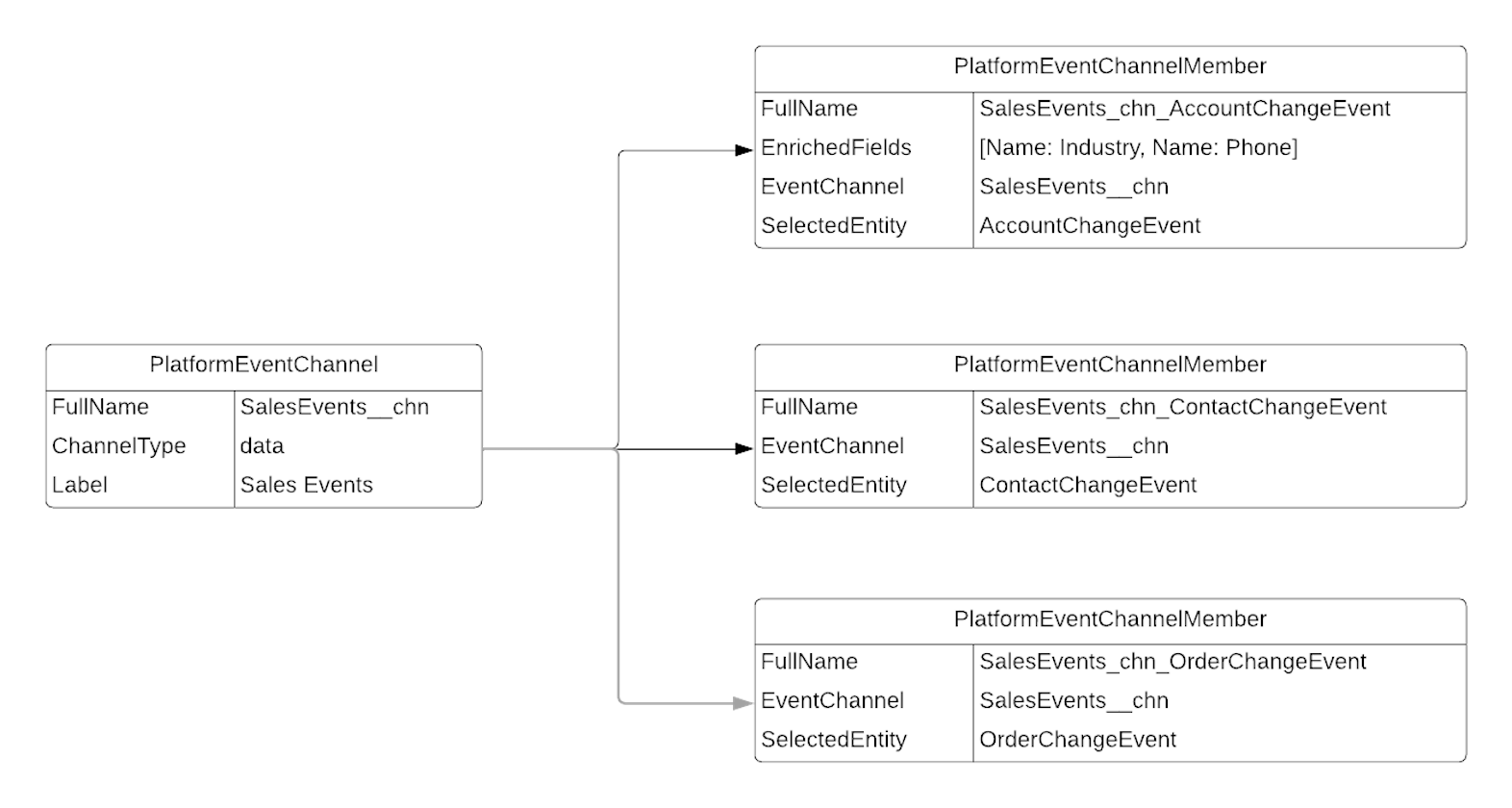
This diagram shows how you can use a custom channel to isolate change events so a subscriber receives only the events they’re interested in. In our example, the SalesEvents__chn channel contains a subset of the selected entities of the ChangeEvents channel: Account and Contact. It also contains one other entity: Order. One of the channel member’s selected entities, AccountChangeEvent, contains two enriched fields in the EnrichedFields field. The EnrichedFields field is an array containing the name of each enriched field: the Industry and the Phone fields. The enriched field values are available in the account change events on this channel and not on other channels when not specified.
Example for HREvents__chn Custom Channel with a Filter Expression
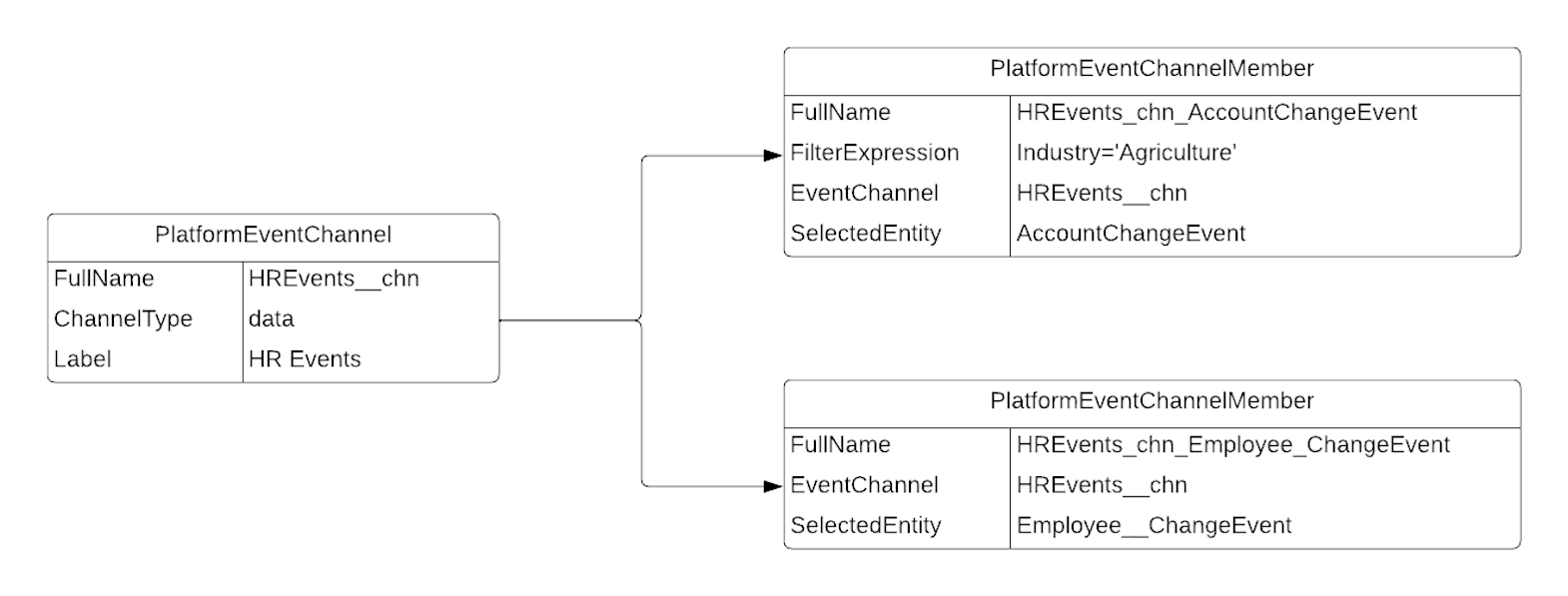
This diagram shows an example of a custom channel, HREvents__chn, designed for entities related to an HR app: Account and the Employee__c custom object. The HREvents__chn channel contains a filter expression for the AccountChangeEvent member. The channel delivers account change events that match the criteria specified in the filter expression. Only change events for accounts whose Industry field is Agriculture are delivered. The channel member for Employee__ChangeEvent doesn’t have a filter, so all Employee__c events are delivered on that channel.
AccountChangeEvent is a selected entity in members of two other channels: the standard ChangeEvents channel and the custom SalesEvents__chn. A subscriber on the ChangeEvents channel receives account change events without enriched fields or a filter. A subscriber on the SalesEvents__chn custom channel receives account change events enriched with the Industry and Phone field values but without a filter. A subscriber on the HREvents__chn custom channel receives account change events that match the filter criteria—they have the Industry field value of Agriculture. No enriched fields are specified, but the account change events received on the HREvents__chn channel are enriched with the Industry field due to filtering’s auto-enrichment feature.


 j
j