


Connect REST API Developer Guide
 j
jAnnouncements Resources
This image shows an announcement in a group. Creating an announcement also creates a feed item with the announcement text.
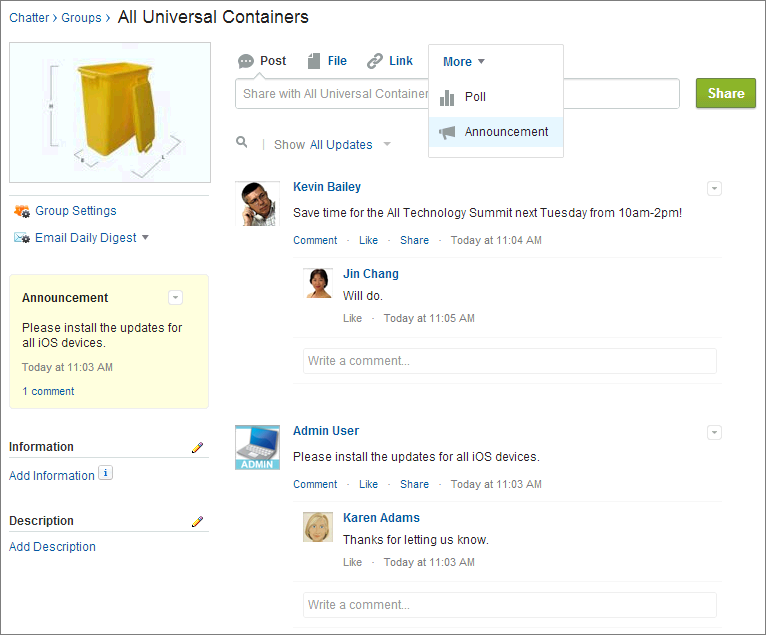
An announcement displays in a designated location in the Salesforce UI until 11:59 p.m. on its expiration date, unless it’s deleted or replaced by another announcement.
Available resources are:
| Resource | Description |
|---|---|
| /chatter/announcements | Get the announcements for the specified parent or create an announcement. |
| /chatter/announcements/announcementId | Get information about, update, or delete an announcement. |
Announcements
Get the announcements for the specified parent or create an announcement.
- Resource
-
1/chatter/announcements1/connect/communities/communityId/chatter/announcements - Available version
- 36.0
- Requires Chatter
- Yes
- HTTP methods
- GET, POST, HEAD
- Request parameters for GET
-
Parameter Name Type Description Required or Optional Available Version page Integer Number of the page you want returned. Starts at 0. If you pass in null or 0, the first page is returned. Optional 36.0 pageSize Integer Specifies the number of announcements per page. Optional 36.0 parentId String ID of the parent entity for the announcement, that is, a group ID when the announcement appears in a group. Required 36.0 - Response body for GET
- Announcement Page
- Request body for POST
-
- Root XML tag
- <announcement>
- JSON example for creating an announcement
-
1{ "body": 2 { 3 "messageSegments": [ 4 { 5 "text": "Please install the updates for all iOS devices.", 6 "type": "Text" 7 } 8 ] 9 }, 10 "parentId": "0F9B0000000004S", 11 "expirationDate": "2016-02-22T00:00:00.000Z" 12} - JSON example for creating an announcement using an existing feed item
-
1{ 2 "feedItemId": "0D5D0000000DaZBKA0", 3 "expirationDate": "2016-02-22T00:00:00.000Z" 4} - Properties
-
Name Type Description Required or Optional Available Version body Message Body Input Text of the announcement. Required for creating an announcement if feedItemId isn’t specified Don’t specify for updating an announcement.
31.0 expirationDate String Date time in ISO 8601 format. The Salesforce UI displays an announcement until 11:59 p.m. on this date unless another announcement is posted first. The Salesforce UI ignores the time value in the expirationDate. However, you can use the time value to create your own display logic in your own UI. Required for creating an announcement Optional for updating an announcement
31.0 feedItemId String ID of an AdvancedTextPost feed item that is the body of the announcement. Required for creating an announcement if body isn’t specified Don’t specify for updating an announcement.
36.0 isArchived Boolean Specifies whether the announcement is archived. Optional 36.0 parentId String ID of the parent entity for the announcement, that is, a group ID when the announcement appears in a group. Required for creating an announcement if feedItemId isn’t specified Don’t specify for updating an announcement.
36.0 sendEmails Boolean Specifies whether the announcement is sent as an email to all group members regardless of their email setting for the group. If Chatter emails aren’t enabled for the organization, announcement emails aren’t sent. Default value is false. Optional for creating an announcement Don’t specify for updating an announcement
36.0
- Response body for POST
- Announcement