


Field Service Developer Guide
 j
jField Service Inventory Management Data Model
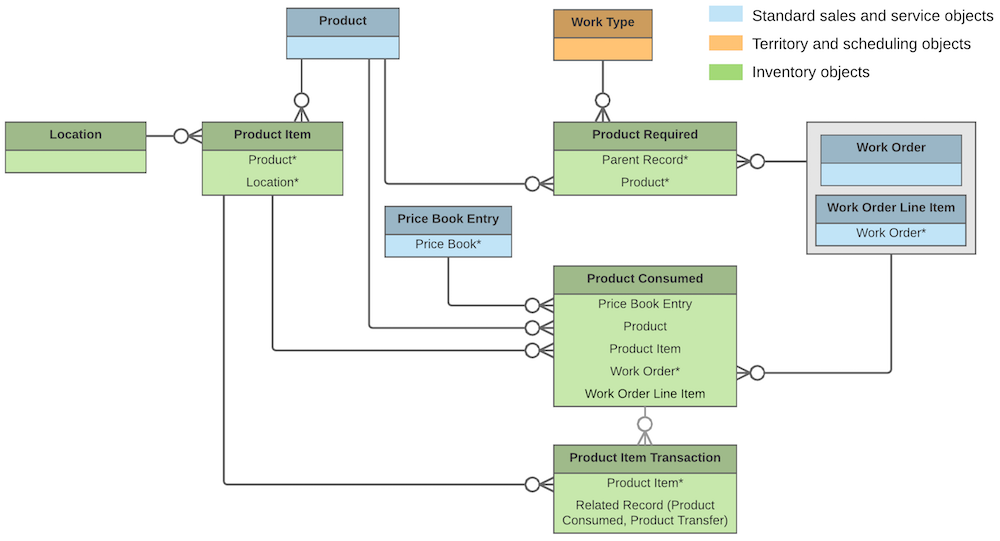
Inventory management starts with product items, which represent the stock of a particular product at a particular location. Each product item is associated with a product and a location in Salesforce. For example, if you have 50 hammers stored in your Warehouse A location and 200 stored in Warehouse B, create one product item for each location. Product items list a quantity at the location that is updated automatically when inventory is transferred or consumed.

If the Inventory Location option is selected on a location, it means that inventory can be stored there. Product items can be associated only with inventory locations.
You can link a location to multiple accounts and service territories. For example, if a location is a shopping mall, you can choose to associate it with every account that operates a store in the mall. You can also create addresses for a location, such as a mailing and home address. And to keep track of customer sites, create associated locations, which contain lookups to an account and a location.

If a particular product is needed to complete a field service job, add products required to ensure that the assigned service resources arrive prepared. Products required can be child records of work orders, work order line items, and work types. Work order and work order line items inherit their work type’s products required.
When a product is consumed during the completion of a work order, track its consumption by creating a product consumed record. You can add products consumed to work orders or work order line items. Track product consumption at the line item level if you want to know which products were used for each line item’s tasks.
The way you use products consumed depends on how closely you want to track the state of your inventory in Salesforce. If you want to track the entire life cycle of items in your inventory, including their storage, transfer, and consumption, link your product consumed records to product items. This approach ensures that your inventory numbers update automatically to reflect the consumption of products from your inventory. If you want to track product consumption only, however, specify a Price Book Entry on each product consumed record and leave the Product Item field blank.
- Product requests are orders for products, which you might create when stock is running low.
- Product request line items are subdivisions of a product request.
- Product transfers track the movement of product items between inventory locations.
- Shipments represent the shipment of product items between locations.
- Product item transactions describe actions performed on a product item. They’re auto-generated records that help you track when inventory is replenished, consumed, or adjusted.
- Return orders track the return of a product item due to damage, order errors, or other reasons.
- Return order line items are subdivisions of a return order.
