


Lightning Aura Components Developer Guide
 j
j<aura:iteration> —Multiple Items Set —Multiple Items Set
There’s no easy and performant way to check if two collections are the same in JavaScript. Even if the old value of items is the same as the new value, the framework deletes and replaces the previously created body of the <aura:iteration> tag.
Example
This component shows the anti-pattern.
1<!--c:iterationMultipleItemsSet-->
2<aura:component>
3    <aura:attribute name="groceries" type="List"
4                  default="[ 'Eggs', 'Bacon', 'Bread' ]"/>
5
6    <aura:handler name="init" value="{!this}" action="{!c.init}"/>
7
8    <aura:iteration items="{!v.groceries}" var="item">
9        <p>{!item}</p>
10    </aura:iteration>
11</aura:component>
Here’s the component’s client-side controller.
1/* c:iterationMultipleItemsSetController.js */
2({
3    init: function(cmp) {
4        var list = cmp.get('v.groceries');
5        // Some logic
6        cmp.set('v.groceries', list); // Performance warning trigger
7    }
8})
When the component is created, the items attribute of the <aura:iteration> tag is set to the default value of the groceries attribute. After the component is created but before rendering, the init event is triggered.
The init() function in the client-side controller sets the groceries attribute, which resets the items attribute of the <aura:iteration> tag. This warning displays in the browser console only if you enabled debug mode.
1WARNING: [Performance degradation] markup://aura:iteration [id:5:0] in c:iterationMultipleItemsSet ["3:0"]
2had multiple items set in the same Aura cycle.
Click the expand button beside the warning to see a stack trace for the warning.
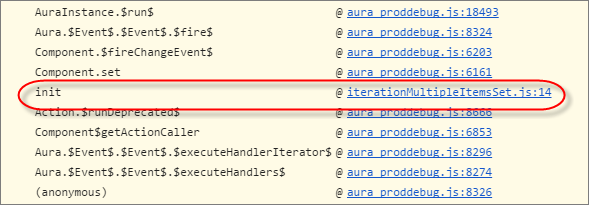
Click the link for the iterationMultipleItemsSet entry in the stack trace to see the offending line of code in the Sources pane of the browser console.
How to Fix the Warning
Make sure that you don’t modify the items attribute of an <aura:iteration> tag multiple times. The easiest solution is to remove the default value for the groceries attribute in the markup. Set the value for the groceries attribute in the controller instead.
The alternate solution is to create a second attribute whose only purpose is to store the default value. When you’ve completed your logic in the controller, set the groceries attribute.
Here’s the fixed component:
1<!--c:iterationMultipleItemsSetFixed-->
2<aura:component>
3    <!-- FIX: Remove the default from the attribute -->
4    <aura:attribute name="groceries" type="List" />
5    <!-- FIX (ALTERNATE): Create a separate attribute containing the default -->
6    <aura:attribute name="groceriesDefault" type="List"
7                  default="[ 'Eggs', 'Bacon', 'Bread' ]"/>
8
9    <aura:handler name="init" value="{!this}" action="{!c.init}"/>
10
11    <aura:iteration items="{!v.groceries}" var="item">
12        <p>{!item}</p>
13    </aura:iteration>
14</aura:component>
Here’s the fixed controller:
1/* c:iterationMultipleItemsSetFixedController.js */
2({
3    init: function(cmp) {
4        // FIX (ALTERNATE) if need to set default in markup
5        // use a different attribute
6        // var list = cmp.get('v.groceriesDefault');
7        // FIX: Set the value in code
8        var list = ['Eggs', 'Bacon', 'Bread'];
9        // Some logic
10        cmp.set('v.groceries', list);
11    }
12})